
Description
Developed by maca development.
maca DownList helps you publish downloadable file lists on your WordPress site. Organize files into lists, show them in a grid or list layout, and let visitors download files through tracked links.
Unlimited lists, Media Library files, shortcode and block, PDF view/download buttons, and an opt-in front-end credit line. More information: maca DownList.
Features
-
Unlimited file lists
-
Unlimited files with title, description, manual thumbnail, and download file (Media Library)
-
File type label with icon on the front end
-
Optional More information link per file
-
PDF files: View (browser) and Download buttons
-
Download counts in admin (Files and Lists)
-
Media Library picker for download files and thumbnails in admin
-
Grid or list layout (default under maca DownList Settings)
-
Shortcode:
[maca_downlist list="your-list-slug"]or[maca_downlist]to show all lists grouped -
maca DownList List Gutenberg block
-
List display heading and intro text per list
-
Built-in multilingual user guide in admin (eight languages)
-
Admin and front-end translations: English, Swedish, Danish, Norwegian (Bokmål), Finnish, German, French, Spanish
-
Optional Powered by maca DownList credit on front-end lists (opt-in under Settings)
Pro version
This WordPress.org package is the free, fully functional maca DownList — unlimited lists and files, with no license check.
maca DownList Pro is a separate plugin (download from maca DownList Pro) with advanced delivery and admin features. License activation is not included in this WordPress.org build (WordPress.org policy).
Included in this free plugin:
-
Unlimited file lists and unlimited files
-
Shortcode and maca DownList List Gutenberg block
-
Show all lists on one page (
[maca_downlist]orlist="all") -
Grid or list layout, PDF View + Download, manual thumbnails
-
Simple download counts in admin (Files and Lists)
-
Media Library storage, list heading and intro text, built-in user guide (eight languages)
-
Powered by maca DownList credit is opt-in and off by default (leave unchecked in Settings to hide it)
Pro adds (separate download — see comparison on maca DownList Pro):
-
Automatic thumbnails for image and video files
-
Built-in video player (stream in the list)
-
Protected file storage (in addition to Media Library)
-
Custom download and information link styling (colors, hover, font)
-
Guest comments and CAPTCHA (reCAPTCHA / Cloudflare Turnstile)
-
Access restrictions (IP / country blacklist)
-
Full download log (IP, country, action) — free shows simple download counts only
-
File versioning
-
Configurable max upload size
-
Pro support in wp-admin
Privacy and external services
Files are stored in the WordPress Media Library. Download links are handled on your site.
On activation, deactivation, and uninstall, the plugin may send a small lifecycle event to api.maca.se (site URL, plugin/WordPress/PHP version, locale). Optional deactivation feedback from the Plugins screen is sent the same way. No license checks and no visitor download content. maca Hub status endpoints only respond when maca Sec provides a site key (optional companion plugin).
Screenshots
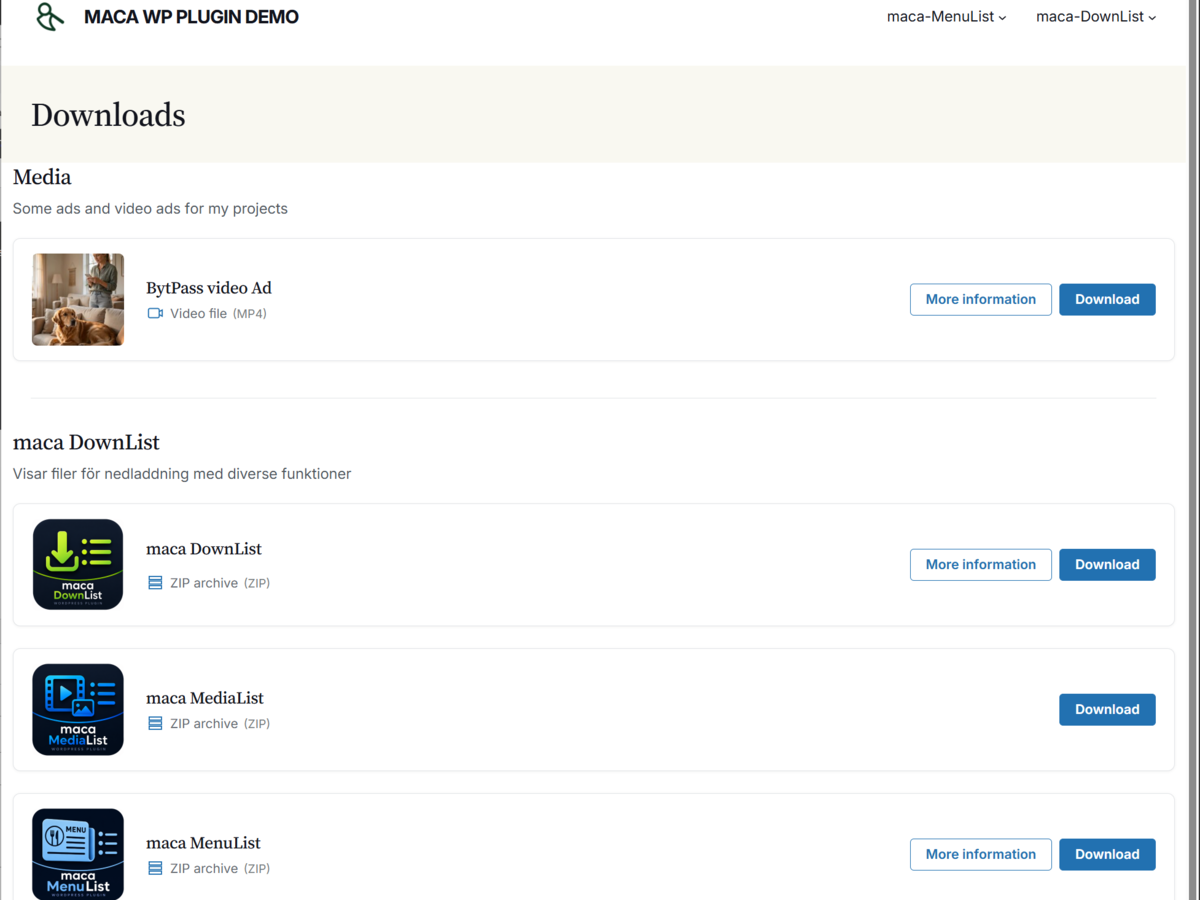
File list on the front end (list layout)

Edit file screen in wp-admin (Media Library file and thumbnail)

maca DownList Settings (default layout and optional front-end credit)

maca DownList Lists page with shortcode copy field

maca DownList guide page
Blocks
This plugin provides 2 blocks.
- maca DownList List
- Smartfiles File List
Installation
Upload the
maca-downlistfolder to/wp-content/plugins/or install via Plugins Add New.Activate the plugin through the Plugins menu.
Create lists under maca DownList Lists.
Add files under maca DownList Add New: title, description, thumbnail, download file, and assign at least one list.
Review maca DownList Settings (default layout and optional front-end credit).
Place
[maca_downlist list="your-list-slug"]on a page or use the maca DownList List block.
FAQ
-
What is included in this plugin?
-
Unlimited lists, unlimited files, manual thumbnails, Media Library storage, grid/list layout, shortcode and block (single list or all lists), PDF view/download buttons, simple download counts in admin, and the built-in guide.
-
How do I show a list on a page?
-
Use
[maca_downlist list="brochures"]wherebrochuresis your list slug, or add the maca DownList List block. To show every list on one page, use[maca_downlist]orlist="all". -
Can a file belong to multiple lists?
-
Yes. Assign multiple lists when editing a file.
-
How do I change the layout?
-
Add
layout="list"orlayout="grid"to the shortcode, or choose layout in the block. The default is under maca DownList Settings. -
How do I upload or replace a download file?
-
Edit a file under maca DownList Files and use Select file or Replace file (WordPress Media Library).
-
Does this plugin phone home?
-
Lifecycle events (activate / deactivate / uninstall) and optional deactivation feedback go to api.maca.se to help improve the product. Download files and visitor traffic stay on your site. This WordPress.org build does not validate licenses.
-
How do PDF files behave on the front end?
-
PDF downloads show View and Download buttons. Other file types show a single download button unless customized.
-
Is there a Pro version?
-
Yes. maca DownList Pro adds video playback, download logging, guest comments, access restrictions, custom link styling, protected storage, and more. It is a separate plugin from maca DownList Pro — not installed from WordPress.org.
-
Can I activate a Pro license in this plugin?
-
No. WordPress.org does not allow paid license activation in the directory package. Install maca DownList Pro from maca.se after purchase; your lists and files in the database are kept when you switch.
Reviews
There are no reviews for this plugin.
Contributors & Developers
“maca DownList” is open source software. The following people have contributed to this plugin.
Contributors
Translate “maca DownList” into your language.
Interested in development?
Browse the code, check out the SVN repository, or subscribe to the development log by RSS.
Changelog
1.6.12
- Admin: download counts on Files list (sortable), Lists page, and list taxonomy screen.
- PDF View vs Download: honor view (inline) and force-download (attachment) intents.
- Wire activation and deactivation telemetry hooks; document api.maca.se in Privacy and FAQ.
- Block inspector: Maximum number of files (limit) control.
- Pro product URL constant points to maca DownList Pro; credit line keeps free product page.
1.6.11
- API telemetry: resolve the public site URL from proxy headers and request host when WordPress home URL points at loopback (same as maca Njuvs and Maca Tjatt).
- Activation telemetry is deferred to shutdown so URL resolution runs after WordPress is fully loaded.
1.6.10
- Activation, deactivation, and uninstall telemetry to api.maca.se (same pattern as maca Restu and Maca Tjatt).
- Deactivation feedback modal now reports to api.maca.se instead of email.
1.6.9
-
maca Hub: REST status endpoints and Hub Connector integration (uses maca Sec site key; download log and license activation remain Pro-only).
-
Admin: warning on the file edit screen when the download file is missing or unreadable.
-
Front end: disabled Download button with explanation when the file is unavailable.
1.6.8
- Plugins screen: deactivation feedback modal (optional reason + email to maca) before deactivate, same flow as maca Restu.
1.6.7
- Plugins screen: GET PRO link (bold, after Deactivate) to maca DownList Pro (https://maca.se/maca-downlist-pro/).
1.6.6
-
Detect missing or unreadable download files (removed from Media Library or missing on disk).
-
Admin warnings on the Files list and File Details screen; front end shows a disabled Download button with an explanation instead of a broken link.
1.6.5
-
Settings: discreet link to maca DownList Pro (maca.se/maca-downlist-pro/).
-
Readme: Free vs Pro comparison for WordPress.org listing (credit line is opt-in/off by default in free version).
1.6.4
-
Readme: Free vs Pro comparison; product pages https://maca.se/maca-downlist/ and https://maca.se/maca-downlist-pro/
-
Plugin URI and credit link point to product page.
1.6.3
- Plugin Check: remove discouraged load_plugin_textdomain(), prefix template variables, phpcs for GET redirects and tax_query, remove unused templates.
1.6.2
-
Fix: load plugin translations in admin (Lists page and settings now respect site/user locale).
-
Readme screenshots updated for org-only features; default file icon SVG escaped on the front end.
1.6.1
- Remove commercial section from Settings admin page (org build).
1.6.0
-
WordPress.org review: remove trialware (no list limits, no license code in this package)
-
Prefixed post type
maca_downlist_fileand taxonomymaca_downlist_list; migrate legacysf_*data -
Tracked download query args use
maca_downlist_download/maca_downlist_nonce -
Media Library only for files; simplified settings; readme and uninstall updated
1.5.3
- Fix shortcode [maca_downlist] not running when copied from Lists (register on init; normalize smart quotes).
1.5.2
- Fix fatal error: undefined Maca_Downlist_PLUGIN_URL (restore MACA_DOWNLIST_* constants).
1.5.0
- Renamed to maca DownList (slug maca-downlist); formerly mc-smartfiles
1.4.1
- Plugin renamed to maca DownList; directory slug mc-smartfiles (WordPress.org)
1.4.0
- WordPress.org review: org build has no license-locked features; front-end credit opt-in
1.3.3
- Plugin header: distinct Plugin URI (product page) and Author URI (developer site) for WordPress.org
1.3.2
- Plugin Check: remove proc_open, fix CAPTCHA script versions, shorter readme description, WP_Filesystem for debug log
1.3.1
- WordPress.org Plugin Check: readme tested up to 7.0, custom updater excluded from distribution zip, i18n and script enqueue fixes
1.3.0
- Lists: custom maca DownList admin page for creating lists (avoids WordPress edit-tags.php POST issues on some hosts); edit-tags overview redirects here
1.2.0
- Fix: earlier output buffering for list create; flush buffer on core redirect; admin “site check” URL to compare hosts
1.1.9
- Fix: output buffering on list create so PHP notices do not break the admin redirect (headers already sent)
1.1.8
- Fix: list add handler no longer depends on
$pagenow(fixes blank screen on some hosts); optional list-add debug log whenWP_DEBUGis on
1.1.7
- Fix: creating a list in admin (handles add-tag before HTML output; clean wp_insert_term args, no full $_POST)
1.1.6
- Fix: creating a list in admin no longer shows a blank page (uses WordPress default add-tag flow)
1.1.5
-
Drag-and-drop upload for download files and thumbnails in admin
-
File type label with icon shown under file description on the front end
-
User guide updated in all eight languages
1.1.0
-
List layout: thumbnail, content, and actions in one row; grid layout improvements
-
Optional list display heading and intro text
-
Shortcode/block: show all lists grouped (
[maca_downlist]orlist="all") -
Full-width / block theme wrapper classes
-
Admin user guide in eight languages (profile language)
-
Front-end and admin translations: Swedish, Danish, Norwegian, Finnish, German, French, Spanish
-
Powered-by footer credit on file list output (opt-in in Settings)
1.0.0
- Initial release