

Description
Auto Release Posts for GitHub monitors GitHub repositories for new releases and uses AI to research each release and generate a human-readable blog post about it. Posts can be automatically published or held as drafts for review, with email notifications when new posts are ready.
Built on the AI Client API and Connectors introduced in WordPress 7.0 — configure your AI provider (Anthropic, OpenAI, Google, or any other connector) once under Settings Connectors, and this plugin uses whatever you’ve set up. No AI API keys to manage in the plugin itself.
How it works:
- Monitor — Add any GitHub repository and the plugin checks for new releases daily via WP-Cron.
- Generate — When a new release is detected, the AI researches the release and writes a blog post tailored to your audience.
- Publish — Posts are created as drafts for review, or published automatically based on your per-repository settings.
You can also generate a post on demand at any time from the Repositories tab.
Features:
- Monitor multiple GitHub repositories for new releases
- AI-powered post generation via WordPress Connectors — works with Anthropic, OpenAI, Google, and any other configured connector
- Significance-aware content — patch, minor, major, and security releases get tailored tone and structure
- Choose the research depth — Standard reviews release notes, linked issues and PRs, metadata, and the README; Deep adds commit messages and file changes since the last release
- SEO-friendly post slugs and excerpts generated automatically by AI
- Configurable publish/draft workflow with per-repository overrides
- Per-repository post defaults (categories, tags, post status)
- Choose your post title format — prefix with project name and version, version only, or no auto-prefix (let the AI write the full title in single-project sites)
- Generate posts on demand for any historical release — pick from a version dropdown when a repo has multiple releases; older releases are automatically backdated to keep the archive in chronological order
- Custom prompt instructions to guide AI writing style, tone, and voice
- Regenerate posts with feedback — refine AI output directly from the block editor sidebar
- Email notifications on draft creation, publication, or both
- Source attribution in the block editor — see which GitHub release generated each post
- Idempotency — the same release never creates duplicate posts
- Optional project link support — enter a URL or WordPress.org slug for download CTAs
- Optional pre-release tracking per repository — track stable releases by default, or opt in to include betas, release candidates, and other pre-release versions
For developers:
- Extensible via filter hooks at every stage of the pipeline
- Customize preferred AI models via the
ghrp_wp_ai_client_model_preferencesfilter - Override significance classification, prompt content, post terms, and post status per-release
- All prompt templates defined in code, versioned with the plugin
Requirements:
- WordPress 7.0 or later
- PHP 8.2 or later
- At least one AI connector configured under Settings Connectors (Anthropic, OpenAI, or Google recommended)
Auto Release Posts for GitHub is an independent project. It is not affiliated with, endorsed by, or sponsored by GitHub, Inc. or the WordPress Foundation. “GitHub” and “WordPress” are used here for descriptive purposes only.
External Services
This plugin connects to external services to fetch release data and (via WordPress Connectors) generate post content. Each service is described below.
GitHub REST API
- What it is: GitHub’s REST API (
https://api.github.com) is used to read release data and repository metadata, and — when a Personal Access Token is configured — to list repositories the token can access. - What is sent: HTTP requests to
api.github.comcontaining the repository owner and name. If a GitHub Personal Access Token is configured (in the Settings tab, or via theGHRP_PATconstant or environment variable), the token is sent in the Authorization header. - When it is sent: Daily via WP-Cron (configurable via the
ghrp_check_frequencyfilter), and on demand when generating, regenerating, or refreshing posts from the plugin’s admin screens. - Terms of Service: https://docs.github.com/en/site-policy/github-terms/github-terms-of-service
- Privacy Policy: https://docs.github.com/en/site-policy/privacy-policies/github-privacy-statement
Image sideloading from GitHub-hosted domains
- What it is: When AI-generated post content references images hosted on
github.com,githubusercontent.com, orgithub.io, the plugin downloads those images to the WordPress Media Library so posts render without external image dependencies. - What is sent: HTTP GET requests to the specific image URLs referenced by the AI output. No data beyond a standard HTTP request.
- When it is sent: At post creation or regeneration time, for image URLs included in the AI-generated content. The allowed domains and limits are configurable via the
ghrp_sideload_allowed_domains,ghrp_max_sideload_images,ghrp_sideload_time_budget, and related filters. - Terms of Service and Privacy Policy: same as GitHub above.
AI providers (via WordPress Connectors)
- What it is: AI-generated post content is produced by whichever AI connector you have configured under Settings Connectors in WordPress 7.0+. The plugin does not call AI provider APIs directly — it dispatches prompts through the WordPress AI Client API.
- What is sent: The release title, release notes body, repository metadata (owner/name, language, description), and any custom prompt instructions you have configured are sent to the AI provider selected by your connector. Optional Deep research mode additionally sends recent commit messages and file change summaries between releases.
- When it is sent: When a new release is detected by the daily scheduled check, when you click “Generate post” or “Regenerate,” and when regenerating from the block editor sidebar.
Privacy and terms for the AI provider depend on which connector is configured. Common providers:
Source Code
The complete, human-readable source code for this plugin is published at:
https://github.com/jakemgold/github-release-posts-wordpress
Bundled JavaScript. The minified files under dist/js/ are built from the source files under assets/js/ using the @10up/scripts toolkit (which wraps Webpack). To rebuild:
npm install && npm run build
Source-to-build mapping:
dist/js/admin.jsis built fromassets/js/admin/index.jsdist/js/editor.jsis built fromassets/js/editor/index.jsdist/css/admin-style.cssis built fromassets/css/admin/style.css
Both source and build outputs ship with the plugin, so the source is available locally as well as in the public repository.
Third-party libraries. The plugin has no third-party PHP dependencies. The vendor/ directory only contains Composer’s own PSR-4 autoloader scaffolding generated from the plugin’s own classes — it does not include any external libraries. The composer.json require block requires only php: >=8.2. PAT encryption uses libsodium, which has been part of PHP core since 7.2.
Bundled npm packages used at build time (development only — not shipped at runtime): @10up/scripts (which itself bundles Webpack, ESLint, Babel, and the build-time-only wp-prettier and eslint-plugin-jsdoc overrides). All declared in package.json and package-lock.json. None of these end up in the distributed plugin.
Screenshots
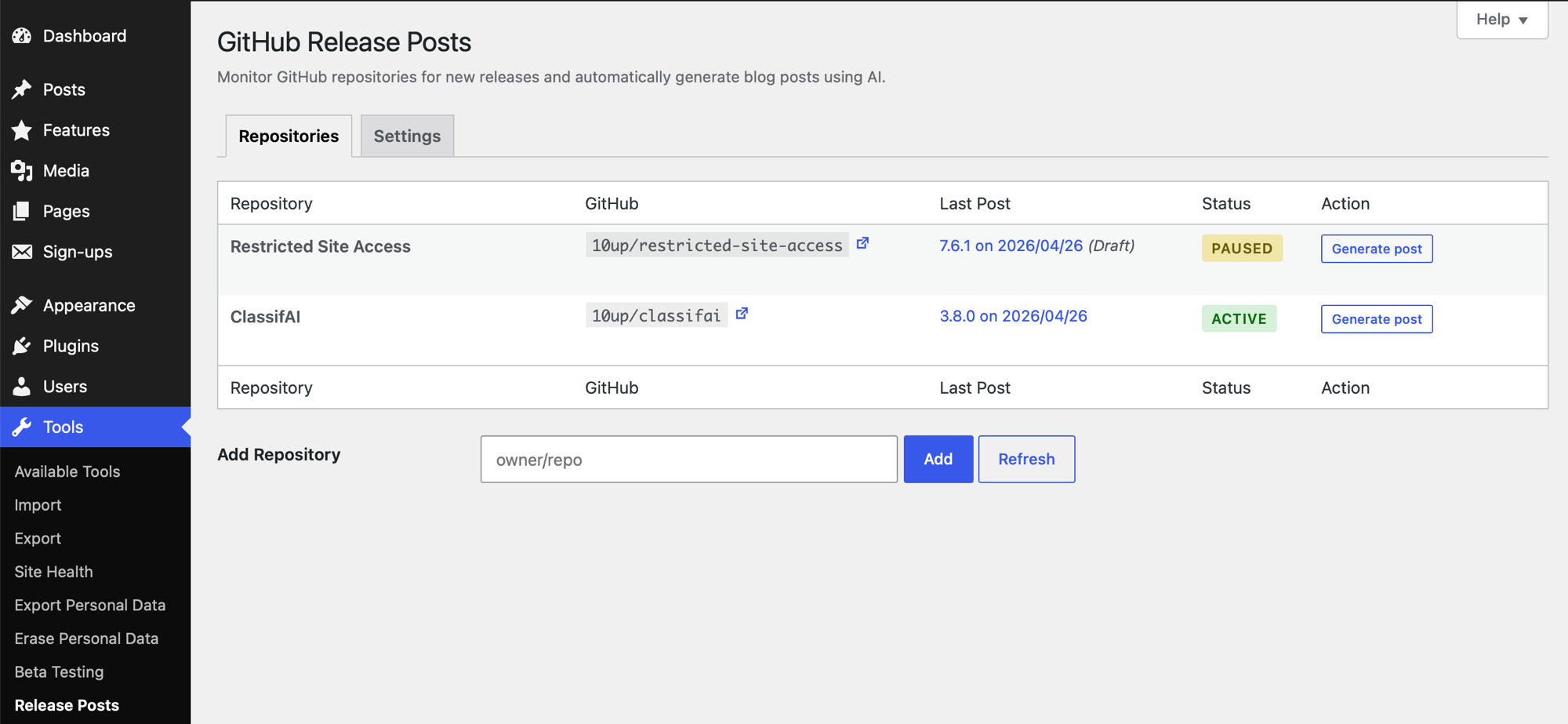
Repositories tab — monitor multiple GitHub repos with last post version, status, and one-click post generation. 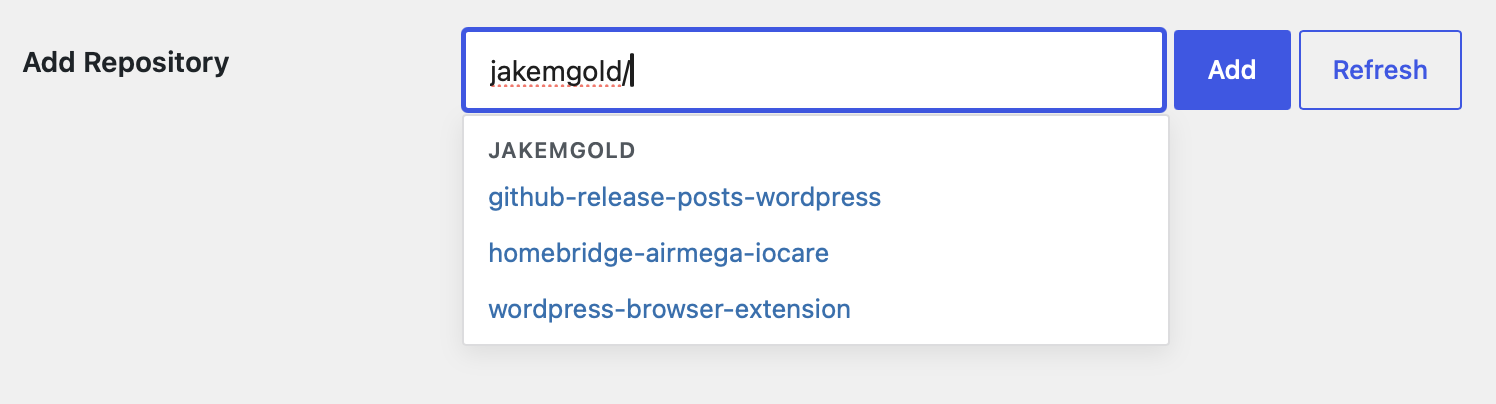
Repository autocomplete — with a GitHub Personal Access Token configured, the Add Repository field suggests from the repositories your token can access, grouped by owner. You can still type any public owner/repo to track a repository that isn’t in the list. 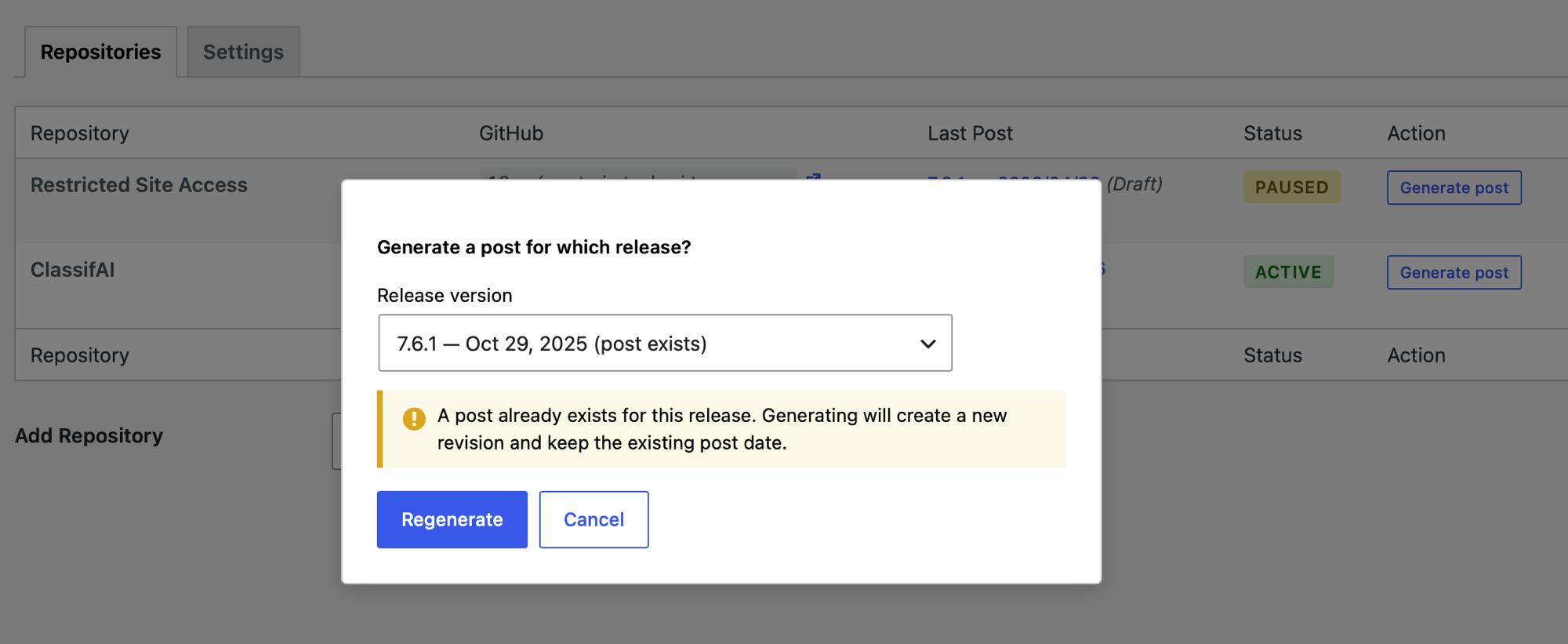
Release picker — generating a post manually lets you pick any historical release. An inline warning surfaces if a post already exists; regenerating creates a new revision and preserves the existing post date. 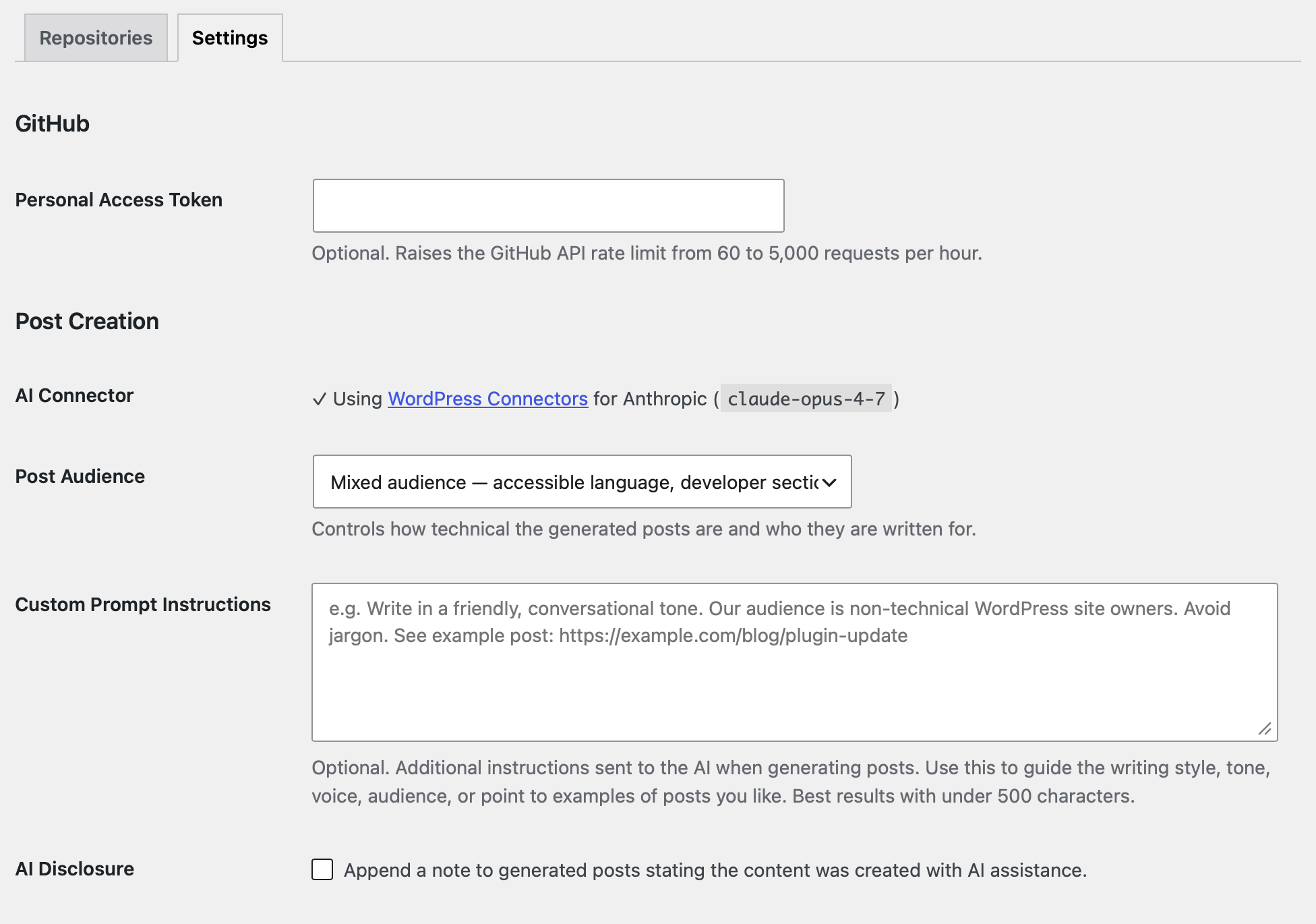
Settings tab — view your AI connector status and configure audience level, custom prompt instructions, and notifications. 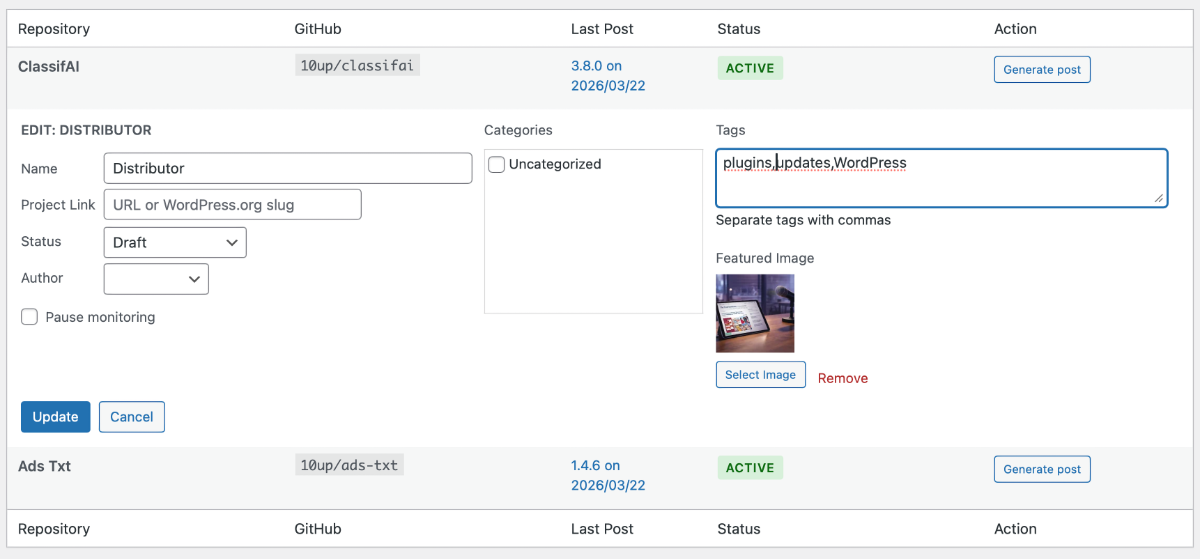
Inline editing — per-repo settings including name, project link, post status, author, categories, tags, and featured image, following the familiar WordPress Quick Edit pattern. 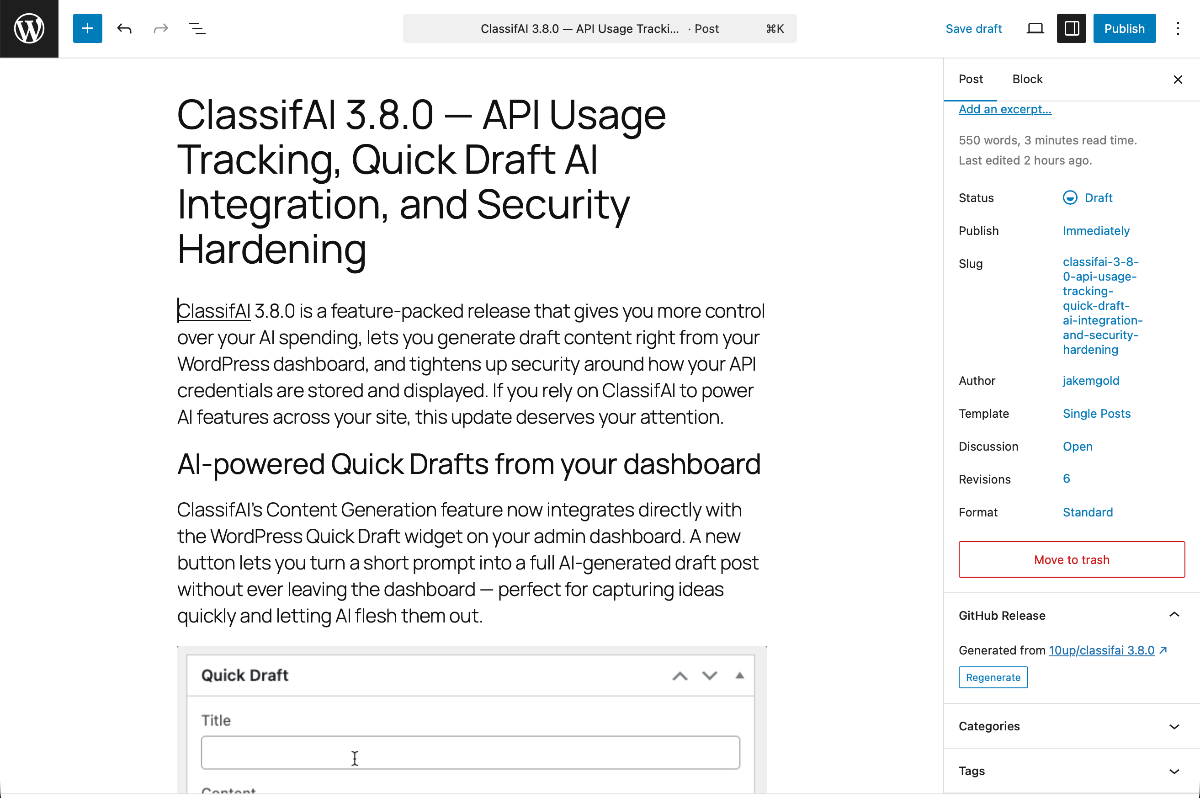
Generated post in the block editor — AI-written content with embedded images, plus the GitHub Release sidebar panel for source attribution and regeneration.
Installation
- Upload the plugin files to
/wp-content/plugins/auto-release-posts-for-github/, or install via the WordPress Plugins screen. - Activate the plugin through the Plugins screen in WordPress.
- Go to Tools Release Posts to configure your AI provider and add repositories.
FAQ
-
Which AI providers are supported?
-
The plugin uses WordPress Connectors (built into WordPress 7.0+) to communicate with AI providers. Any connector installed on your site will work. We recommend Anthropic (Claude Opus 4.7), OpenAI (GPT-5.5), or Google (Gemini 2.5 Pro) for best results. Configure your connector under Settings Connectors.
-
Do I need a GitHub API key?
-
No. The plugin uses the public GitHub API for public repositories. Adding an optional Personal Access Token raises the API rate limit from 60 to 5,000 requests per hour and replaces the “owner/repo” text field on the Repositories tab with a dropdown of repos the token can access.
-
Does it work with private repositories?
-
Yes. Add a GitHub Personal Access Token in the Settings tab. A fine-grained token scoped to the specific repositories you want to monitor is recommended; a classic token with the
reposcope also works. -
How often does the plugin check for new releases?
-
By default, the plugin checks daily via WP-Cron. Developers can change this to hourly, twice daily, or weekly using the
ghrp_check_frequencyfilter. -
Can I customize the AI-generated content?
-
Yes, in two ways. Site owners can enter custom prompt instructions in the Settings tab to guide the AI’s writing style, tone, and voice. Developers can use filter hooks (
ghrp_prompt,ghrp_prompt_title_guidance,ghrp_prompt_content_guidance) for full control over the prompt sent to the AI. -
Can I edit or regenerate a post after it’s created?
-
Yes. Generated posts are standard WordPress posts and can be edited normally in the block editor. A Release Attribution panel in the editor sidebar lets you regenerate the content with optional feedback — for example, “make it shorter” or “emphasize the security fix.”
-
What shows up in the block editor for generated posts?
-
A Release Attribution panel appears in the document sidebar, showing which GitHub release the post was generated from with a link to the release notes. From this panel you can also regenerate the post content with feedback.
Reviews
There are no reviews for this plugin.
Contributors & Developers
“Auto Release Posts for GitHub” is open source software. The following people have contributed to this plugin.
Contributors


Translate “Auto Release Posts for GitHub” into your language.
Interested in development?
Browse the code, check out the SVN repository, or subscribe to the development log by RSS.
Changelog
1.0.2
Addresses WordPress.org reviewer feedback on prefix consistency.
- Renamed plugin constants
GITHUB_RELEASE_POSTS_VERSION,_URL,_PATH,_INCtoGHRP_VERSION,GHRP_URL,GHRP_PATH,GHRP_INCfor prefix consistency. - Renamed the GitHub PAT environment variable / PHP constant from
GITHUB_RELEASE_POSTS_PATtoGHRP_PAT. Sites that supplied the token viawp-config.phpor an environment variable must update the constant/var name. - Renamed the admin JavaScript global from
ctbpAdmin/ctbpFetchtoghrpAdmin/ghrpFetch, completing the v0.9.0 rebrand. Removed remaining[CTBP]debug-log prefixes and internal placeholder markers from the v0.9.0 era.
1.0.1
Pre-publication fixes addressing automated and manual review feedback. Since 1.0.0 was withheld during the WordPress.org review process, this is the first version actually shipping to the directory; Composer-installed sites at 1.0.0 should update to pick up the bug fixes below.
Bug fixes
- Editor “Regenerate” now refreshes the post content in place. Previously, regeneration updated the post on the server but left the editor’s local state holding the old content; a subsequent Save could clobber the regenerated content with stale blocks.
- Adding a repository no longer leaves it stuck if the browser closes or AI generation fails between the page redirect and the inline generate call. The next scheduled cron run now correctly picks up unfinished first posts.
- Manual “Generate post” for a release whose previous post was sent to Trash now creates a fresh draft (matching documented intent). Previously the existing trashed post short-circuited the insert and the user received a success response with no new draft.
- Trashed generated posts are no longer auto-restored by unrelated workflow events.
- The cron worker lock is now atomic at the database level, eliminating a small race window when two cron workers run simultaneously.
- The 120-second AI request timeout is now applied correctly. Previously the filter was removed before the underlying HTTP request fired, so long-running generations silently hit the default 30-second timeout.
- Post lookup is now deterministically ordered by post ID descending, so the most recently inserted post wins when both a trashed predecessor and an active post exist for the same release.
Compliance with WordPress.org Plugin Directory guidelines
- Direct-access guards (
if ( ! defined( 'ABSPATH' ) ) exit;) added to every PHP class file. - Replaced heredoc syntax (disallowed by Plugin Check) with standard double-quoted string concatenation in the AI prompt builder.
- The cron-results admin notice is now scoped to the plugin’s own settings page (Guideline 11). It no longer appears on every wp-admin screen.
- Removed
load_plugin_textdomain(); WordPress auto-loads translations for plugins hosted on the directory since version 4.6. - New “Source Code” section in the readme documents the public GitHub repository, source-to-build mapping for the bundled JavaScript, and the build command (Guideline 4).
- Form-handler reads of
$_SERVER['REQUEST_METHOD']and$_GET['page']now applyisset(),wp_unslash(), andsanitize_key()per WordPress coding standards. - Removed stray
.DS_Store/.gitkeepfiles from the distribution zip; includedcomposer.jsonandcomposer.lockso reviewers can verify the (no-third-party-PHP-dependencies) manifest.
1.0.0
- Plugin renamed to Auto Release Posts for GitHub for WordPress.org compatibility (the prior name began with a trademark, which the Plugin Directory guidelines disallow). The WordPress.org slug and text domain are now
auto-release-posts-for-github. The Composer package name (github-release-posts/github-release-posts), main plugin file, PHP namespace, hook prefix (ghrp_*), and REST namespace (ghrp/v1) are unchanged — existing Composer-installed sites are unaffected. - New External Services section in the readme covering the GitHub REST API, image sideloading from GitHub-hosted domains, and AI provider connectors — meets the WordPress.org disclosure requirement for plugins that contact third-party services.
- Smarter display naming on add — names are pulled from the repo’s README first heading when possible (e.g., “Ads.txt” instead of “ads-txt”), with a cleaned-up slug as fallback.
- New per-repo “Include pre-releases” option to opt into tracking beta/RC versions. Off by default.
- Adding a repository now redirects immediately; the first post generates in the background instead of blocking the page for 30–60 seconds.
For developers
- Modernized the admin and editor JavaScript:
varlet/const, template literals,URL.canParse()for URL validation, fullwp-prettiercompliance. Build output is byte-stable; runtime behavior is unchanged. - Toolchain: pinned
eslint-plugin-jsdoc@^46.10.1andprettier@npm:wp-prettier@2.2.1-beta-1viapackage.jsonoverridesto fix a JSDoc plugin crash on Node 20+ and to honor the codebase’s WordPress paren-spacing style. - JS lint and PHPCS now both pass with zero errors and zero warnings.
- Pre-release security review and hardening pass — KSES sanitization on AI/GitHub-sourced content at all save boundaries (defense-in-depth against prompt-injected HTML in release notes), output escaping for REST response data in admin JS, Unicode bidi-control character stripping in extracted display names, and tighter capability checks on release-attribution post meta REST endpoints.
- Engineering pass — PHPStan analysis now runs clean, dead constants and unused methods removed, several type-annotation gaps closed, cron lock guaranteed-released via try/finally so a single failing release can no longer block the next scheduled run.
0.11.1
- Installable via Composer (
composer require github-release-posts/github-release-posts) for Composer-managed WordPress sites such as Roots/Bedrock. Bootstrap now detects when the plugin is loaded through the consumer’s Composer autoloader and skips the local vendor/autoload.php require — Composer-installed sites no longer see the spurious “missing Composer dependencies” admin notice that 0.11.0 surfaced.
0.11.0
New
- Repository picker on the Add Repository field. With a GitHub Personal Access Token configured, the field becomes a searchable list of repositories your token can access, grouped by owner. You can still type any public
owner/repoto track a repository that isn’t in the list. - The Personal Access Token can be supplied via a
GHRP_PATPHP constant inwp-config.phpor an environment variable of the same name, for sites that prefer not to store secrets in the database. - PAT validation indicator on Settings — a green check or yellow warning confirms whether GitHub accepts the token.
The repository picker and external PAT configuration are built on initial work contributed by Ben Word.
Improvements
- The editor’s “Regenerate” button now uses the post’s actual release (it was incorrectly always pulling the latest) and respects the title format you set in Settings.
- Better support for editorial-workflow plugins like Edit Flow and PublishPress — their custom post statuses are now recognized for titles, email links, and the repository table.
- Releases with many images no longer risk timing out — image processing has sensible limits and falls back gracefully on partial failures.
- Trashing a generated post now stops scheduled checks from recreating it. Clicking “Generate post” manually still creates fresh content for trashed releases when you want a new one.
- Hardened the admin against potentially malformed data in release tags from tracked repositories.
- Sites using a weekly release-check frequency now schedule correctly on plugin activation.
- Missing Composer dependencies show a friendly admin notice instead of a fatal error.
For developers
- PHP namespace renamed from
Jakemgold\GitHubReleasePoststoGitHubReleasePosts. Composer package renamed fromjakemgold/github-release-poststogithub-release-posts/github-release-posts. - New filter hooks:
ghrp_max_sideload_images,ghrp_sideload_time_budget,ghrp_sideload_max_consecutive_failures,ghrp_sideload_request_timeout,ghrp_skip_accessible_repo.
Thanks to Thorsten Ott for the code review that prompted many of the improvements and internal refactors in this release.
0.10.0
- New: Post title format setting (Settings Post Creation Post Titles). Choose between the existing “{Project name} {version} — {subtitle}” prefix, a “Version X.Y — {subtitle}” prefix, or no auto-prefix (the AI writes the full title — recommended for sites focused on a single project).
- New: Version picker for the “Generate post” button. When a repository has multiple GitHub releases, an admin picker lets you generate a post for any historical release — useful for backfilling an archive. Older releases automatically have their post date set to one hour after the release was published, keeping the archive in chronological order.
- New: Inline conflict warning in the version picker when a post already exists for the selected tag — no surprise modal.
- New: Success affordance — after generating, a green checkmark appears next to the Generate post button, linked to the new post for one-click access.
- New:
ghrp_post_titlefilter for full programmatic override of generated post titles. - Tweak: Title prompt guidance is now project-neutral and gives the AI explicit direction on varying title openings across an archive (encouraging mid-title or version-led phrasings instead of always leading with project name + version).
- Tweak: The Last Post column flash on the Repositories tab no longer fires when generating a post for a non-latest release (since the new post would not actually be the most recent).
0.9.2
- Fix: Show a warning notice at the top of the plugin admin page (both tabs) when no AI connector is configured or ready. Previously the warning was buried inside the AI Connector status field on the Settings tab and was cached for up to a minute, so it didn’t always reflect the current state after toggling connectors.
0.9.1
- Fix: Plugin now fails gracefully on WordPress versions older than 7.0 instead of fataling. Adds explicit WordPress and PHP version checks before loading the autoloader, and shows an admin notice explaining the requirements.
0.9.0
- Plugin renamed and rebranded to GitHub Release Posts.
- Folder, slug, text domain, PHP namespace, hooks, options, REST routes, and CSS/JS prefixes all updated to match the new name.
- Plugin slug:
github-release-posts(folder + text domain + WP.org slug). - PHP namespace:
GitHubReleasePosts. - Hook/option/transient prefix:
ghrp_*(wasctbp_*). - REST namespace:
ghrp/v1(wasctbp/v1). - No automatic migration from prior pre-release versions — uninstall and reinstall on a clean site.
0.8.1
- New: Deep research depth — optionally fetches commit messages and file change summaries between releases for richer AI context. Useful when release notes are sparse.
- New: Research Depth setting (Standard / Deep) in the Post Creation section of Settings.
- Tweak: Post Audience changed from a dropdown to radio buttons for clearer scanning.
- Tweak: Post Creation section now appears before GitHub on the Settings tab.
- Tweak: Cleaner page header copy on Tools Release Posts.
- Tweak: Updated readme phrasing — describes researching releases, not just reading notes.
0.8.0
- Requires WordPress 7.0+ with Connectors API.
- AI generation via WordPress Connectors — supports Anthropic, OpenAI, Google, and any configured connector.
- Preferred model list with automatic fallback (Claude Opus 4.7, GPT-5.5, Gemini 2.5 Pro).
- Connector status panel replaces manual provider/API key configuration.
- Improved notification emails with contextual subject lines and post titles.
- Test notification email feature.