
Description
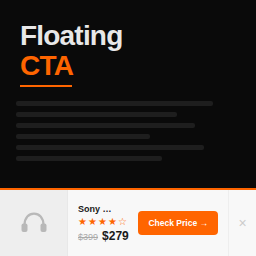
Floating CTA adds a clean, conversion-focused sticky CTA bar to the bottom of your posts. Built specifically for Amazon affiliate publishers and product review sites.
Unlike generic notification bar plugins, Floating CTA is purpose-built for product recommendations. Each bar includes:
- Product title — the name of whatever you’re recommending
- Star rating — visual 0–5 star display (supports half stars)
- Price display — current price with optional strikethrough old price
- Buy Now button — fully customizable text (Check Price, Buy Now, View Deal) and affiliate URL
- Product image — optional thumbnail from your media library
Why Floating CTA?
Most “sticky bar” plugins are built for email signups, announcements, and cookie notices. Floating CTA is built for one thing: getting more clicks on your affiliate links.
- Lightweight — vanilla JavaScript, no jQuery. ~3KB total frontend footprint.
- Accessible — proper ARIA labels, keyboard navigable, screen reader friendly.
- Mobile optimized — responsive layout that adapts to any screen size.
- Affiliate-friendly — built-in
rel="nofollow sponsored"support. - Per-post control — enable and configure individually on each post.
- Dismissible — visitors can close it, and it stays closed for the session.
How It Works
- Install and activate the plugin.
- Edit any post and find the “Floating CTA” meta box.
- Check “Enable,” fill in the product details, and publish.
- A floating bar appears at the bottom of that post.
That’s it. No page builders, no shortcode soup, no 47-step configuration wizard.
Floating CTA Pro
Need more control? Floating CTA Pro adds:
- Full color customization — bar, button, text, price, stars
- Display rules — show after scroll %, time delay, exit intent
- Device targeting — desktop only, mobile only, or both
- Click tracking — see which posts get the most clicks
- Product schema — automatic JSON-LD markup for search results
- Per-post color overrides — different colors for different posts
- Custom post type support — works on pages and any CPT
- Badge labels — “Editor’s Choice,” “Best Value,” etc.
Screenshots

The floating bar on a product review post (desktop) 
The floating bar on mobile 
Per-post configuration in the meta box 
Global settings page
Installation
- Upload the
floatingctafolder to/wp-content/plugins/. - Activate through the Plugins menu in WordPress.
- Go to Settings Floating CTA to configure defaults.
- Edit any post and use the Floating CTA meta box to enable per post.
FAQ
-
Does it work with my theme?
-
Yes. Floating CTA uses standard WordPress hooks and minimal CSS that works with any properly coded theme. The bar is fixed-positioned and doesn’t interfere with your theme’s layout.
-
Does it slow down my site?
-
No. The total frontend footprint is approximately 3KB (CSS + JS combined). Scripts only load on posts where the bar is enabled.
-
Can I use it on pages or custom post types?
-
The free version works on posts only. Floating CTA Pro supports pages and any custom post type.
-
Does it add schema markup?
-
The free version does not output schema. Floating CTA Pro adds Product, AggregateRating, and Offer schema automatically.
-
Is it compatible with caching plugins?
-
Yes. The dismiss functionality uses client-side sessionStorage, so it works correctly with page caching.
-
Can visitors close the bar?
-
Yes. There’s a dismiss button that hides the bar for the current browser session.
Reviews
There are no reviews for this plugin.
Contributors & Developers
“Floating CTA – Sticky Product Bar for Affiliate & Review Sites” is open source software. The following people have contributed to this plugin.
Contributors
Translate “Floating CTA – Sticky Product Bar for Affiliate & Review Sites” into your language.
Interested in development?
Browse the code, check out the SVN repository, or subscribe to the development log by RSS.
Changelog
2.0.10
- Fixed: Inline CSS injected via the
fcta_bar_inline_cssfilter is now rendered correctly inside the<style>tag (previousesc_html()call HTML-encoded the CSS attribute-selector quotes, breaking add-on color overrides).</style>breakout still defended via string replacement.
2.0.9
- Added: Extension hooks API (
fcta_meta_fields,fcta_supported_post_types,fcta_should_show_bar,fcta_should_render,fcta_render_data,fcta_bar_classes,fcta_bar_inline_css,fcta_settings_defaults,fcta_register_settings,fcta_show_pro_section) and action hooks (fcta_before_render_bar,fcta_after_render_bar,fcta_bar_inside,fcta_after_settings_form,fcta_meta_box_after_fields) to let companion plugins extend behavior cleanly - No user-facing changes
2.0.8
- Tested with WordPress 7.0
- Improved: Listing copy and tags refined for clearer positioning (sticky CTA bar for Amazon affiliate and product review publishers)
- No functional changes
2.0.7
- Compliance: Replaced all disabled form controls in the Pro section of the settings page with informational feature cards, so the free plugin contains no locked or restricted UI (WordPress.org Guideline 5)
- Compliance: Reworded settings-page copy to describe Floating CTA Pro as a separate plugin available from floatingcta.com rather than an in-plugin unlock
- Compliance: Removed “Unlock” language from the upgrade CTA
2.0.6
- Compliance: Plugin header name matches readme title (Plugin Check)
- Compliance: Trimmed short description to under 150 characters
- Compliance: Removed manual load_plugin_textdomain() — WordPress auto-loads translations for .org-hosted plugins since 4.6
- Compliance: Annotated necessary $wpdb queries in uninstall and migration with phpcs:ignore + rationale
- Compliance: Prefixed template-scope variables ($fcta_is_enabled, $fcta_pro_url)
- Cleanup: Removed unused duplicate uninstall function in main plugin file (uninstall.php is canonical)
2.0.5
- Security: All template output now uses wp_kses_post() for pre-built HTML (image, stars, price)
- Security: All $wpdb queries now use $wpdb->prepare() throughout (migration, uninstall)
- Fixed: Template rel attribute uses proper if/endif instead of ternary echo
- Improved: PCP Plugin Repo compliance pass
2.0.4
- Fixed: $_POST handling now uses wp_unslash() and sanitize_text_field() per WordPress coding standards
- Fixed: Nonce verification uses sanitized input (PCP compliance)
- Improved: Meta save uses map_deep() for bulk sanitization before field-specific sanitizers
2.0.3
- Changed: Dismiss now hides bar for current page view only (refresh brings it back)
- Changed: Session/timed dismiss persistence moved to Pro as part of Display Rules
- Simplified: Frontend JS reduced to minimal dismiss handler (~35 lines)
2.0.2
- Fixed: Dismiss button no longer overlaps CTA button — now part of flex flow
- Fixed: Settings page pro teaser sections now render with proper backgrounds, borders, and badges in WordPress admin
- Fixed: Admin CSS specificity increased to override WordPress admin defaults
- Fixed: Feature card grid displays correctly as 3-column layout
2.0.1
- Added: Pro feature teasers on settings page (greyed-out Appearance, Display Rules, Conversion & Tracking, Schema & SEO, Per-Post Extras sections)
- Added: Bottom CTA banner for pro upgrade
- Added: Admin CSS loads on settings page (previously only loaded on post editor)
2.0.0
- Complete rewrite with modern architecture
- Vanilla JavaScript (no jQuery dependency)
- Proper output escaping and sanitization throughout
- Accessible: ARIA labels, keyboard navigation, focus management
- Responsive mobile layout
- Dismiss button with session persistence
- Global default settings (button text, currency, link rel)
- Settings API integration
- Block editor (Gutenberg) compatibility
- Migration from v1 meta keys
1.0.1
- Initial public release