

Description
Emboss creates the PDF documents a WooCommerce store needs for every order: invoices, receipts with a PAID badge, proforma invoices for unpaid orders, a credit note for every refund, and packing slips or delivery notes for fulfillment. Documents attach to WooCommerce emails, and customers download them from My Account.
Everything is in the free plugin. There is no premium tier, no upsell, and no tracking. The settings live under WooCommerce > Settings > Invoices and use the same controls as the rest of WooCommerce.
Documents
- Invoice for orders awaiting payment, and a receipt with a PAID badge, payment date and method once the order is paid.
- Proforma invoice for unpaid orders. It uses its own number (
PRO-plus the order number), so it never takes an invoice number. Bank transfer and cheque orders get a proforma with your bank details or cheque instructions until you mark them as paid. - Credit note for every refund, each with its own number, date, amount, refunded items and reason. The credit note shows which invoice it credits.
- Packing slip with line items, SKUs and weight, and no prices. Rename it to “Delivery note” under Branding if that is what your store calls it.
E-invoicing (UBL)
Turn on e-invoices under Invoices > E-invoicing and every invoice gets a UBL XML file next to its PDF. Choose Peppol BIS Billing 3.0 or XRechnung 3.0. Refunds get a credit note XML that points back to the invoice.
- By default only business orders get an e-invoice: orders with a buyer VAT number or Peppol ID. You can create one for every order instead.
- Optional VAT number, Peppol ID and Leitweg-ID fields at checkout, for both the Checkout block and the classic checkout.
- VAT numbers saved by common EU VAT plugins are read too.
- A tax mapping table matches each WooCommerce tax rate to a VAT category. Untaxed sales to EU businesses default to reverse charge.
- The XML attaches to the same emails as the PDF and is in the bulk ZIP download.
Sample files pass the KoSIT validator against the XRechnung 3.0.2 and Peppol BIS 3.0.21 rules. Nothing is sent to any network: the XML is built on your server, and you send or upload it yourself.
Right-to-left and CJK languages
Arabic, Hebrew and Persian text prints with joined letters in the right reading order, and right-to-left documents get a mirrored layout in every template. A Text direction setting picks the direction from the site or order language, or you can set it yourself.
For Chinese, Japanese and Korean, click “Download CJK fonts” under Invoices > Advanced, or upload your own TrueType font. Nothing is downloaded until you click the button.
Printing and bulk tools
- Print invoices or packing slips for up to 100 selected orders as one PDF, each order on its own page.
- Download PDFs for many orders as one ZIP file.
- Export your invoice and credit note list as CSV.
- Create PDFs for orders placed before Emboss was installed. They run in the background with Action Scheduler.
Where documents appear
- Attached to the customer Processing, On hold, Completed, Refunded and Invoice emails, and to the New Order email sent to the store. You choose which emails carry them.
- On the My Account orders list and order page, and on the order received page, including for guest customers.
- On the WooCommerce orders list and the order screen, with download, regenerate and email buttons.
- Through the REST API, for apps and integrations.
Built for WooCommerce
- Sequential invoice numbers with database locking, so two orders placed at the same moment never share a number. Issued numbers and dates never change on regenerate.
- Prefix, suffix, padding, starting number and date placeholders, with a live preview of the next number.
- Four templates: Modern, Classic, Minimal and an 80 mm Thermal layout for receipt printers. A4 or Letter paper.
- Invoices in the order’s language with WPML or Polylang.
- Subscriptions renewals get their own invoice, and keep the buyer’s VAT number and Peppol ID.
- HPOS and Cart and Checkout blocks compatible. Orders are read and written only through WooCommerce CRUD.
- Theme template overrides that survive plugin updates.
Documentation and support
- Emboss product page
- Emboss documentation: setup, every setting, e-invoicing, RTL and CJK, template overrides, hooks and the REST API.
- Questions and bug reports go to the support forum on WordPress.org.
Privacy
Emboss does not collect telemetry and does not load assets from a CDN. The two optional features below are the only times it contacts another server, and both are off until you turn them on.
External services
QR codes on packing slips (Invoices > Branding > QR code on packing slips, off by default). When it is on, the plugin asks the QR Server API at https://api.qrserver.com/v1/create-qr-code/ for a QR code image and embeds it in the packing slip. The data sent is the order edit URL. Each QR code is cached on your site for 12 hours, so printing the same order again does not call the API. If the API can’t be reached, the packing slip still prints, without the QR code.
- Provider: Foundata GmbH (Germany)
- Terms of service: goqr.me/de/rechtliches
- Privacy policy: goqr.me/de/rechtliches/datenschutz-qrserver.html
CJK font download (Invoices > Advanced > Download CJK fonts, runs only when an admin clicks the button). The plugin downloads three font files from the Google Fonts repository on GitHub (raw.githubusercontent.com), pinned to one commit. No store or customer data is sent. Each file’s size and SHA-256 hash are checked before it is saved in the plugin’s private storage folder.
- Chocolate Classical Sans (Chinese and Japanese) and Nanum Gothic Regular and Bold (Korean), all under the SIL Open Font License 1.1
- Provider: GitHub, Inc.
- Terms of service: GitHub Terms of Service
- Privacy policy: GitHub General Privacy Statement
If you would rather not use the download, upload your own .ttf font on the same screen. Uploading contacts no server.
Screenshots




Installation
- Install Emboss from Plugins > Add New, or upload the
emboss-pdf-invoices-for-woocommercefolder to/wp-content/plugins/. - Activate the plugin from the Plugins screen.
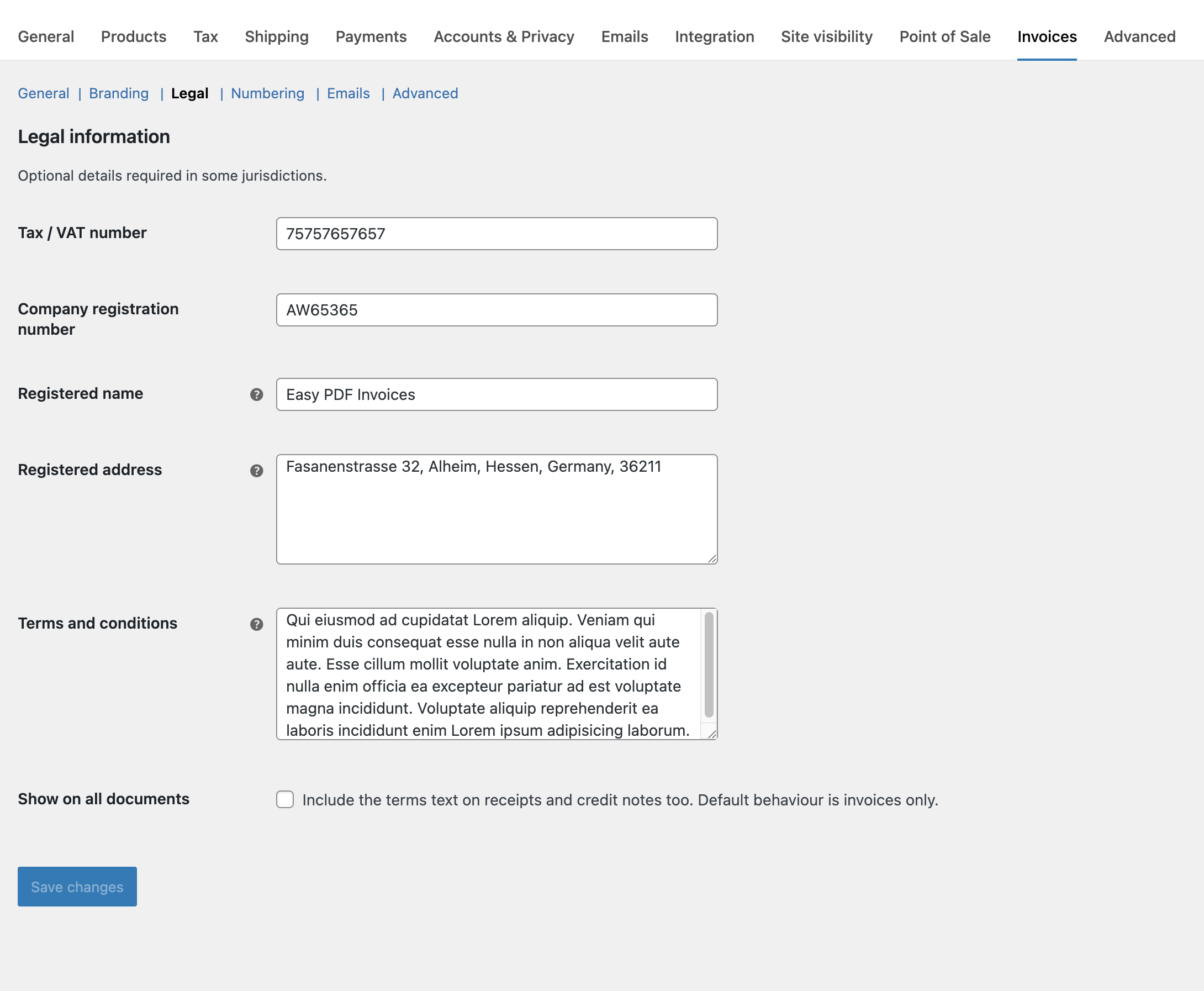
- Go to WooCommerce > Settings > Invoices and add your logo, company details and tax number.
- Place a test order and check that the PDF is attached to the email.
FAQ
-
Does Emboss create credit notes for partial refunds?
-
Yes. Every refund, full or partial, gets its own credit note with its own number. A credit note made by an earlier version keeps its number and total and still covers the refunds it covered. The refund email attaches the credit note, and My Account lists every credit note on the order.
-
Can I send a proforma invoice before the customer pays?
-
Yes. Unpaid orders get a proforma invoice with the amount due and your payment instructions. It says “This is not a tax invoice.” and uses the
PRO-prefix, so your invoice numbers stay sequential. The real invoice is created when the order is paid. You can turn proformas off under Invoices > General. -
Does it generate packing slips or delivery notes?
-
Yes. Packing slips print from the order screen, the orders list, as one PDF for many orders, or as a ZIP. Set “Packing slip name” under Branding to “Delivery note” and the PDF, file name and buttons use that name.
-
Which e-invoice formats are supported?
-
Peppol BIS Billing 3.0 and XRechnung 3.0, both in UBL 2.1. XRechnung needs a seller contact phone number and email under Invoices > E-invoicing. If one is missing, the XML is not created and the E-invoicing screen tells you which field to fill in.
-
Does Emboss send e-invoices over the Peppol network?
-
No. Emboss creates the XML file. Upload it to your Peppol access point or your customer’s portal, or send it by email. An e-invoice for an order without a buyer Peppol ID is for your records.
-
Does it support Arabic, Hebrew and other right-to-left languages?
-
Yes. Arabic, Hebrew and Persian print fully, with a mirrored layout. Urdu prints in the Naskh style, but two letters (heh goal and yeh barree) show as boxes with the bundled font, and the Nastaliq style is not available.
-
Does it support Chinese, Japanese and Korean?
-
Yes, once CJK fonts are added under Invoices > Advanced. Download them with one click (about 16 MB) or upload your own .ttf font. OpenType CFF (.otf) fonts are not supported.
-
Does this plugin work with HPOS and the Checkout block?
-
Yes. Emboss declares compatibility with WooCommerce’s custom order tables and with the Cart and Checkout blocks.
-
Can I customize the document templates?
-
Yes. Copy the templates from
emboss-pdf-invoices-for-woocommerce/templates/intoyour-theme/emboss-pdf-invoices/and edit them. Your copies survive plugin updates. The templates guide explains the override folder and the four template styles. -
Can I set the invoice number format?
-
Yes. Invoices > Numbering has a prefix, suffix, zero padding, starting number and date placeholders, with a live preview of the next number.
-
How do I attach a PDF invoice to WooCommerce emails?
-
Go to WooCommerce > Settings > Invoices > Emails and pick which order emails carry the PDF. You can also send a download link instead of an attachment.
-
Will my invoice numbers reset if I deactivate the plugin?
-
No. Numbers, PDFs and order data are kept by default. You can change this under Invoices > Advanced.
-
What does “Delete everything” remove when I delete the plugin?
-
It removes the settings, counters, the plugin’s storage folder with every PDF and XML, and downloaded CJK fonts. Buyer VAT numbers, Peppol IDs and Leitweg-IDs stay on the orders, because they are part of your tax records.
-
Why does Emboss need PHP 8.3?
-
The text shaping library used for Arabic and Hebrew needs a current PHP version, and PHP 8.3 is what WooCommerce recommends. On older PHP versions, Emboss shows a notice and does not load, so your store keeps running.
-
Does it work on nginx?
-
Yes. The storage folder ships with an
.htaccessfile for Apache, which nginx ignores. Add this rule to your server block so PDFs can only be opened through the plugin’s own permission checks:location ~* /wp-content/uploads/emboss-pdf-invoices/ { deny all; }Replace
emboss-pdf-invoiceswith your Storage directory setting if you changed it.
Reviews
There are no reviews for this plugin.
Contributors & Developers
“Emboss – PDF Invoices, Credit Notes & Packing Slips for WooCommerce” is open source software. The following people have contributed to this plugin.
Contributors
Translate “Emboss – PDF Invoices, Credit Notes & Packing Slips for WooCommerce” into your language.
Interested in development?
Browse the code, check out the SVN repository, or subscribe to the development log by RSS.
Changelog
1.1.0
- Security: Updated the bundled PDF library (dompdf) to 3.1.6, which fixes six reported issues.
- Security: The CSV export adds a leading quote to text cells that start with a spreadsheet formula character.
- New: One credit note per refund, with its own number, the refund’s date and amount, and the refunded items or the refund reason. The refund email attaches the credit note for that refund.
- New: Proforma invoices for unpaid orders, with their own
PRO-number, the amount due, and your bank or cheque details. - New: Bank transfer and cheque orders get a proforma until you mark them as paid. A “Bank transfer and cheque orders” setting switches back to “Invoice right away”.
- New: E-invoices in UBL XML, in Peppol BIS Billing 3.0 or XRechnung 3.0 format, with buyer VAT number, Peppol ID and Leitweg-ID fields at checkout and a tax mapping table.
- New: Arabic, Hebrew and Persian documents with joined letters, right-to-left order and a mirrored layout in all four templates, and a Text direction setting.
- New: Chinese, Japanese and Korean documents. Download CJK fonts with one click or upload your own .ttf font.
- New: “Print invoices (one PDF)” and “Print packing slips (one PDF)” bulk actions for up to 100 orders.
- New: A “Packing slip name” setting, so packing slips can be called “Delivery note”.
- New: CSV export and the past orders tool moved to their own Invoices > Tools tab.
- New: My Account, the order received page and the order screen list every credit note, plus the proforma and XML downloads.
- New: The REST API
documentsmap hascredit_notes,proformaandublentries. - New: After 10 documents, a dismissible notice asks for a review on WordPress.org.
- Fix: Pending and other unpaid orders stay without an invoice number when you use “Download PDFs (ZIP)”, regenerate, the past orders tool, or the REST API.
- Fix: “Email customer” on an unpaid order leaves the order without an invoice number.
- Fix: “Set next invoice number” refuses a number that was already issued and tells you the lowest number you can use.
- Fix: “Set next invoice number” also counts trashed orders, so a restored order never shares a number.
- Fix: Deleting a refund removes its credit note PDF. Its number is never reused.
- Fix: Viewing an order in My Account, on the order screen or through the REST API leaves its documents unchanged.
- Fix: The storage directory setting only accepts a folder the plugin owns, and “Delete everything” only removes that folder.
- Fix: PDF folder protection works on Apache 2.4 servers without the old access module.
- Fix: The download limit skips shop managers.
- Fix: The bulk “Regenerate PDFs” notice says why each order was skipped.
- Fix: Subscriptions renewals work with other plugins that change the renewal order.
- Fix: Queuing PDFs for past orders shows how many orders were queued.
- Tweak: A credit note made by 1.0.x keeps its number, date and total, and still covers the refunds it covered. Refunds made after the update get their own credit notes.
- Tweak: The QR code and font download requests send a plain plugin name instead of your site address.
- Tweak: Problems creating the storage folder are written to the WooCommerce log.
- Tweak: Emboss needs PHP 8.3 or later.
- Tweak: Tested up to WooCommerce 11.2.
- Dev: New filters
epdi_proforma_available,epdi_proforma_notice,epdi_proforma_due_date,epdi_proforma_payment_instructions,epdi_proforma_gateways,epdi_bulk_print_limit,epdi_einvoice_applies,epdi_einvoice_tax_category,epdi_einvoice_vat_meta_keys,epdi_document_directionandepdi_pdf_shaped_html. - Dev: New actions
epdi_document_generatedandepdi_einvoice_generated.
1.0.2
- Fix: the order edit screen’s Update button and order actions stopped working when the Emboss metabox was present.
- Fix: the Numbering “next number” tool and the Advanced tab CSV export did nothing; both work again.
- Fix: invoice numbers were issued to failed block checkout attempts. Documents are now generated on processing, completed, and on-hold orders (configurable under General), never on pending.
- Fix: cash on delivery, cheque, and bank transfer orders showed a PAID receipt while processing. They get an invoice until the order is completed.
- Fix: partial refunds now produce a credit note, and the partially refunded email attaches it.
- Fix: the on-hold email and Subscriptions renewal emails now attach the PDF.
- Fix: “Email customer” and “Email invoices to customers” always attach the PDF.
- Fix: regenerating an invoice kept the same number but could change its format and date. Issued numbers and dates are now fixed.
- Fix: CSV export and backfill ignored the To date when a From date was set.
- Fix: the plain-text email download link broke for guest customers.
- Fix: uninstall with “Delete everything” left the counters and the storage folder behind.
- Fix: the REST PDF endpoint returned a corrupted file.
- Fix: the order number, date, and payment method block was missing on documents with a separate shipping address.
- New: packing slips from the order screen, the orders list, and a bulk ZIP download.
- New: each order keeps its invoice or receipt, credit note, and packing slip as separate files, so a refund keeps the paid invoice visible.
- New: My Account and the thank you page offer the credit note next to the invoice.
- New: the Date format setting is applied to documents.
- New: the orders list, the CSV export, and the REST metadata show the credit note number, and the REST metadata lists every document of an order.
- New: the bank transfer and cheque “on-hold” email has its own attachment setting.
- Changed: the “Auto-clean old PDFs” setting was removed; invoices are never deleted automatically.
- Changed: the Language setting is now applied; documents follow the order language only when “Use the order language” is selected.
- Changed: the epdi_attach_to_email filter now receives the per-email setting as its default instead of always true.
1.0.0
- Initial release.
- WooCommerce settings tab with General, Branding, Legal, Numbering, Emails, and Advanced sections.
- HPOS and Cart/Checkout block compatibility declared.
- Plugin row Settings link and Support link.
- Secure storage directory created on activation.