

Description
Katina Link Manager helps you manage all your outbound links in one place. Create cloaked, trackable links for affiliate programs, partner referrals, or any URL you want to manage centrally.
Why Katina Link Manager?
- Zero nag screens, zero upsell banners, zero review popups
- GDPR-compliant click tracking (no IP addresses stored by default)
- One-click migration from ThirstyAffiliates, Pretty Links, LinkCentral, and Easy Affiliate Links
- Link health monitoring catches broken links before your visitors do
- Ad-blocker safe
- Clean, modern admin interface
Features:
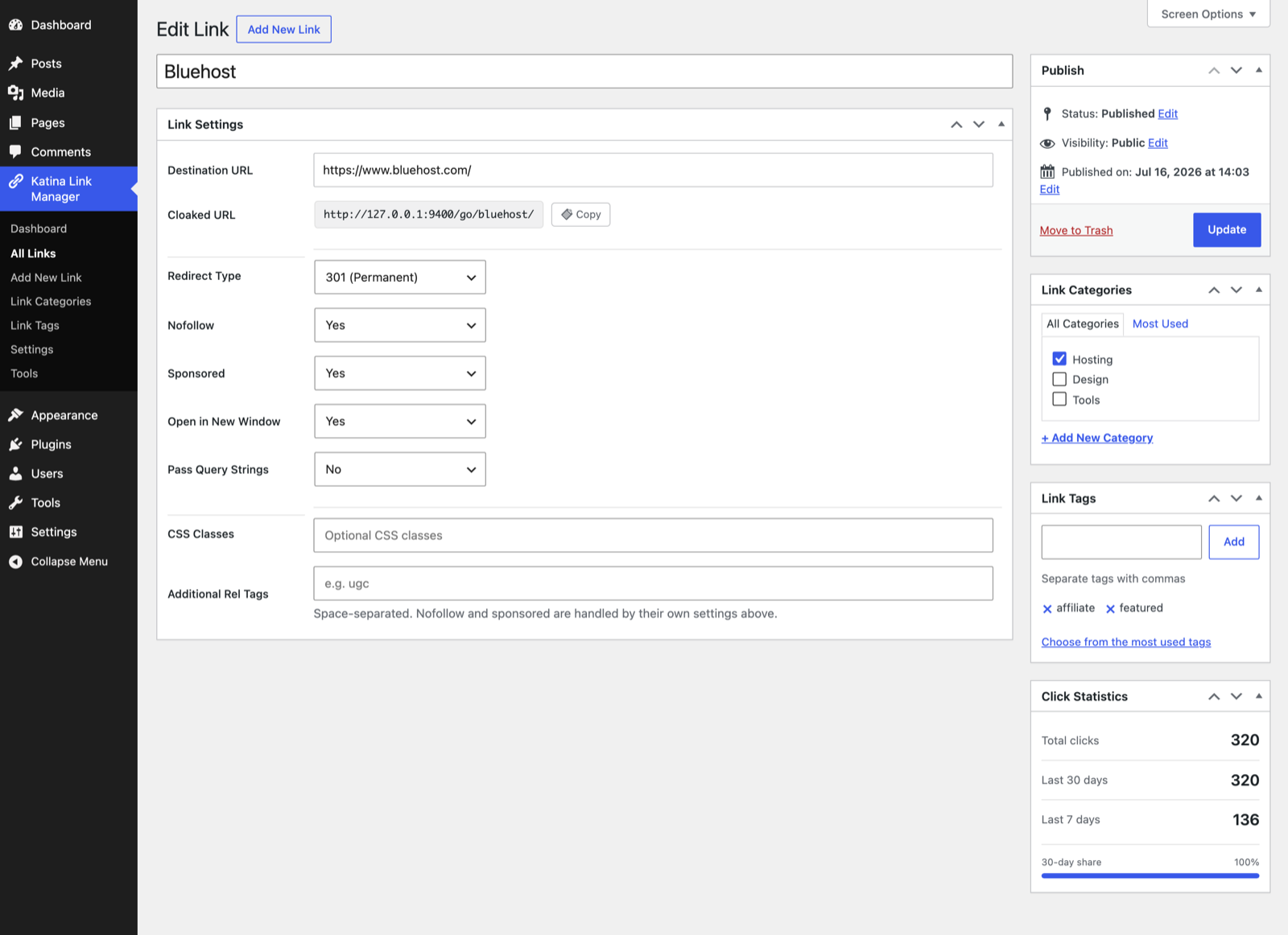
- Custom link management with cloaked URLs
- 301, 302, 307 redirects
- Click tracking with bot filtering
- Link categories and tags
- Gutenberg block and Classic Editor integration
- Link Fixer — automatically syncs link attributes in your content
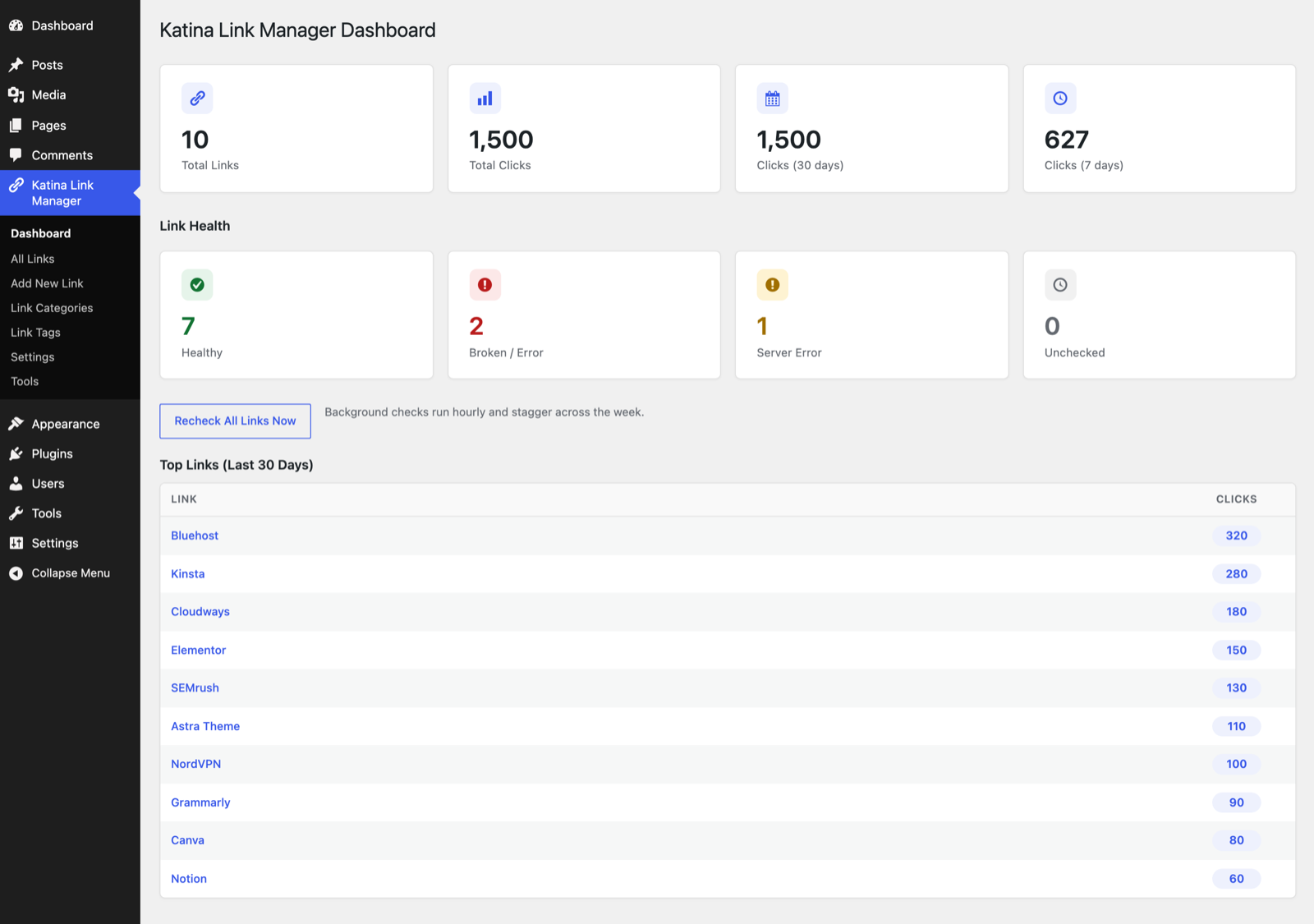
- Link health monitoring (optional, off by default — makes outbound requests to your link destinations)
- CSV import/export
- Nofollow, sponsored, UGC rel attributes
- Query string passthrough
- Dashboard with click statistics and health overview
- Reports: clicks per day, top referrers, top countries, per link or site-wide, with CSV export
- Setup wizard with migration detection
Screenshots


Blocks
This plugin provides 1 block.
- Katina Link Manager Link
Installation
- Upload
katina-link-managerto/wp-content/plugins/ - Activate the plugin
- The setup wizard will guide you through configuration and migration
FAQ
-
No. Never. This is a core principle of Katina Link Manager.
-
Is click tracking GDPR compliant?
-
Yes. By default, Katina Link Manager does not store IP addresses. Country data is derived at click time and the IP is immediately discarded.
-
Can I migrate from ThirstyAffiliates or Pretty Links?
-
Yes. Katina Link Manager includes built-in migration from ThirstyAffiliates, Pretty Links, LinkCentral, and Easy Affiliate Links. The setup wizard detects these automatically, or you can use the Migrate page at any time.
-
How does link health monitoring work?
-
Link health monitoring is optional and turned off by default. When you enable it under Settings Modules, the plugin sends outbound HTTP requests to each of your link destinations twice daily in the background to detect broken links (404s, server errors), which are then flagged in the admin list and on the dashboard. You can also run a manual check at any time. No requests are made until you enable the feature.
Reviews
There are no reviews for this plugin.
Contributors & Developers
“Katina Link Manager” is open source software. The following people have contributed to this plugin.
Contributors
Translate “Katina Link Manager” into your language.
Interested in development?
Browse the code, check out the SVN repository, or subscribe to the development log by RSS.
Changelog
1.2.1
- Cloaked link paths are now disallowed in robots.txt (using your configured prefix). The redirects already sent X-Robots-Tag: noindex; the Disallow also keeps crawlers from spending crawl budget fetching redirect URLs just to be told noindex. Sites that discourage search engines are left untouched.
1.2.0
- New Reports screen. Clicks per day, top referrers, top countries, and top links, over a date range you pick (or one of the presets: 7, 30, 90, 365 days, this month, last month, year to date).
- Reports work across every link or for a single link — pick one from the Link filter, or click through from Top links.
- Export the clicks in the selected range to CSV.
- The chart is drawn server-side as inline SVG, so the screen pulls in no charting library and no external assets.
1.1.5
- Link health checks are now off by default and require explicit opt-in. They no longer run on activation; enable them under Settings Modules to start the background checks. This makes the plugin’s outbound requests fully opt-in.
- Removed the load_plugin_textdomain() call — WordPress.org loads translations automatically since WordPress 4.6.
1.1.4
- Admin styles now load on every Katina admin screen. The dashboard, settings, tools, and setup wizard could render unstyled because the asset gate keyed only on the post type, which some of those screens don’t carry in their URL.
- Cleaned up the “Skip setup” link on the setup wizard so it reads as a plain text link instead of an outlined button.
1.1.3
- Link health: only 404 and 410 count as broken now. Auth and anti-bot refusals (400/401/403/405/406/429) get a browser-profile retry and, if still refused, are marked “unknown” for manual review instead of “broken” — affiliate networks routinely block automated checks while serving real visitors fine.
- Follow up to 5 redirects when checking link health.
1.1.2
- Sanitize and validate the remaining $_SERVER reads (user agent, request URI, query string, and the link fixer’s REMOTE_ADDR rate-limit key).
- Sanitize the uploaded file’s tmp_name and unslash $_POST values before sanitize_key in the migration screen.
1.1.1
- Sanitize $_SERVER values used for client IP detection.
- Inline known sanitize_callback functions in register_setting() calls for clarity.
- Rename internal JavaScript globals to the plugin prefix.
1.0.0
- Initial release
- Link management with cloaked URLs and redirects
- Click tracking with bot filtering (GDPR-compliant)
- Categories and tags
- Gutenberg block and Classic Editor integration
- Link Fixer for content attribute sync
- Link health monitoring (automated + manual)
- Migration from ThirstyAffiliates, Pretty Links, LinkCentral, Easy Affiliate Links
- Content scanner for shortcode replacement
- CSV import/export
- Setup wizard with migration detection
- Dashboard with click stats and health overview