
Description
Sonia is an AI chatbot for WooCommerce that helps you sell more and answer fewer support emails. It adds a conversational assistant to your store, powered by the DBM-AI cloud service. Visitors get instant, accurate answers about your products — and you get fewer repetitive questions in your inbox.
Sonia is grounded in your real product catalog and site content, so it answers accurately about your store instead of giving generic AI guesses. It has two jobs:
- Shop assistant — answers product questions, searches your WooCommerce catalog, compares items, recommends alternatives, and notifies shoppers when products are back in stock.
- Form completion assistant — guides visitors through forms with field-by-field help, multi-field pre-fill from natural language, and accessibility features.
Why store owners use it:
- Sell more — Sonia helps turn browsers into buyers with instant product search, side-by-side comparisons, and personalised recommendations.
- Cut customer support costs — by answering product, stock, and FAQ questions automatically, around the clock, Sonia helps keep repetitive questions out of your inbox.
- Bring shoppers back — automatic restock notifications re-engage visitors who were interested in out-of-stock items.
- Accurate, not generic — Sonia answers from your actual catalog and crawled site content, so replies are about your store, not made-up AI guesses.
- Speaks in your brand’s voice — set Sonia’s name, personality and language yourself; and with on-demand specialisation she can be tuned to your industry and individual brand, so she answers with your tone and your brand’s own knowledge.
Features:
- Conversational shop assistant for WooCommerce — product search, details, comparison, recommendations, restock notifications
- Form completion assistant — field help icons, multi-field pre-fill from natural language
- Multilingual product search — visitors can search in 8 languages (EN, RO, ES, FR, DE, IT, PT, NL) even if your catalog is in a different language
- Smart query matching — fuzzy matching maps visitor queries to your store’s categories, brands, colours, and sizes
- Personalisation — configurable name, personality, voice and language, plus optional on-demand specialisation for industry- and brand-specific knowledge
- Optional text-to-speech for AI replies
- Optional speech-to-text voice input
- Works with Contact Form 7, WPForms, Gravity Forms, Elementor Forms, and any HTML form
- Shadow DOM isolation — zero CSS conflicts with your theme
- Mobile responsive
- Per-page enable/disable control
- Optional Cloudflare Turnstile bot protection
- Privacy-first: PII is sanitized before reaching the AI
Setup:
- Install and activate the plugin
- Go to Settings > DBM Sonia Shop Assistant
- Paste your API key from your DBM-AI Dashboard
- Choose your form selector (auto-detected for popular form plugins)
- Done!
For step-by-step guides see the Tutorials.
External services
This plugin relies on two third-party services. Both are documented below so site owners and visitors know what data is sent and when.
1. DBM-AI
What it is and what it is used for: DBM-AI is the cloud AI service that powers the conversational chat widget (shop assistant + form assistant). The plugin loads the chat widget script from this service and forwards visitor chat messages to it for AI processing.
What data is sent and when:
- On each visitor chat message: the message text, conversation context, current page URL, and your site’s API key are sent to the DBM-AI API.
- When you save the API key, test the connection, or connect WooCommerce from the settings page: your API key, site URL, and (if WooCommerce is enabled) read-only WooCommerce REST API credentials are sent.
- When the chat widget is loaded on a page: the widget script is fetched from
https://dbm-ai.com/ai-form/plugin.js. - When text-to-speech is enabled and the AI replies: synthesized audio is streamed from the DBM-AI API.
Service provided by DBM-AI (https://dbm-ai.com):
- Terms of Service: https://dbm-ai.com/ai-form/terms/
- Privacy Policy: https://dbm-ai.com/ai-form/privacy-policy/
By activating this plugin and entering your API key you agree to the DBM-AI Terms of Service and Privacy Policy.
2. Cloudflare Turnstile (optional)
What it is and what it is used for: Cloudflare Turnstile is a CAPTCHA-style bot-protection service. The plugin only loads it if you enter a Turnstile Site Key in the settings page. When enabled, the Turnstile widget is shown on protected forms / chat sessions to verify that the visitor is not a bot.
What data is sent and when:
- When a visitor loads a page where Turnstile is enabled, the Turnstile JavaScript is loaded from
https://challenges.cloudflare.com/turnstile/v0/api.js. - The browser then exchanges environmental signals (IP address, browser fingerprint data, behavioural signals) with Cloudflare to generate a verification token. This is handled by Cloudflare and described in their privacy policy.
- The verification token is included with the visitor’s chat / form submission so the server can validate it.
Service provided by Cloudflare, Inc. (https://www.cloudflare.com):
- Terms of Service: https://www.cloudflare.com/website-terms/
- Privacy Policy: https://www.cloudflare.com/privacypolicy/
If you do not enter a Turnstile Site Key, no requests are made to Cloudflare.
Screenshots

Dashboard overview — usage stats, plan info, API key, and embed snippet 
Domain management — whitelist the domains where your plugin is embedded 
Form management — auto-detected forms with activation toggle 
Form field editor — AI-generated descriptions and custom instructions per field 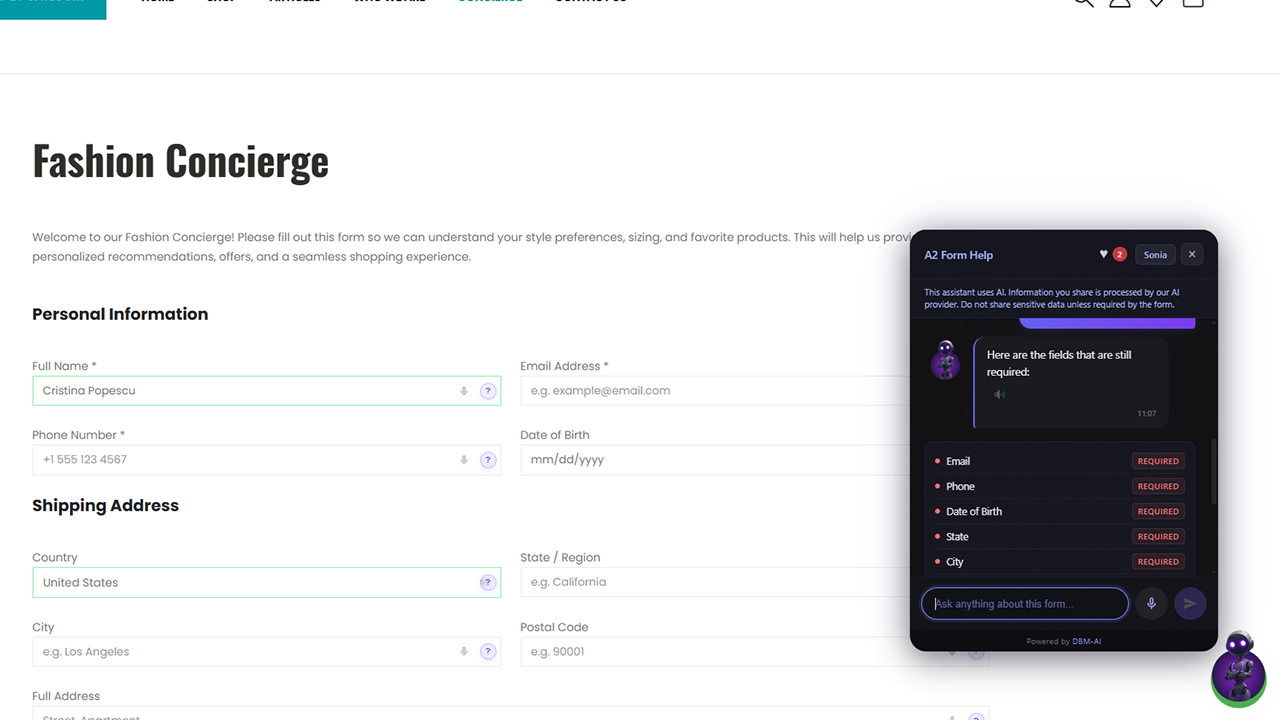
Shop Assistant — configure name, personality, and language 
Website Knowledge & E-Commerce — crawled data, WooCommerce connection, business details 
Chat widget on the frontend — product search, cards, and AI responses 
Account settings — email, API key, password management
Installation
- Upload the
dbm-sonia-shop-assistantfolder to/wp-content/plugins/ - Activate the plugin through the Plugins menu
- Go to Settings > DBM Sonia Shop Assistant and enter your API key
- (Optional) If WooCommerce is active, the plugin will auto-connect your store
For detailed instructions see the Tutorials.
FAQ
-
Where do I get an API key?
-
Sign up at dbm-ai.com to create your account and get an API key.
-
Which form plugins are supported?
-
The plugin works with Contact Form 7, WPForms, Gravity Forms, Elementor Forms, and any standard HTML form. It auto-detects popular form plugins and suggests the correct CSS selector.
-
Does this work with WooCommerce?
-
Yes. When WooCommerce is active, the plugin will auto-generate read-only API keys and connect your product catalog to the AI assistant. Visitors can search products, compare items, check stock, and get personalised recommendations directly in the chat. Product search works across 8 languages — visitors can ask in their own language even if your store catalog is in a different language.
-
Will Sonia reduce my customer support workload?
-
That is one of its main purposes. Sonia answers product, stock, pricing, and FAQ questions automatically, 24/7, directly in the chat — so repetitive questions are handled before they reach your inbox. The more complete your product catalog and site content, the more questions it resolves on its own.
-
Can I personalise Sonia to my brand?
-
Yes — in two layers. The everyday settings — the assistant’s name, personality, voice and language — you control yourself in the dashboard. On higher plans, optional on-demand specialisation tunes Sonia to your industry and your individual brand: your tone of voice and your brand-specific knowledge, so she sounds like part of your team. See the Tutorials for details.
-
Can I disable the assistant on specific pages?
-
Yes. Each post and page has a “DBM Sonia Shop Assistant” meta box in the editor sidebar where you can disable it per page.
-
What data is sent to the external service?
-
Visitor chat messages, form field questions, and your API key are sent to the DBM-AI service for processing. PII is sanitized before reaching the AI. See the External services section below for full details.
-
Is this GDPR compliant?
-
The plugin sanitizes PII before sending data to the AI service. You should include a note about the AI assistant in your site’s privacy policy. The plugin provides a suggested privacy policy snippet under Settings > Privacy.
-
Where can I find more help?
-
See the Tutorials for step-by-step guides and tips.
Reviews

Contributors & Developers
“DBM Sonia – AI Shop Assistant for WooCommerce” is open source software. The following people have contributed to this plugin.
Contributors
Translate “DBM Sonia – AI Shop Assistant for WooCommerce” into your language.
Interested in development?
Browse the code, check out the SVN repository, or subscribe to the development log by RSS.
Changelog
1.0.6
- Compatibility: declared support for WooCommerce High-Performance Order Storage (HPOS) and block-based cart/checkout. Clears the “incompatible plugin” warning and no longer blocks stores from enabling HPOS.
1.0.5
- Compatibility: tested with WordPress 7.0.
- Compatibility: minimum PHP lowered to 7.0; declared WooCommerce support (10.3+).
- Docs: clearer, benefit-focused plugin description.
1.0.4
- Fix: The dashboard Reconnect button now works. Previous 1.0.3 calls to
connect-ecommercewere rejected by the backend as “domain not authorized” becausewp_remote_postsent no Origin/Referer. The plugin now sends aRefererheader with the site URL so the backend resolves the calling domain correctly.
1.0.3
- Change: Reconnect is now triggered from the DBM-AI dashboard instead of background polling. Adds a REST endpoint (
POST /wp-json/dbm-sonia/v1/reconnect, authenticated via X-Api-Key) that mints fresh WooCommerce keys on demand. - Removed: Background auto-reconnect on
admin_init/wp_loaded(could cause disconnect loops on transient 401s).
1.0.2
- Improvement: WooCommerce auto-reconnect now also triggers on frontend page loads, not just when an admin visits wp-admin. Stores will recover from disconnects automatically on the next visitor hit, without waiting for an admin to log in.
1.0.1
- Fix: WooCommerce auto-reconnect no longer deletes existing API keys before the new keys are confirmed by the backend. If the backend call fails or times out, the old keys are preserved so the store stays connected.
1.0.0
- Initial release
- Conversational shop assistant for WooCommerce
- Form completion assistant with per-field help and pre-fill
- Text-to-speech and speech-to-text support
- Optional Cloudflare Turnstile bot protection
- Per-page enable/disable