Description
Nexus Nav transforms the standard WordPress navigation into a powerful, fully customizable design system integrated directly with Elementor.
Unlock the power of Mega Menus by using any Elementor Template as a submenu. Design complex layouts with maps, contact forms, or product grids, and simply link them to your menu items.
🌟 Key Features
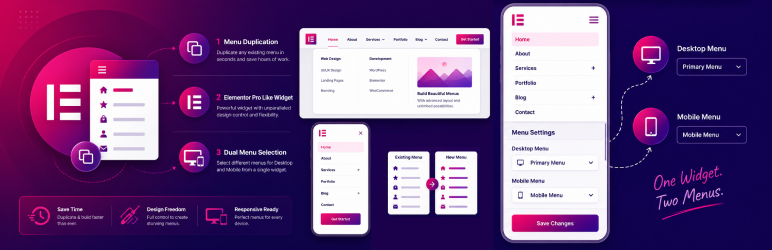
- Mega Menu Customization: Use Elementor Templates as submenus for unlimited design possibilities.
- Elementor Widget: A dedicated “Nexus Nav Menu” widget with advanced styling controls.
- Dual Menu Support: specific unique feature allowing different menus for Desktop and Mobile within a single widget.
- Responsive Layouts: Choose from Horizontal, Vertical, or Hamburger (Off-Canvas) layouts.
- Custom Icons: Add FontAwesome icons or upload custom SVGs to your menu items directly from the WP Menu screen.
- Advanced Styling: Full control over typography, colors, borders, shadows, and spacing.
- Mobile Breakpoints: Precision control over when your menu switches to the mobile hamburger toggle.
- One-Click Duplication: Easily duplicate existing menus to experiment with new structures.
- Lightweight & Fast: Optimized for performance with no bloat.
🚀 How It Works
- Create: Go to Appearance > Menus.
- Enhance: Use the new “Nexus Nav Settings” on menu items to add icons or enable Mega Menus.
- Display: Drag the “Nexus Nav Menu” widget into any Elementor page or header.
Installation
- Upload the
nexus-menufolder to the/wp-content/plugins/directory. - Activate the plugin through the ‘Plugins’ menu in WordPress.
- Go to Appearance > Menus to configure your menu structure.
- Open Elementor and use the Nexus Nav Menu widget to display it.
Reviews
There are no reviews for this plugin.
Contributors & Developers
“Advanced Menu Builder for Elementor” is open source software. The following people have contributed to this plugin.
Contributors
Translate “Advanced Menu Builder for Elementor” into your language.
Interested in development?
Browse the code, check out the SVN repository, or subscribe to the development log by RSS.
Changelog
1.0.1
- Rebranding to Nexus Nav.
- Improved User Guide in Admin Settings.
- Added Dual Menu support details.
1.0.0
- Initial release.