
Description
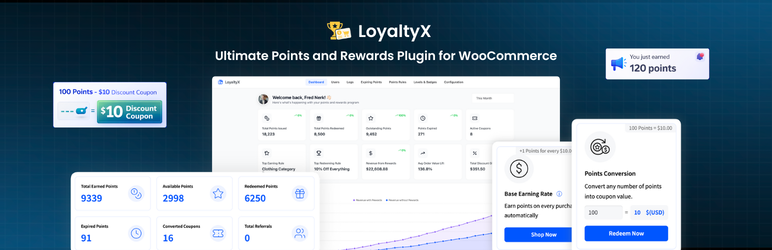
LoyaltyX is a lightweight and performance-optimized WooCommerce points and rewards plugin built for store owners who want to turn one-time buyers into regulars.
Your customers are choosing between you and a competitor. LoyaltyX makes your store the obvious choice to return to. Your customers earn loyalty points automatically on every qualifying order, then redeem those points for discount coupons directly on the cart or checkout page. The whole system runs in the background with no manual work on your end after the initial setup.
Repeat customers spend 67% more per order than new ones. Without a loyalty program, there’s no reason for a customer who bought once to choose your store over a competitor the next time. LoyaltyX creates that reason. Points accumulate with each purchase, giving customers a balance they’re motivated to come back and spend.
Setting up your basic loyalty program takes under 15 minutes. Define how many points customers earn per dollar spent, set how many points equal a discount, and the plugin handles everything from there.
Quick Links
Why customer retention is worth your attention
Every year, store owners spend more and more acquiring new customers while the ones they already have quietly stop buying. A customer who purchases once and never returns is expensive. You paid to acquire them and got one order for it.
A well-run loyalty program changes the math. When a returning customer knows they have 450 points sitting in their account, they have a concrete reason to buy from you instead of checking a competitor first. Points work like a psychological anchor. They increase switching costs without lowering your prices.
LoyaltyX handles this for WooCommerce stores without requiring a developer or a monthly SaaS subscription. Install it, configure your rates, and your store starts retaining customers from day one.
WooCommerce Points and Rewards – Free Version Features
Purchase-Based Points Earning
The core of any loyalty program is earning points on purchases. LoyaltyX makes this automatic.
- Set a global conversion rate: for example, customers earn 10 points for every $1 spent
- Choose which order statuses trigger point awards (processing, completed, or both)
- Configure rounding rules for how fractional point totals are handled
- Exclude specific products or categories from the earning calculation
- Optionally exclude sale products from earning points
- Choose whether shipping costs and taxes count toward the earning total
- Control whether orders paid with coupons still qualify for points
Flexible Points Redemption at Cart and Checkout
Redemption happens where customers are already making decisions: the cart and checkout pages.
- Customers redeem points for discount coupons in one click on cart or checkout
- Set minimum and maximum redemption limits to protect your margins
- Define your conversion rate: for example, 100 points = $1 discount
- Partial redemption is supported – customers choose how many points to spend
- Exclude specific products or categories from redemption eligibility
- Option to exclude sale products from counting toward redemption discounts
Customer Rewards Dashboard in My Account
Customers can track exactly what they’ve earned, spent, and what’s still available.
- Dedicated “Points and Rewards” section added automatically to the My Account page
- Dashboard shows total points earned, currently available points, and total points redeemed
- Full transaction history with a log of every earning and redemption event, including the reason
- Visual summaries with icons so customers can scan their balance at a glance
- Colors, icons, card backgrounds, and border styles are all configurable from the admin panel
- Rename “Points” to anything that fits your brand: Stars, Credits, Coins, or any custom label
- Use
[ddwcpr_points_dashboard]to embed the full dashboard anywhere on your site - Use
[ddwcpr_available_points_value]to show a customer’s current balance in any page or widget
Points Notifications Across Your Store
Customers who see they can earn points while browsing are more likely to complete a purchase.
- Product pages show “Earn X Points with this purchase” messages before the add-to-cart button
- Shop page / loop displays point values on individual product cards
- Cart page shows how many points the current order will earn
- Checkout page reminds customers of pending earnings and available points to redeem
- Order confirmation page displays how many points were earned on the completed order
- All message text, position, and styling (background color, font size, padding, border radius) is editable from your admin panel
- Guest visitors can see earning messages before they register
Admin Management and Control
You can manage the loyalty program directly from the WordPress admin without writing SQL or touching a database.
- View all customers and their current points balances from a single list
- Make manual point adjustments: add or subtract points from any user account with a reason note
- Full points log showing every transaction across your entire store for audit purposes
- Refund sync: points earned on an order are automatically revoked when that order is refunded or cancelled
- Choose which order statuses trigger point revocation
Developer-Friendly and Performance Focused
- HPOS compatible: fully declared for WooCommerce High-Performance Order Storage
- Translation-ready with
.potfile included, compatible with WPML, Polylang, and Loco Translate - Compatible with Astra, OceanWP, Divi, GeneratePress, Flatsome, and any WooCommerce-compatible theme
- Compatible with all standard WooCommerce payment gateways
- Ajax-powered redemption and dashboard updates with no full page reloads required
- Clean code with hooks and filters throughout for custom development needs
- All database queries are optimized and follow WordPress coding standards
View the Free Version Live Demo
LoyaltyX Pro – Advanced Features
The Pro version expands what the free version does well into a complete loyalty and engagement system. See everything included in Pro here.
More Ways to Earn Points
Purchase points are just the starting point. Pro adds earning triggers for the actions that keep customers engaged between orders.
- Sign-up bonus: Award points automatically when a customer creates an account
- Product review rewards: Customers earn points when their review is approved
- Daily login bonus: Award points for each day a customer logs into your store
- Birthday rewards: Automatically send points on a customer’s birthday
- Referral program: Both the referring customer and the new referral earn points
- Level-up bonus: Award points when a customer reaches a new loyalty tier
- Specific product or category points: Set different earning rates for individual products or whole categories
- User role based earning: Configure different point rates for VIPs, wholesalers, or any custom WordPress role
Advanced Redemption Options
Pro adds multiple redemption types so your program can match the way your store operates.
- Fixed amount coupons: 500 points = $5 discount
- Percentage off coupons: 1000 points = 10% off the order total
- Free shipping: Let customers redeem points to remove shipping costs entirely
- Free products: Customers can claim specific products by spending points, no payment needed
- Buy X Get Y: Integrate BOGO offers with your rewards redemption rules
- Bundle rewards: Customers redeem points to claim a fixed product bundle
Loyalty Tiers and Gamification
Tiers give customers a visible goal to work toward. Customers in higher tiers earn points faster, which makes reaching the next tier worth the effort.
- Create unlimited tiers with custom names: Silver, Gold, Platinum, or any naming scheme you choose
- Tier entry is based on lifetime points earned or lifetime points spent, your choice
- Higher tiers earn points at a higher multiplier rate, rewarding your best customers proportionally
- Tier progress bar visible in the customer dashboard so customers always know how close they are
- Email notification when a customer reaches a new tier
Points Expiration
Points that never expire remove urgency. Points that expire create a reason to come back before the customer forgets.
- Set a global expiration period based on days of inactivity
- Customers receive an email reminder a configurable number of days before their points expire
- A second email confirms when points have expired
- Expiration is tracked per-customer based on their last earned or redeemed event
Advanced Analytics and Data Management
- Import and export customer point balances via CSV for migration or backup purposes
- Bulk point operations: update multiple user balances at once from the admin
- Advanced reports covering total redemptions, redemption rates, program ROI, and your top-spending loyalty customers
- Email marketing integration for personalized communications tied to point events
View the Pro Version Live Demo
Upgrade to LoyaltyX Pro
How It Works
- Install and activate LoyaltyX from the WordPress plugin directory.
- Go to DevDiggers Plugins > LoyaltyX > Configuration and set your global earning rate. For example: 10 points earned for every $1 spent.
- Set your redemption rate. For example: 100 points = $1 discount applied at cart or checkout.
- Optionally rename “Points” to Stars, Credits, Coins, or anything that fits your brand.
- Customers automatically earn points on every qualifying order. Their balance appears in My Account immediately after the order reaches the configured status.
- When customers visit the cart or checkout, they see their available balance and can redeem in one click.
That covers the basic setup. Most stores are live with their loyalty program within 15 minutes of installation.
Free vs Pro
Free Version Includes
- Purchase-based point earning with configurable conversion rate
- Cart and checkout redemption for discount coupons
- Partial redemption with min/max limits
- Customer rewards dashboard in My Account
- Full transaction log
- Manual admin point adjustments
- Refund sync (auto-revoke points on refund/cancellation)
- Points notifications on product, shop, cart, checkout, and order pages
- Shortcodes for embedding dashboard and balance anywhere
- CSV import functionality
- HPOS compatible, translation-ready, and theme-compatible
Pro Version Adds
- Sign-up, review, referral, birthday, daily login, and level-up earning rules
- Product and category-specific earning rates
- User role-based earning rates
- Fixed, percentage, free shipping, free product, BOGY, and bundle redemption types
- Loyalty tiers with multiplier rates and progress tracking
- Points expiration with automated email reminders
- Advanced analytics and reporting
- CSV export and bulk operations
- Priority support
See the full Free vs Pro comparison
Automatic Installation
- Go to Plugins > Add New in your WordPress admin.
- Search for LoyaltyX – Points and Rewards for WooCommerce.
- Click Install Now, then click Activate.
Manual Installation
- Download the plugin zip file from WordPress.org or your DevDiggers account.
- Go to Plugins > Add New > Upload Plugin in WordPress admin.
- Upload the zip file and click Install Now, then Activate.
Alternatively, unzip the file and upload the folder to /wp-content/plugins/ via FTP, then activate through the Plugins menu.
After Activation
- Navigate to DevDiggers Plugins > LoyaltyX in the WordPress admin sidebar.
- Go to Configuration > General and enable the loyalty program.
- Set your earning rate under Configuration > Points Earning.
- Set your redemption rate under Configuration > Points Redeeming.
- Optionally configure email notifications under Configuration > Emails.
- Visit your storefront to confirm earning messages are displaying on product and shop pages.
Screenshots
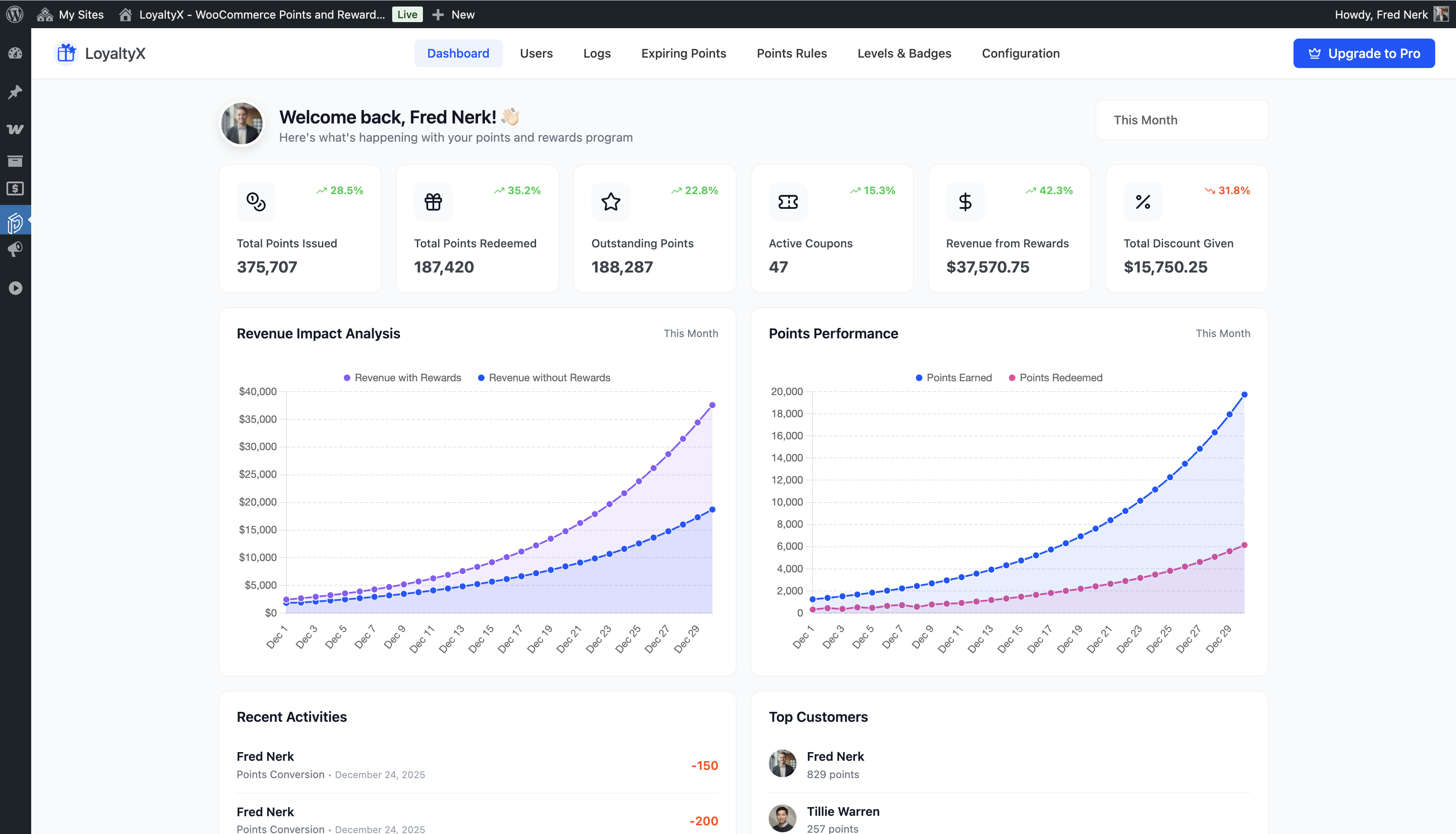
Admin dashboard overview with program stats across all customers 
Customer rewards dashboard in the My Account area, showing points balance, total earned, and total redeemed 
Customer earning section listing all available ways to earn points and corresponding point values 
Customer redemption section where customers choose how many points to redeem for a discount coupon 
Customer rewards and history section showing full transaction log with dates and reasons 
Shop page product cards displaying earn points messages alongside each product 
Product page showing the points earning notice before the add-to-cart button 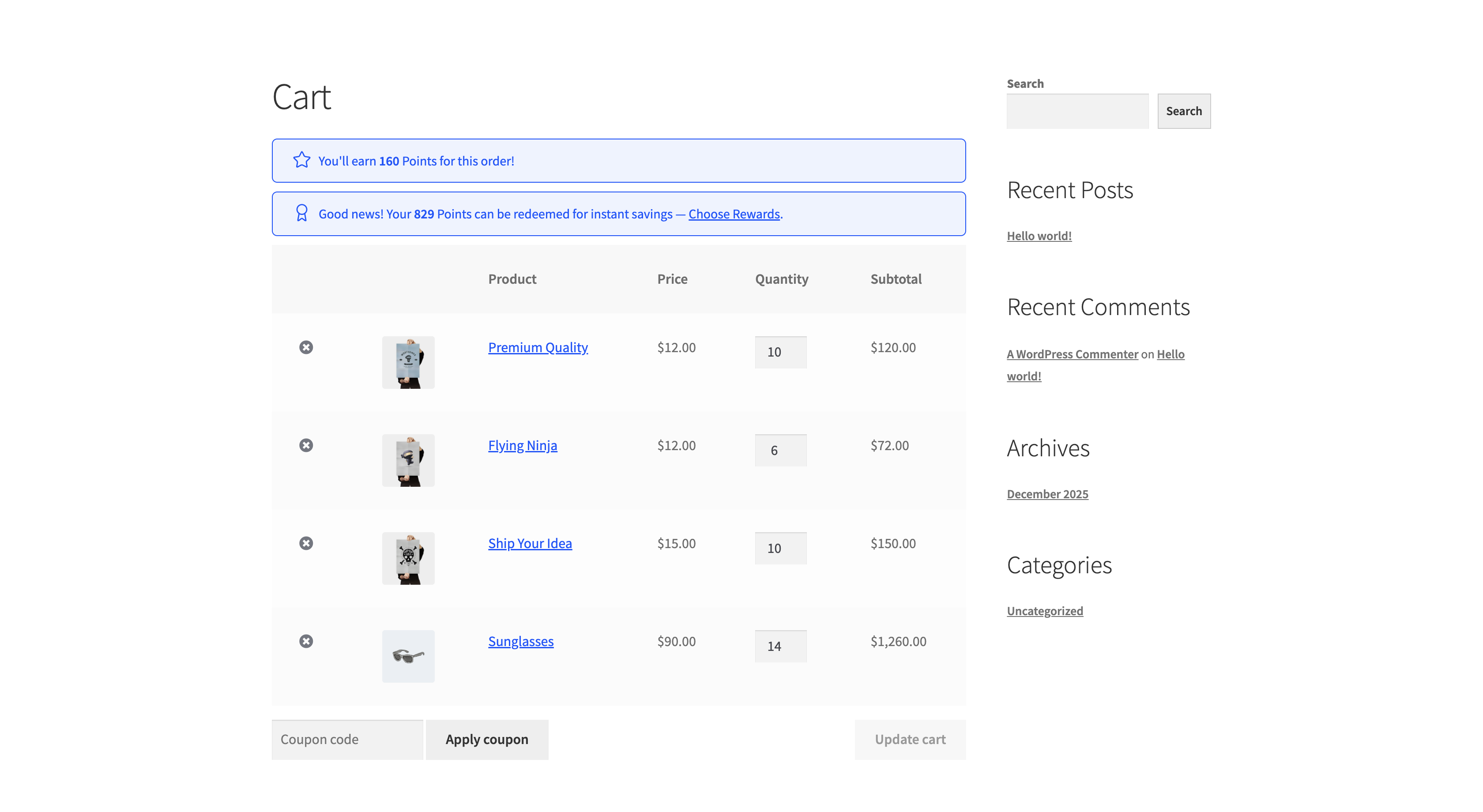
Cart page with points earning message for the current order and redemption prompt for available balance 
Checkout page showing pending points to be earned and the active redemption option 
Rewards popup on cart and checkout pages for increased engagement 
Admin users list showing each customer’s current points balance 
Manual point adjustment screen for adding or subtracting points from a specific user 
Full transaction log in admin showing every point event across the store 
Choose point earning rules page 
Choose point redeeming rules page 
General configuration page with award and revoke order statuses settings 
Points earning configuration panel with conversion rate, rounding rules, and exclusion settings 
Points redemption configuration panel with limits and conversion settings 
Display messages configuration showing all notice positions, text, and styling options 
Layout configuration panel with color pickers for dashboard card and icon styles 
Email notifications configuration showing all triggered email templates 
Shortcode reference page inside the admin panel 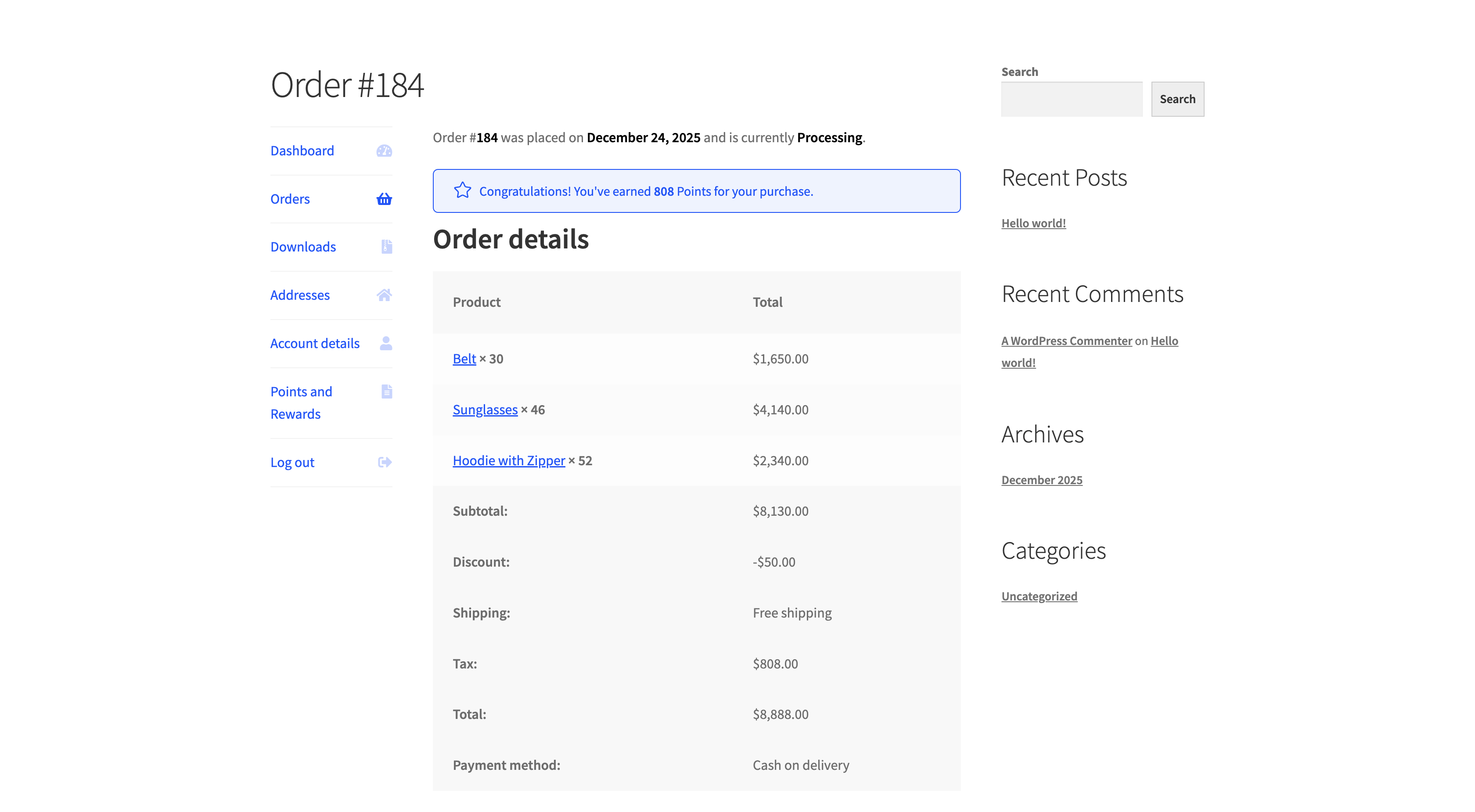
Order confirmation page showing points earned from the completed purchase
FAQ
-
How do customers earn loyalty points in my WooCommerce store?
-
In the free version, customers earn points automatically on every qualifying purchase. You set the conversion rate from the admin panel: for example, 10 points per $1 spent. Points are awarded when an order reaches the status or statuses you configure, typically processing or completed. The customer’s balance updates in their My Account dashboard immediately.
The Pro version adds additional earning triggers: account registration, product reviews, daily logins, birthdays, referrals, specific product and category rules, and user-role-based earning rates.
-
Can customers redeem points at checkout?
-
Yes. The free version adds a redemption option to both the cart page and the checkout page. Customers see their available balance and can choose how many points to redeem. The plugin generates a discount coupon code automatically and applies it to the order. You control the minimum and maximum redemption limits, and partial redemption is fully supported.
-
Is LoyaltyX compatible with WooCommerce HPOS?
-
Yes. LoyaltyX has declared full compatibility with WooCommerce High-Performance Order Storage. The plugin has been tested with HPOS enabled on standard and block-based checkout configurations. There’s no additional configuration needed on your end.
-
Does this plugin work with the WooCommerce block checkout?
-
Yes. The plugin is compatible with the WooCommerce block-based checkout. Points earning messages and redemption options display correctly in the block checkout environment.
-
Can I rename “Points” to something else?
-
Yes. From the Configuration panel you can set a singular and plural label for your points currency. Common choices are Stars, Credits, Coins, Tokens, or any custom name that fits your brand. The new label appears everywhere: on product pages, cart, checkout, the My Account dashboard, and email notifications.
-
What happens to points when an order is refunded?
-
Points earned on a refunded or cancelled order are automatically revoked. You configure which order statuses trigger revocation from the admin panel. The point adjustment appears in the customer’s transaction log with the reason noted.
-
Do points expire?
-
Points expiration is a Pro feature. In Pro you set an expiration period based on days of customer inactivity. Customers receive a reminder email before their points expire, and a second confirmation email when the expiration occurs.
-
How do I display the customer’s points balance outside of My Account?
-
Use the
[ddwcpr_available_points_value]shortcode to show the current user’s point balance anywhere on your site: sidebars, page builders, custom templates, or any widget area. Use[ddwcpr_points_dashboard]to display the full rewards dashboard, including transaction history and earning rules, anywhere on your site. -
Is this plugin compatible with multilingual setups?
-
Yes. LoyaltyX ships with a
.pottranslation file. It’s compatible with WPML, Polylang, and Loco Translate. All customer-facing strings, including earning messages, redemption notices, email content, dashboard labels, and point names, are fully translatable. -
Does this plugin slow down my store?
-
No. The plugin uses optimized database queries and runs on a well-structured schema with three dedicated tables for points logs, earning rules, and redemption rules. Ajax is used for real-time balance and redemption updates so the overall page load is not affected. HPOS compatibility also means order-related queries stay fast as your order volume grows.
-
Can I import existing points from another loyalty plugin?
-
Yes, it includes a CSV import tool that lets you upload customer user IDs and corresponding point balances. This allows you to migrate from another loyalty plugin without losing your customer’s accumulated history.
-
What’s the difference between the free and Pro versions?
-
The free version covers purchase-based earning, cart and checkout redemption, the customer dashboard, admin management, and all compatibility features. That’s enough to run a solid entry-level loyalty program at no cost.
Pro adds advanced earning rules (referrals, reviews, signups, birthdays, daily logins), loyalty tiers with multiplier rates, points expiration with automated reminders, additional redemption types (free shipping, free products, BOGO, bundles), advanced analytics, bulk operations, and CSV import/export.
See the full breakdown at devdiggers.com/knowledge-base/loyaltyx-free-vs-pro/
-
Is there a demo I can try before installing?
-
Yes. A live demo of the free version is available at demo.devdiggers.com/woocommerce-loyaltyx-free/ and the Pro version demo is at demo.devdiggers.com/woocommerce-loyaltyx/.
-
Does the plugin require a developer to set up?
-
No. All configuration is handled through an admin panel with labeled fields. There’s no code editing required for the standard setup. Developers who want to extend the plugin will find action hooks and filters throughout the codebase.
-
Where can I get support if something isn’t working?
-
Use the support forum here on WordPress.org for free version questions. The documentation at devdiggers.com/knowledge-base/woocommerce-points-and-rewards/ covers all configuration options with step-by-step guides. Pro license holders have access to direct support from the DevDiggers team.
Reviews


Contributors & Developers
“LoyaltyX – Points, Rewards & Loyalty Program for WooCommerce (Referral, Gamification & Customer Retention)” is open source software. The following people have contributed to this plugin.
Contributors
Interested in development?
Browse the code, check out the SVN repository, or subscribe to the development log by RSS.
Changelog
1.0.2
- Resolved the issue of plugin conflict with other DevDiggers plugins.
1.0.1
- Updated DevDiggers Framework code
- Confirmed compatibility with WooCommerce 10.6.1 and WordPress 6.9.4
- Resolved reward coupon generation issue
1.0.0
- Initial release