

Description
Most Amazon affiliate plugins display products you already know about. You pick ASINs, embed them, and hope visitors buy those exact products. But what about everything else your visitors want? They leave your site, search Amazon directly, and someone else gets the commission.
Paapi Product Search for Amazon changes that. It adds live Amazon product search to your WordPress site. Visitors search, filter, browse, and click through to buy – every product automatically tagged with your Associate ID. You earn commissions on whatever they decide to buy, not just the products you manually linked.
One shortcode. No ASIN hunting. Works in minutes.
Why Affiliates Use It
- Earn on every search, not just manual links – visitors discover products you never had to curate
- Keep visitors on your site – interactive search reduces bounce rates
- Fast by default – build-time server-side rendering (SSR) means instant page loads
- Smart caching – search results cached 30 min, product data cached 1 hr, so your API quota stays healthy
- Works with both APIs – Amazon Creators API (OAuth 2.0) and PA-API 5.0 (AWS Sig V4)
Free Features
- Live Amazon product search with autocomplete suggestions
- Brand, price range, condition, merchant, and availability filters
- Sorting: Relevance, Price, Newest Arrivals, Customer Reviews, Featured
- Grid layout with responsive mobile-first design
- 5 categories (Electronics, Books, Fashion, Toys & Games, Home & Garden)
- Up to 50 products (5 pages) with infinite scroll, Load More, or no pagination
- Customizable product count (2-20 per page)
- Visual shortcode builder – no coding required
- Cache management page with usage monitoring
- Appearance customization: Neutral base color, orange accent, card style, border radius
Premium Features ($39/yr)
- All 26 Amazon categories – cover your entire niche, not just 5
- Unlimited pagination – up to 100 products (Amazon’s API limit)
- List layout – vertical display for detailed product comparisons
- Full appearance control – 5 base colors, 17 accent colors, 5 card styles, 5 border radius levels, dark mode, 16 fonts (15 Google Fonts + system default)
- Deal badges – Lightning Deal, Best Deal, Prime Exclusive, Low Stock warning, discount percentage, deal countdown timer
- Product badges – Prime, Best Seller rank (#1-100)
- Prime and Deals filters – let visitors find Prime-eligible products and active deals
- White-label mode – remove all PSFA branding for a fully custom experience
- Button and display customization – custom button text, hide Amazon icon, hide category banner
Add-ons ($19/yr each, requires Premium)
- Product Boxes – display individual Amazon products anywhere with shortcodes. Search-to-Save workflow, feature bullets, winner badges
- Comparison Tables – side-by-side product comparisons with winner badges, star ratings, responsive mobile layouts
- Analytics – track searches, clicks, impressions, and filter usage. Dashboard with charts, date picker, CSV/JSON export. Privacy-first, no cookies or PII
How It Works
- Install and activate the plugin
- Enter your Amazon API credentials (Creators API or PA-API – we support both)
- Add
[psfa_search]to any page or post - Your visitors search Amazon products and you earn commissions on every purchase
Requirements
- WordPress 5.0 or higher
- PHP 7.4 or higher
- cURL extension enabled
- Amazon Product Advertising API credentials (Access Key ID, Secret Access Key, and Associate Tag)
Getting Amazon API Credentials
To use this plugin, you’ll need to:
- Sign up for the Amazon Associates program
- Apply for API access at Creators API or Product Advertising API (PA-API v5) We support both!
- Once approved, you’ll receive your Access Key ID and Secret Access Key
- Your Associate Tag is your Amazon Associates ID
Privacy & Security
- All API credentials are stored securely in WordPress options
- Users must provide their own Amazon API credentials
- No user data is collected or transmitted to third parties
- All product data comes directly from Amazon’s API
- All requests use secure HTTPS connections
Support
For support, feature requests, or bug reports, please visit the plugin’s support forum on WordPress.org.
Credits
This plugin uses the Amazon Product Advertising API 5.0 (PA-API 5.0) And the Amazon Creators API to search and retrieve product information.
Third-Party Libraries
This plugin includes the following open-source libraries:
- shadcn/ui – UI component library (MIT License)
- Radix UI – Accessible UI primitives used by shadcn/ui (MIT License)
- Lucide React – Icon library (ISC License)
- Phosphor Icons – Duotone icon set, used for select inline SVG icons (MIT License)
- React – UI framework (MIT License)
- Tailwind CSS – Utility-first CSS framework (MIT License)
Source Code
The JavaScript bundles are built from TypeScript and React source files using the tools listed below.
Build tools used:
* Vite – For TypeScript/React bundling and minification
* Node.js – Runtime environment
* React 19 – Admin UI and frontend rendering
* Tailwind CSS v4 – Utility-first styling
* shadcn/ui – Accessible UI components built on Radix UI primitives
* Lucide React – Icon library used by UI components
* Phosphor Icons – Duotone icon set (inline SVGs)
External Services
This plugin connects to the following external services:
Amazon Product Advertising API (PA-API 5.0)
This plugin uses Amazon’s Product Advertising API to search and retrieve product information. This is the core functionality of the plugin.
- What it does: Searches Amazon’s product catalog and retrieves product details (title, price, images, etc.)
- When data is sent: When a user performs a product search on your website
- What data is sent: Search queries, category selections, and filter parameters
- Service provider: Amazon.com, Inc.
- Terms of Service: https://affiliate-program.amazon.com/help/operating/agreement
- Privacy Policy: https://www.amazon.com/gp/help/customer/display.html?nodeId=468496
Amazon Autocomplete Suggestions
This plugin uses Amazon’s autocomplete API to provide search suggestions as users type.
- What it does: Provides real-time search suggestions based on user input
- When data is sent: When a user types in the search box (after 2+ characters)
- What data is sent: The partial search query text
- Service provider: Amazon.com, Inc.
- Service URL: https://completion.amazon.com/
- Terms of Service: https://www.amazon.com/gp/help/customer/display.html?nodeId=508088
- Privacy Policy: https://www.amazon.com/gp/help/customer/display.html?nodeId=468496
Google Fonts (Premium Feature)
Premium users can select custom fonts from Google Fonts for product display elements.
- What it does: Loads custom font files for typography customization
- When data is sent: When a page with the product search is loaded and custom fonts are configured
- What data is sent: Font family names
- Service provider: Google LLC
- Terms of Service: https://developers.google.com/terms
- Privacy Policy: https://policies.google.com/privacy
Privacy Policy
This plugin does not collect, store, or transmit any personal user data. All product searches are performed using your Amazon API credentials, and all data comes directly from Amazon’s servers. Search queries entered by your site visitors are sent to Amazon’s API to retrieve product results. Please refer to the External Services section above for details on third-party services used by this plugin.
Screenshots

Product results in grid layout with Neutral base color (Free feature) 
Product results in list layout (Premium feature) 
Search interface with autocomplete suggestions 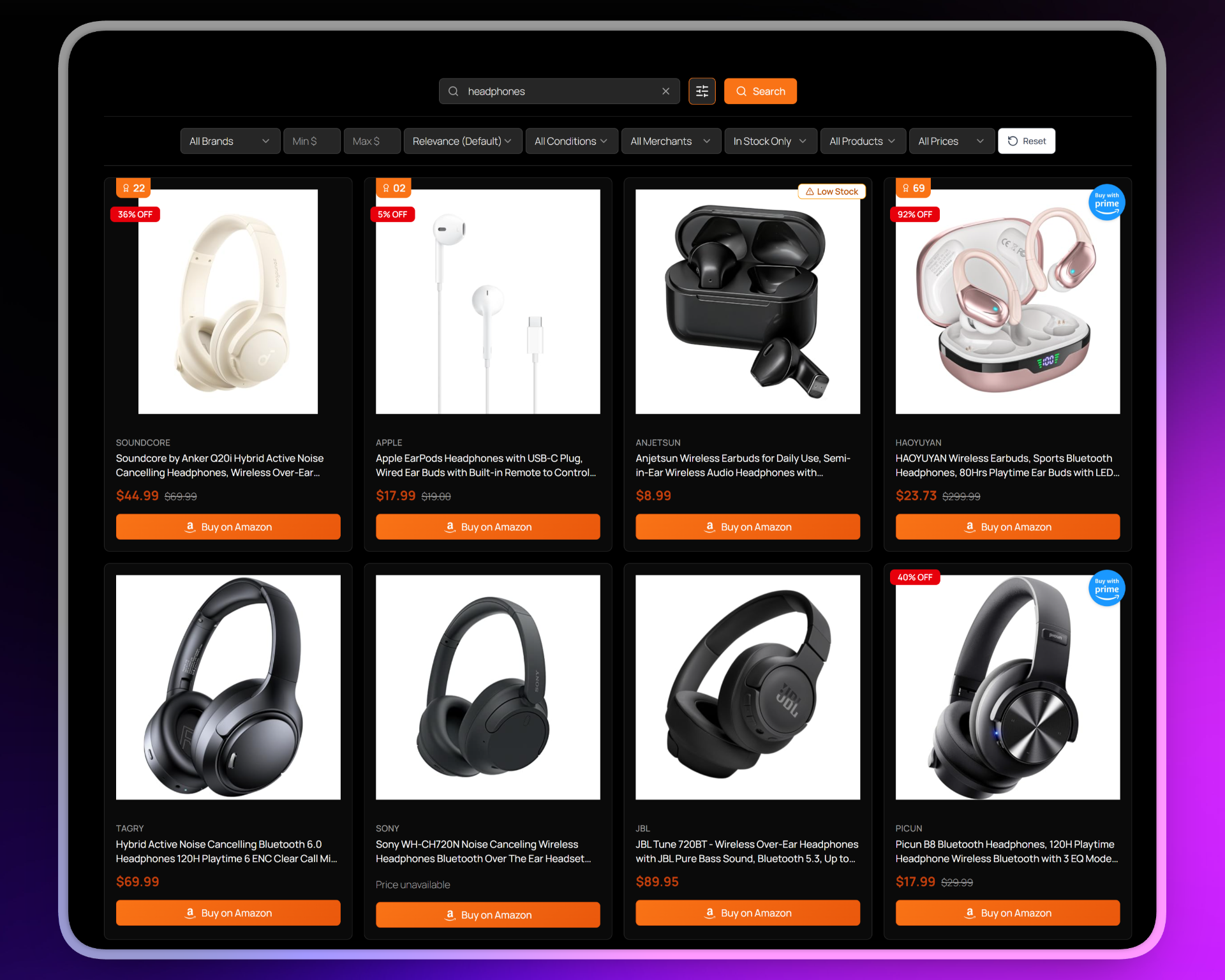
Dark mode with Neutral base color 
Responsive design for mobile devices 
Admin: Credentials page for entering your amazon associate credentials 
Admin: Appearance page: with live preview, 6-axis theming (base color, accent, card style, radius, dark mode, font) 
Admin: Layout page showing display options and badge toggles 
Admin: Shortcode builder page showing shortcode builder for easy shortcode generation 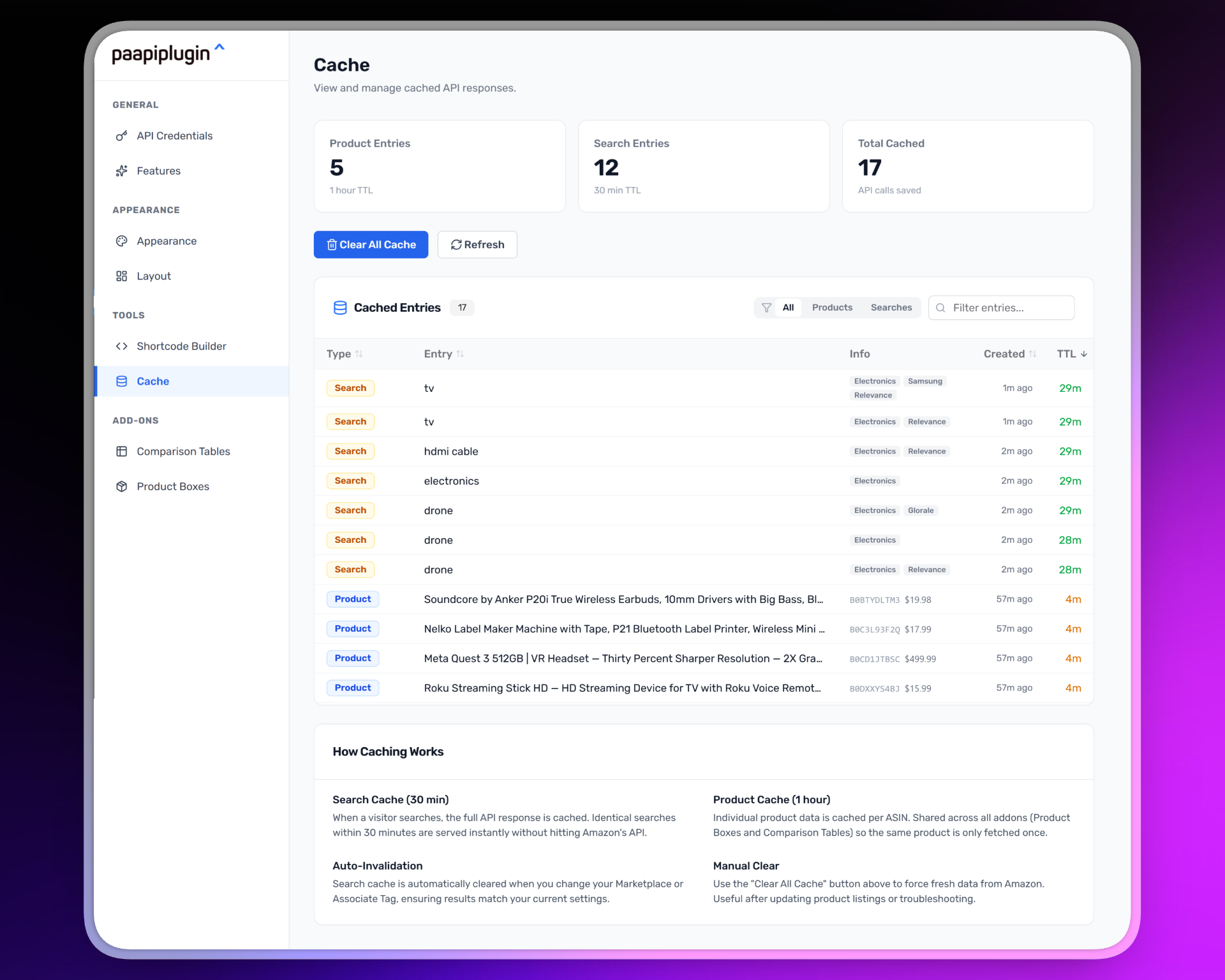
Admin: Cache page showing cached items table with usage information and reset/clear buttons
Installation
Automatic Installation
- Go to Plugins Add New in your WordPress admin.
- Search for “Paapi Product Search for Amazon” (or upload the ZIP from WordPress.org once approved).
- Click Install Now and then Activate.
Manual Installation
- Upload the
paapi-product-search-for-amazonfolder to/wp-content/plugins/. - Activate the plugin through the Plugins menu in WordPress.
- Go to Settings Paapi Product Search for Amazon.
- Enter your Amazon Product Advertising API credentials.
- Add the shortcode
[psfa_search]to any page or post.
Configuration
- Navigate to Settings Paapi Product Search for Amazon in your WordPress admin.
- Select your Authentication Type:
- OAuth 2.0 (Creators API) – Recommended for new users
- AWS Signature V4 (PA-API) – Legacy authentication method
- For OAuth 2.0 (Creators API):
- Enter your Client ID and Client Secret from Creators API
- Enter your Credential Version (typically “1”)
- Select your Auth Region and Marketplace
- For AWS Signature V4 (PA-API):
- Enter your Access Key ID and Secret Access Key
- Enter your Associate Tag (your Amazon Associates ID).
- Click Test Connection to verify your credentials work.
- Click Save Settings.
- (Optional) Customize appearance in the Appearance tab (base color, accent, radius, dark mode, font).
FAQ
-
How is this different from other Amazon affiliate plugins?
-
Most Amazon plugins (AAWP, AzonPress, AmaLinks Pro) display products you already know about – you pick ASINs, embed them, done. This plugin adds live search. Visitors find products themselves, browse, filter, and click through to buy. You earn commissions on products you never had to manually curate. Use it alongside your existing plugin or replace the ASIN-hunting workflow entirely.
-
Do I need an Amazon Associates account?
-
Yes. You need an Amazon Associates account and API access (Creators API or PA-API v5) to use this plugin. The plugin uses your API credentials and Associate Tag to search Amazon’s catalog and tag every product link with your affiliate ID.
-
How do I get Amazon API credentials?
-
- Sign up for Amazon Associates
- Apply for Creators API (recommended) or PA-API v5 access
- Enter your credentials in the plugin settings and click Test Connection
-
Will this slow down my site?
-
No. The frontend uses build-time server-side rendering (SSR) – the initial HTML is pre-rendered, so the first paint is instant. Smart caching (30 min for searches, 1 hr for products) means repeat visits load in milliseconds. Your API quota stays healthy and your pages stay fast.
-
What’s included in the free version?
-
The free version is a real product, not a crippled trial. You get live Amazon search with autocomplete, 5 categories, 50 products, brand/price/condition filters, sorting, infinite scroll, caching, responsive grid layout, and a visual shortcode builder. Premium adds all 26 categories, 100 products, deal badges, full appearance customization, list layout, and white-label mode.
-
Can I customize how it looks on my site?
-
Yes. The plugin has a 6-axis appearance system. Free users get the Neutral base with orange accent. Premium users control all 6 axes: base color (5 options), accent color (17 options), card style (5 presets), border radius, dark mode, and font (15 Google Fonts + system default). Over 42,000 possible combinations – it matches any WordPress theme.
-
Does it work with caching plugins?
-
Yes, but you may need to exclude pages with the
[psfa_search]shortcode from full-page caching, since the search functionality requires dynamic content. -
Can I use it on multiple sites?
-
Yes. Each site needs its own license and Amazon API credentials.
Reviews
There are no reviews for this plugin.
Contributors & Developers
“Paapi Product Search for Amazon” is open source software. The following people have contributed to this plugin.
Contributors
Translate “Paapi Product Search for Amazon” into your language.
Interested in development?
Browse the code, check out the SVN repository, or subscribe to the development log by RSS.
Changelog
2.13.1
- Improved: WordPress.org listing – rewritten tags, description, features, and FAQ for clarity and discoverability
2.13.0
- New: Analytics addon support – track searches, clicks, impressions, and filter usage with admin dashboard
2.12.3
- Improved: Frontend search and pagination stability
- Fixed: Potential race condition when changing search queries rapidly
2.12.2
- New: Analytics add-on support – track searches, clicks, impressions, and filter usage with an admin dashboard
- Fixed: Admin menu now appears as a top-level menu item in the WordPress sidebar
2.12.1
- Fixed: Sort filter (NewestArrivals/AvgCustomerReviews/Featured) not updating results when query + brand filter are both active
- Fixed: Frontend showing stale results briefly when search query changes
- Fixed: Cache page time formatting showing raw hours instead of days/weeks/months
2.12.0
- Improved: Price range filter now uses a dual-thumb slider in a popover, consistent with other filter controls
2.11.0
- New: API response caching – search results cached 30 minutes, product data cached 1 hour (WordPress transients)
- New: Unified product cache across all addons (single cache per ASIN)
- New: Dedicated Cache management page with cached items table, sorting, filtering, and creation timestamps
- New: Auto-invalidation when marketplace or associate tag changes
- Improved: Addon AJAX uses
get_items()instead ofsearch_items()for known-ASIN lookups - Improved: Addon premium enforcement (admin notice + shortcode gate + AJAX gate + no frontend assets)
2.10.0
- Major: Complete UI modernization with React 19, shadcn/ui components, and Tailwind CSS v4
- Major: Entire frontend rebuilt in React with build-time server-side rendering (SSR) for instant loading
- Major: New 6-axis appearance system replacing the old fixed theme + color picker model
- New: 5 base color palettes (Neutral free, Stone, Slate, Zinc, Gray premium)
- New: 17 accent colors from Tailwind’s chromatic palette
- New: 5 card styles (Vega, Nova, Maia, Lyra, Mira)
- New: 5 border radius levels (None, Small, Medium, Large, Full)
- New: Dark mode toggle for any base color
- New: 15 Google Fonts plus system default for typography customization
- New: Hide Amazon Icon toggle for product cards
- New: Unified Appearance page replacing separate Themes and Customization pages
- New: Product Boxes add-on fully rendered with React (was vanilla JS)
- New: Comparison Tables add-on fully rendered with React (was vanilla JS)
- New: shadcn/ui admin components (Dialog, AlertDialog, Switch, Slider, Sonner toasts)
- Improved: Admin UI with react-router-dom v7 navigation
- Improved: 188 tests passing (Vitest + React Testing Library)
- Improved: All styling via Tailwind CSS v4 utility classes (754-line style.css removed)
- Removed: css-generator.php (replaced by static theme CSS files)
- Removed: Old fixed themes (Ocean Blue, Modern, Minimal, Amazon Inspired) replaced by 6-axis system
- Removed: Per-theme color picker customization (replaced by accent color axis)
- Removed: Card Layout feature
- Removed: Vanilla TypeScript frontend widgets (replaced by React components)
- Removed: PHP frontend fallback (React-only rendering)
2.9.2
- New:
countshortcode attribute to control product display count (2-20) - New: Product count slider in Shortcode Builder (shows when pagination=”none”)
- New: “Flexible Product Count” added to Features list
2.9.1
- Refactor: HTML structure consolidation – single source of truth for product cards
- New:
psfa_render_product_card()function for consistent product card rendering - Improved: AJAX now returns pre-rendered HTML + JSON (progressive enhancement)
- Improved: Frontend bundle size reduced from ~13KB to ~10KB
- Improved: Addon hooks now work automatically for AJAX-loaded products
- New: Design token system with CSS custom properties
- Improved: Tailwind CSS v4 migration complete
- New: Visual regression testing with 26 Playwright tests
2.9.0
- Major: Full React+TypeScript migration complete
- New: React admin UI with react-router navigation (9 pages)
- New: TypeScript frontend widgets (Autocomplete, InfiniteScroll, Countdown, FiltersToggle, ClearButton)
- New: Unified
/srcproject structure - New: Shared utility library
- Improved: 85 tests passing (Vitest + React Testing Library)
- Improved: Type safety across entire codebase
2.8.3
- Improved: Welcome video ID now filterable via
psfa_welcome_video_idhook
2.8.2
- Improved: Disabled browser autocomplete on API credentials inputs
2.8.1
- New: Welcome section with setup video for new users on API Credentials page
- Improved: Video player with custom thumbnail and auto-reset on finish
2.8.0
- New: White-label mode – Premium users can remove “Powered by PSFA” branding
- New: “Powered by PSFA” branding link on frontend search results
- New: White-label toggle in Layout Display Options (Premium)
2.7.0
- New: Comparison Tables add-on support – create product comparison tables with winner badges
- New: Winner Highlighting badges (Best Value, Editor’s Choice, Best Rated, Budget Pick, Premium Pick)
- New: Responsive table options – stack (cards) or scroll on mobile devices
- New: Custom button text support for comparison tables
- Improved: Documentation updates for add-on shortcode attributes
2.6.0
- New: Add-on support infrastructure – hooks and filters for extending plugin functionality
- New: Product Boxes add-on compatibility – display individual Amazon products with shortcodes
- New: Admin navigation system for add-on sections
- Improved: Plugin architecture to support modular add-ons
2.5.0
- Improved: CSS architecture refactored – base styles in style.css, themes contain only color overrides
- Improved: Product card alignment – titles now use line-clamp for consistent card heights
- Improved: Title hover tooltip shows full product name when truncated
- New: Countdown badge shimmer animation effect for time-limited deals
- New: Theme-specific badge colors for all themes (Ocean Blue, Modern, Minimal, Dark, Amazon Inspired)
- Fixed: Badge color overrides now properly apply in all themes
2.4.0
- New: Display Options settings – Hide Search Bar, Hide Filters, Hide Category Banner toggles in admin
- New: Shortcode overrides – Display options can be overridden per-page using shortcode attributes
- New: Shortcode builder – Added Hide Category Banner toggle to Display Options card
- Improved: Settings priority system – URL params > shortcode attributes > admin settings
- Fixed: Admin settings now properly apply when no shortcode attributes are provided
2.3.1
- Fixed: Price filter consistency – Initial page load now sends minPrice/maxPrice to Creators API
- Fixed: Creators API 404 handling – No results now gracefully shows empty state instead of error
2.3.0
- New: OffersV2 API Migration – Full migration from OffersV1 to OffersV2 for enhanced deal data
- New: OAuth 2.0 / Creators API authentication support with admin UI selector
- New: Test Connection button in credentials settings to validate API credentials
- New: Auth type selector – Choose between OAuth 2.0 (Creators API) or AWS Sig V4 (legacy PA-API)
- New: Has Deal filter – Filter products to show only items with active deals
- Improved: Badge & Deal Settings moved to Layout section with consistent UI
- Improved: Badge toggles now match Filter Visibility design (2-column grid, clickable rows)
2.2.1
- Added: Info tooltips throughout admin settings for better guidance
- Improved: Admin interface polish and styling refinements
2.2.0
- Added: New Tailwind CSS admin interface with modern styling
- Added: Comprehensive test suite (256 tests, 64% coverage)
- Fixed: Demo panel styling and layout issues
- Fixed: Card selection border states in admin
- Improved: WordPress.org compliance – removed CDN dependencies
- Improved: Code quality and maintainability
2.1.3
- Added: Stock status filter (In Stock Only, All Items, Out of Stock Only)
- Added: Filter visibility settings – choose which filters to show/hide in the search interface
- Fixed: Filter parameters now correctly propagate to URL on form submission
2.1.2
- Fixed: Price sorting now correctly handles products with sale/original prices
- Fixed: Sorting accuracy when brand filter is applied
- Changed: Renamed “Pro” to “Premium” in upgrade notices
2.1.1
- Changed: Shortcode renamed from [product_search_for_amazon] to [psfa_search] for WordPress.org compliance
- Updated: All documentation and shortcode builder to use new shortcode name
2.1.0
- Added: Product Badges premium feature card in Features tab
- Added: Shortcode Builder admin tab with visual shortcode generator
- Added: Info tooltips to Customization and Shortcode tabs for better UX
- Fixed: WordPress coding standards compliance
- Improved: Plugin zip file structure
2.0.6
- Restructured: Plugin folder organization (includes core) for better maintainability and add-on support
- Improved: Filters now always visible when hide_search=”true” shortcode attribute is used
- Fixed: Asset paths after folder restructure
2.0.5
- Fixed: White page issue on production sites when applying filters
- Fixed: JavaScript error with lightbox initialization before DOM ready
- Improved: POST form redirect now runs early via template_redirect hook for faster response
2.0.3
- Fixed: All CSS class prefixes updated to psfa- (WordPress.org compliance)
- Fixed: All option names updated to psfa_ prefix
- Fixed: All AJAX action hooks updated to psfa_ prefix
- Fixed: JavaScript localization variable renamed to psfaAjax
- Improved: Complete prefix standardization across all plugin files
2.0.2
- Fixed: Inline scripts and styles now use proper WordPress enqueue functions
- Fixed: Nonce verification now uses proper sanitization
- Fixed: All function prefixes updated to PSFA_ (4+ characters)
- Improved: WordPress.org compliance for plugin guidelines
- Updated: External services documentation
- Updated: Source code documentation for minified JS
2.0.1
- Fixed: Category limits enforced correctly in free version (5 categories)
- Fixed: Pagination limits enforced correctly in free version (5 pages)
- Fixed: Upgrade notice displays properly for premium categories
- Improved: Build system for free/premium version separation
2.0.0
- Added premium theme system with 4 additional themes (Ocean Blue, Modern, Minimal, Dark)
- Added list display mode for premium users
- Added comprehensive customization options: custom colors, button customization, card layouts, font customization
- Added all 27 Amazon categories for premium users
- Added unlimited pagination for premium users (up to Amazon’s 10-page limit)
- Added hide category banner option
- Improved admin interface with tabbed navigation
- Enhanced CSS generation system for dynamic customizations
- Refined PA‑API filtering support for brand, condition, and merchant
- Stabilized the interaction between price range filters and all sort options
- Improved infinite scroll behaviour with better pagination handling
- Polished the responsive UI (mobile and desktop)
- Added comprehensive PHPUnit test suite
- Updated architecture to follow DRY/SOLID principles
1.5.0
- Introduced advanced sorting options (Relevance, Price Low High / High Low, Newest Arrivals, Average Customer Reviews, Featured).
- Added client‑side sorting fallbacks when PA‑API sorting is not available for a given filter combination.
- Improved integration between brand filtering and sorting so that the overall product list remains globally sorted across AJAX pages.
1.4.0
- Added support for condition and merchant filters mapped to PA‑API parameters where available.
- Improved “no products found” messaging to distinguish between genuine empty results and API errors.
- Hardened error handling for PA‑API HTTP failures and invalid parameter responses.
1.3.0
- Reworked infinite scroll to better respect Amazon’s 10‑page
ItemPagelimit and to avoid repeated empty page requests. - Added an explicit upgrade notice when the free plan’s page limit is reached, with a link to upgrade to the premium version.
- Improved pagination logic to ensure filters and sorts are preserved across AJAX requests.
1.2.0
- Enhanced the price range filter with more robust parsing and inclusive min/max boundaries.
- Ensured price filtering works consistently between the initial page load and subsequent AJAX loads.
- Fixed several edge cases where items without prices or with unusual formats could slip through filters.
1.1.0
- Introduced the brand dropdown filter with dynamic options based on the current result set.
- Added autocomplete suggestions powered by a secure WordPress AJAX endpoint.
- Improved overall accessibility and keyboard navigation within the search experience.
1.0.2
- Minor bug fixes and internal refactors in preparation for the 1.1.0 feature set.
1.0.1
- Improved handling of restrictive filter combinations and “No results” cases.
- Added clearer error messaging when PA‑API credentials are missing or invalid.
- Tightened input sanitization and ensured compliance with WordPress coding standards.
1.0.0
- Initial release.
- Core product search via PA‑API v5.
- Category selection and basic brand/price filters.
- Infinite scroll and autocomplete suggestions.
[psfa_search]shortcode and default responsive styling.