

Description
Smart Reviews Display lets you showcase reviews from multiple sources including WordPress.org, Yelp, and Google Reviews. Choose from responsive grid (masonry), list, or carousel displays with full reviewer details and smart caching.
Key Features
- Multiple Review Sources: WordPress.org plugins/themes, Yelp business reviews, Google Places reviews, and custom reviews
- Custom Reviews System: Create up to 10 custom reviews with full control over content, ratings, and clickable links
- Review Grouping: Organize custom reviews into categories (testimonials, product-reviews, etc.)
- Responsive Layouts: Masonry grid, list, and carousel (3 reviews on desktop, 2 on tablet, 1 on mobile)
- Smart Management: Dashboard with add/edit/delete review displays, custom reviews management, internal vs display titles
- Rich Content: Avatars, star ratings, descriptions, aggregate ratings, contextual fields, and review links
- ID-Based Shortcodes: Simple
[smart_reviews id="123"]format that auto-updates - Gutenberg Blocks: Full block editor support with live preview
- Smart Caching: Configurable cache management and TTL controls
- Upgrade Integration: Clear upgrade path to Pro version for unlimited custom reviews
- Security First: WordPress coding standards compliance with proper sanitization
- Lightweight Frontend: Optimized CSS/JS with no bundled frontend libraries
Usage
Dashboard Management
- Go to Smart Reviews Display Dashboard
- Click “Add New Review Display” to create a new configuration
- Fill in the form:
- Internal Title: For backend management (e.g., “WooCommerce Reviews”)
- Display Title: Shown on frontend (e.g., “What our customers say”)
- Description: Optional description text
- Review Source: WordPress.org, Yelp, Google Reviews, or Custom
- Slug/ID: Plugin slug, Yelp business ID, Google Place ID, or leave empty for Custom
- Review Group: Select specific group for Custom reviews (optional)
- Type: Plugin/Theme (WordPress.org only), Business (Yelp), Place (Google), or Custom
- Layout: Grid (masonry), List, or Carousel
- Display Options: Show title, show aggregate rating
- Save and use the generated shortcode or block
Custom Reviews Management
- Go to Smart Reviews Display Custom Reviews
- Click “Add Review” to create a new custom review
- Fill in the custom review form:
- Source: WordPress, Google, or Yelp (for styling consistency)
- Username: Reviewer’s name
- Profile Photo URL: Optional profile photo (default avatar used if empty)
- Review Date: When the review was written
- Review Text: The actual review content
- Review Link: Optional clickable link to original review
- Star Rating: 1-5 star rating
- Review Group: Group name for organization (e.g., “testimonials”, “product-reviews”)
- Business ID/Place ID: Required for Google and Yelp sources
- Save the review and use it in your review displays
- Note: Free version supports up to 10 custom reviews. Upgrade to Pro for unlimited reviews.
Gutenberg Block
Search for “Smart Reviews” in the block editor. You can either:
* Use ID: Select a saved review display by ID
* Configure Manually: Set all options directly in the block
Shortcode Usage
New ID-based format (recommended):
[smart_reviews id=”123″]
Custom reviews examples:
[smart_reviews source=”custom” layout=”grid” title=”Customer Testimonials”]
[smart_reviews source="custom" group="testimonials" layout="grid" title="Customer Testimonials"]
Yelp example:
[smart_reviews source=”yelp” business_id=”your-business-id” type=”business” layout=”grid”]
Google Reviews example:
[smart_reviews source=”google” place_id=”your-place-id” type=”place” layout=”carousel”]
External services
This plugin can connect to external services depending on which review source you choose. No external requests are made for Custom reviews created and stored inside your own WordPress site.
WordPress.org
If you use WordPress.org as the review source, the plugin fetches review feeds/pages and plugin rating data from WordPress.org so it can display reviews and aggregate ratings.
It sends the selected plugin or theme slug in the request URL and includes your site’s home URL in the standard WordPress user-agent header when reviews are fetched, refreshed, or re-cached.
Terms and policies: https://codex.wordpress.org/WordPress_Policies
Privacy policy: https://wordpress.org/about/privacy/
Google Maps Platform (Places API)
If you use Google Reviews as the source and enter a Google API key, the plugin sends the configured Google Place ID to the Google Places API so it can fetch reviews, rating totals, place name, and related place URLs.
Requests are made when the reviews are first fetched and again whenever the cache expires or you manually clear the plugin cache. Google also receives your site’s home URL in the standard WordPress user-agent header.
Terms of service: https://developers.google.com/maps/terms
Privacy policy: https://policies.google.com/privacy
Yelp Fusion API
If you use Yelp as the review source and enter a Yelp API key, the plugin sends the configured Yelp business ID to the Yelp Fusion API so it can fetch business reviews, rating totals, business name, and related Yelp URLs.
Requests are made when the reviews are first fetched and again whenever the cache expires or you manually clear the plugin cache. Yelp also receives your site’s home URL in the standard WordPress user-agent header.
Terms of service: https://www.yelp.com/developers/api_terms
Privacy policy: https://terms.yelp.com/privacy/en_us/20260101_en_us/
Screenshots
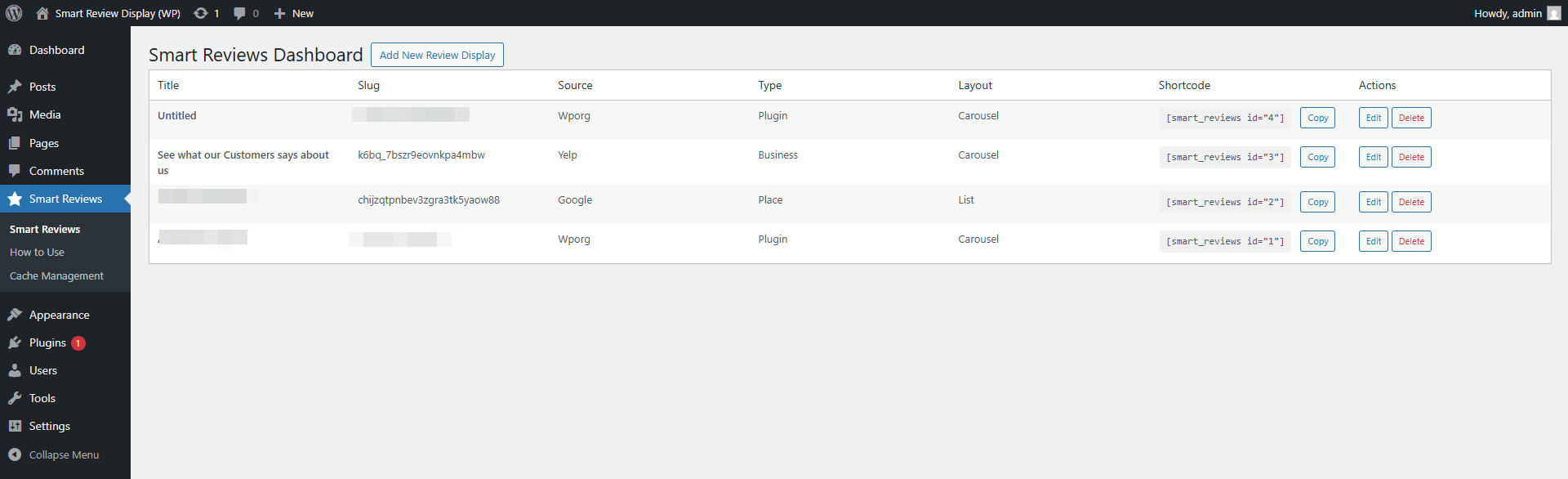
Dashboard with review management interface 
Add/Edit review display modal 
List layout with descriptions 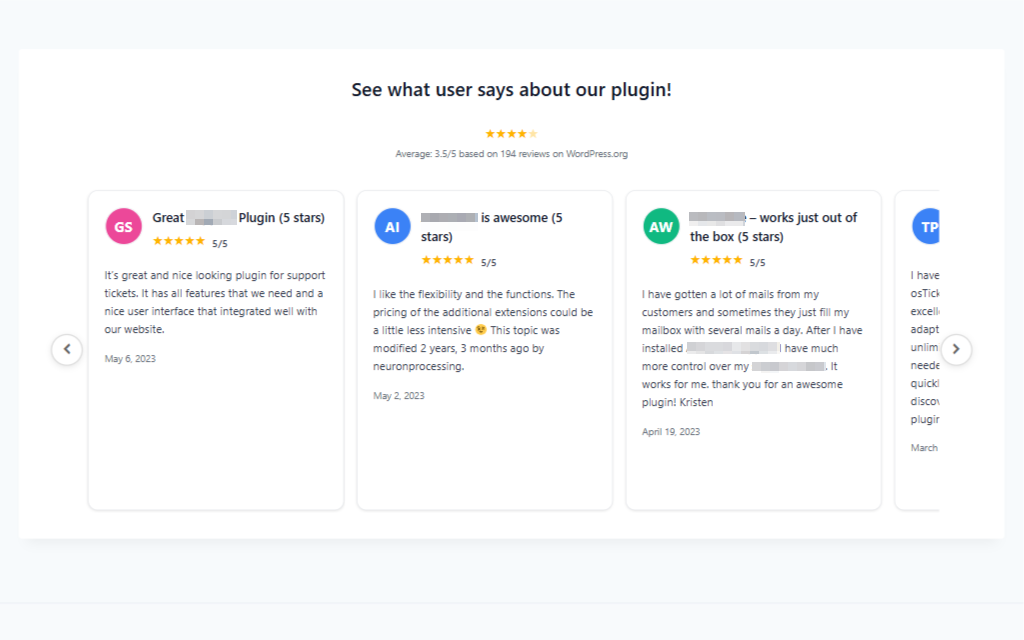
Carousel layout with edge-positioned navigation
Installation
From WordPress Admin Dashboard
- Log in to your WordPress admin dashboard
- Navigate to Plugins Add New
- Search for “Smart Reviews Display”
- Click Install Now and then Activate
- Go to Smart Reviews Display Dashboard to manage review displays
Manual Installation
- Download the plugin files
- Upload the
smart-reviews-displayfolder to/wp-content/plugins/directory - Activate the plugin through the Plugins screen in WordPress
- Go to Smart Reviews Display Dashboard to manage review displays
FAQ
-
What review sources are supported?
-
WordPress.org (plugins/themes), Yelp business reviews, Google Places reviews, and custom reviews.
-
How do I get started quickly?
-
Use the new ID-based shortcode
[smart_reviews id="123"]after creating a review display in the dashboard. -
What are custom reviews?
-
Custom reviews allow you to create up to 10 of your own reviews with full control over content, ratings, and links. Perfect for testimonials, case studies, or showcasing specific feedback.
-
How do I create custom reviews?
-
Go to Smart Reviews Display Custom Reviews, click “Add Review”, fill in the details (username, text, rating, optional link), and save. Use groups to organize them.
-
Can I group custom reviews?
-
Yes! Assign each custom review to a group (e.g., “testimonials”, “product-reviews”). When creating a review display, select “Custom” as source and choose a specific group.
-
Can custom reviews be clickable?
-
Yes! Add a review link when creating custom reviews. Users can click on the review to visit the original source or any URL you specify.
-
What’s the limit for custom reviews?
-
Free version supports up to 10 custom reviews. Upgrade to Smart Reviews Pro for unlimited custom reviews.
-
Can I show aggregate ratings?
-
Yes, for WordPress.org plugins and all external sources (Yelp, Google). Themes don’t have aggregate ratings on WordPress.org.
-
How often are reviews updated?
-
Reviews are cached with transients. Control TTL and clear cache in Smart Reviews Display Cache Management.
-
Can I customize the appearance?
-
Yes. The plugin uses responsive masonry grid, list, and carousel layouts. Carousel shows 3 reviews at once on desktop, 2 on tablet, and 1 on mobile. Override with custom CSS.
-
What’s the difference between Internal Title and Display Title?
-
Internal Title is for backend management only. Display Title appears on the frontend (optional).
-
Do I need API keys for Yelp/Google?
-
Yes, you’ll need to configure Yelp Fusion API and Google Places API keys in the settings.
Reviews
There are no reviews for this plugin.
Contributors & Developers
“Smart Reviews Display” is open source software. The following people have contributed to this plugin.
Contributors

“Smart Reviews Display” has been translated into 1 locale. Thank you to the translators for their contributions.
Translate “Smart Reviews Display” into your language.
Interested in development?
Browse the code, check out the SVN repository, or subscribe to the development log by RSS.
Changelog
1.0.5
- Removed the frontend powered-by credit footer from public review displays.
- Replaced automatic remote avatars with local fallback initials to avoid third-party frontend requests.
- Added plain-language external service disclosures for WordPress.org, Google, and Yelp.
- Updated WordPress compatibility metadata to tested up to 6.9.
1.0.4
- Security Enhancement: Improved input sanitization and validation across all review sources
- Bug Fixes: Fixed caching issues and improved error handling for external API calls
1.0.3
- Security Enhancement: Improved input sanitization and validation across all review sources
- Bug Fixes: Fixed caching issues and improved error handling for external API calls
1.0.2
- Custom Reviews System: Added ability to create up to 10 custom reviews with full CRUD operations
- Custom Reviews Management: New admin page for managing custom reviews with add/edit/delete functionality
- Review Grouping: Added group/category system for organizing custom reviews
- Review Links: Custom reviews can now include clickable links to original review sources
- Upgrade Integration: Added upgrade button linking to Pro version when 10 review limit is reached
- Database Schema: Added review_link and review_group fields to custom reviews table
- Frontend Integration: Custom reviews now display properly with group filtering support
- Carousel Enhancement: Updated carousel to show 3 reviews at once with full-width layout
- UI Improvements: Minimized gap between username and stars for better visual hierarchy
- Center Alignment: Username and stars now center-aligned with avatar image
- Responsive Design: Maintained original review card widths while showing 3 reviews on desktop
- Migration Support: Automatic database migrations for existing installations
1.0.1
- New Features: Added Yelp and Google Reviews integration with API support
- Dashboard Revamp: Complete admin interface with add/edit/delete review displays
- ID-Based Shortcodes: Simple
[smart_reviews id="123"]format that auto-updates - Enhanced UI: Internal vs Display titles, descriptions, contextual type fields
- Carousel Fix: Navigation arrows positioned at container edges
1.0.0
- Initial submission
- Shortcode and block for WP.org reviews (plugins/themes)
- Grid, list, and carousel layouts
- Reviewer avatars, stars, numeric rating, date, and content
- Optional aggregate rating display (plugins)
- Settings page (defaults, cache)