WPZOOM

Forum Replies Created
-
@rogeriodec Maybe you can find the widget on the “Appearance > Widgets” page and not in the Elementor? I think the widget was added to a footer widget area in your theme.
Also, in Elementor our widget can be found under the “WordPress” section: https://d.pr/i/BQgGRD
Pavel
Forum: Plugins
In reply to: [WPZOOM Social Feed Widget & Block] Still can’t view my IG feed!I checked your website, but it seems that you’re using a different plugin, not ours.
https://wordpress.org/plugins/wd-instagram-feed/Can you try to install our plugin and configure it?
@kaitlinkeenum Yes, that’s possible!
@ekojr Thank you for letting us know about this issue.
We’ve just updated the theme plugin and fixed the problem:
https://wordpress.org/plugins/social-icons-widget-by-wpzoom/Forum: Reviews
In reply to: [Inspiro] Basic and esay@darthdez Thank you for your review!
It’s a shame that you find our theme great, and just because of a non-related theme issue, you left us a 4-star review.
The problem you’re having migrating your website from localhost to a server is not relevant to the theme you’re using at all. It’s just a general issue that can happen no matter the theme you’re using.
Forum: Reviews
In reply to: [Inspiro] Never use this theme@tarachandesu We are sorry to hear about the issues you’re having.
I’ve checked, and it seems that you have purchased a different theme from our website.
The theme we recommended is Inspiro, because this is the premium upgrade for the free version.
However, you purchased a totally different theme, which is Inspiro PRO. The design of this theme is totally different, so the layout is not broken. It’s just different, and it’s enough to compare the demos of both themes to notice that.
Anyway, I have fixed the problem with the wrongly purchased theme, and now you have access to your account to the right theme – Inspiro (Premium).
Feel free to give a try to the right theme, or we can issue a full refund.
Moderators: this review refers to a different theme, so we consider it inappropriate to be placed here. It’s not even related to the Premium version that we sell on our website.
// Pavel
@chanhope We are sorry about this inconvenience.
Instagram API no longer offers us a way to display these numbers, and this feature was recently removed from the plugin.
I have just updated the banner image from the plugins page to reflect this change, and there are no numbers anymore displayed:
https://wordpress.org/plugins/instagram-widget-by-wpzoom/Reviews are very important for us to continue maintaining this plugin and I’d appreciate it if you could understand that we simply forgot to update the banner. It wasn’t really necessary to leave a 1-star review just to inform us about this problem.
// Pavel
Forum: Plugins
In reply to: [WPZOOM Social Feed Widget & Block] Delete ButtonHello @sisterhoodagenda
The widget includes an option which lets you remove the button: https://d.pr/i/RNQmFe
Hello @whichtransfers
How about checking the settings available in the block/widget?
Such options are available already – https://d.pr/i/fO8NhS
Forum: Themes and Templates
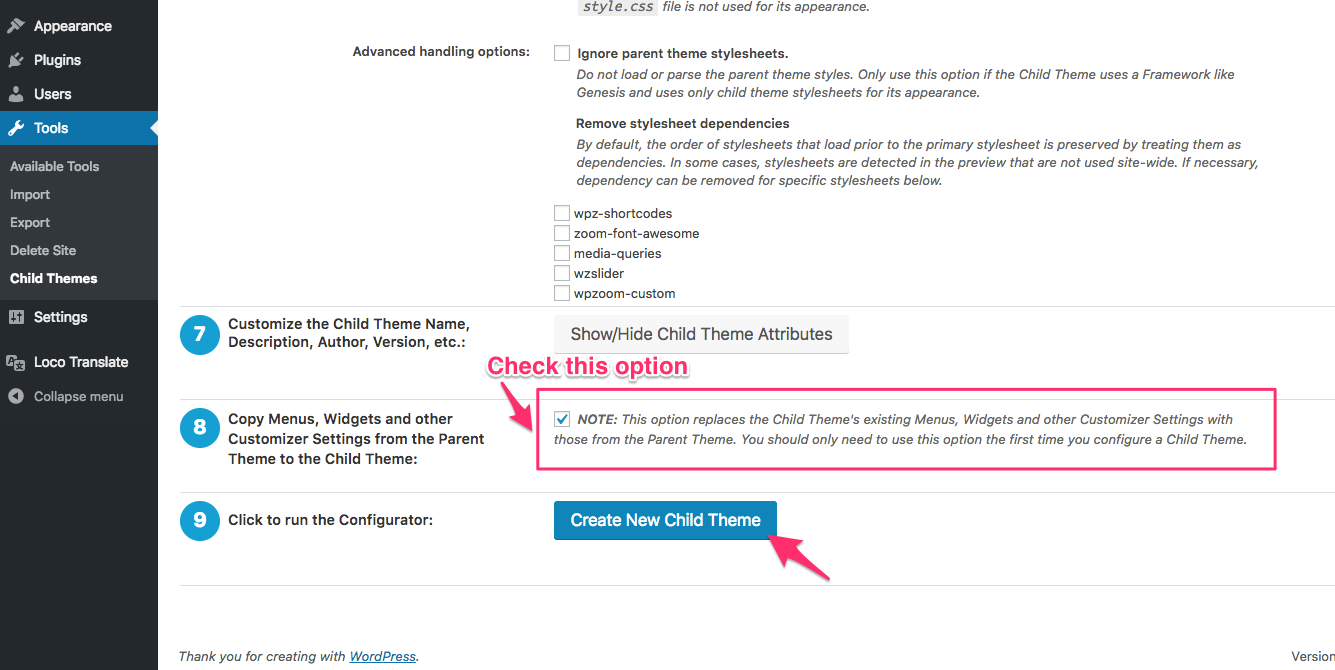
In reply to: [Inspiro] Cannot create a child themeWe recommend using the following plugin to generate a Child Theme:
https://wordpress.org/plugins/child-theme-configurator/Just make sure to check the option at step no. 8:
https://www.wpzoom.com/wp-content/uploads/2018/07/Pasted_Image_17_07_2018__12_32.pngAlso, if you haven’t made any changes to the theme files, then you shouldn’t be worried about updates or losing your progress.
Here’s also a ZIP file with a Child Theme I generated for Inspiro (Lite): https://d.pr/f/yl0GA0
Pavel
@fred74 Hello,
Could you please tell us what theme you’re using? We’d like to try to replicate the issue you’re having.
1. Our theme supports only self-hosted and Vimeo video in the background on mobile devices. If you need YouTube, probably you want to use Sydney theme instead?
2. The link you mentioned includes instructions for the Premium version of the Inspiro theme, and that’s not a feature available in the free version.
The documentation for the free version (Inspiro Lite) can be found here:
https://www.wpzoom.com/documentation/inspiro-lite/3. I don’t see the connection between our theme and your antivirus? Can you provide more details? Our theme doesn’t require a license.
4. The theme doesn’t limit the maximum video upload size. That’s a server-related thing:
https://www.wpbeginner.com/wp-tutorials/how-to-increase-the-maximum-file-upload-size-in-wordpress/Forum: Plugins
In reply to: [Recipe Card Blocks Lite] Direction Steps Displayed Incorrectly@alicewong We’ve released an update that will fix the issue with the Bulk Add when it includes additional HTML tags.
Forum: Themes and Templates
In reply to: [Foodica] Images not displaying in recipe indexHi @jordanur,
This problem is caused by Lazy Loading for Images not working properly on your website.
I see that you have such a feature enabled, probably by a plugin, so could you try to fix/disable it? Or you can use another Lazy Loading plugin.
Forum: Reviews
In reply to: [Inspiro] good interface & good usabilityThank you, @luisturi!