LBell

Forum Replies Created
-
Forum: Plugins
In reply to: [Pretty Google Calendar] Events Not Displaying in the CalendarClosing due to lack of information. Hope you got it sorted @zanderlise!
Forum: Plugins
In reply to: [Pretty Google Calendar] API Error on websiteClosing due to lack of information. Hope you got it sorted!
Forum: Plugins
In reply to: [Pretty Google Calendar] Pagination marks – remove with shortcode?If you’re talking about the left and right arrows, these can’t be controlled currently, but we’re working on an experimental feature to allow all FullCalendar arguments where you can use do fun things like override the header toolbar (https://fullcalendar.io/docs/headerToolbar). It’s in testing now, and should be released for the plugin soon.
You can add a feature request here: https://github.com/lbell/pretty-google-calendar/issues
Forum: Plugins
In reply to: [Pretty Google Calendar] Hide ALL Hyperlinks on PG CalenderI think I see what you’re asking.
Given that the Google Calendar must be public for it to be displayed with this plugin, it’s important your client knows that those links are publicly accessible, even if they are rendered as inactive on the site. My suggestion would be for them to create a separate calendar for public consumption, and use a different calendar for internal planning.
You can add a feature request to add a shortcode flag to ignore parsing URLs in the body of the event, but note that with limited time and more pressing issues, it’s likely to be a while before I implement that.
Feature request: https://github.com/lbell/pretty-google-calendar/issues
Forum: Plugins
In reply to: [Pretty Google Calendar] Hide ALL Hyperlinks on PG CalenderHowdy!
It’s unclear whether you’re asking to remove the links from the Calendar (and not show details) or remove links from the details.
For the former, the
no_linkshortcode should do the trick.For the latter, it’s a simple matter of not putting links in the body of the event on Google Calendar.
Does that help?
Forum: Plugins
In reply to: [Pretty Google Calendar] Events Not Displaying in the CalendarExcellent sleuthing @ihuman! We’ll make a note in the sticky.
Keeping this thread open since we aren’t sure that will solve @zanderlise ‘s problem.
Forum: Plugins
In reply to: [Pretty Google Calendar] API Error on websiteWhat theme are you using? Works fine in test environment with Elementor + Elementor Hello theme.
- This reply was modified 2 years, 6 months ago by LBell.
Forum: Plugins
In reply to: [Pretty Google Calendar] Events not showingClosed due to lack of information.
Forum: Plugins
In reply to: [Pretty Google Calendar] Events not showingClosed due to lack of information.
Forum: Plugins
In reply to: [Pretty Google Calendar] Events Not Displaying in the CalendarHmmm. I’d like to dig deeper – can you send me an email at lbell270 at the gmails?
Forum: Plugins
In reply to: [Pretty Google Calendar] Different colors per calendarHowdy! Actually this isn’t implemented yet. We added the ability to style/color different instances of the shortcode on the same page, but have not yet added the ability to color different feeds in the same calendar separately. Coming soon.
I don’t accept “live with it” as an answer 🙂
Wondering what happens if you put it on a page with nothing else… maybe there’s a JS conflict that’s scrambling the
jsEvent.preventDefault()from registering on the element.Please send me note at lbell270 at the gmails and we can dig a little deeper.
Forum: Plugins
In reply to: [Pretty Google Calendar] Events Not Displaying in the CalendarHowdy! Typically this is associated with the finicky API settings. The native embed uses a different protocol to access the calendar than this plugin, so I’d check the API first.
Some folks have had luck restricting the API key to Calendar:
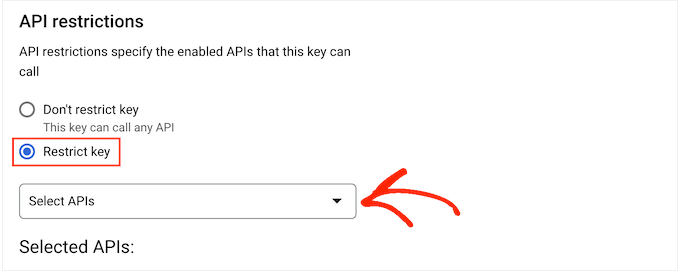

Please let us know if this works!
Odd – when that last came through in email, your shortcode reads in part:
…
use_tooltip="true" no_link="true" enforce_listview_on_mobile="true"…Seems maybe there’s an HTML character in there that doesn’t belong. Also, I never trust curly quotes…
Try this:
[pretty_google_calendar gcal="1059whatson@gmail.com" use_tooltip="true" no_link="true" enforce_listview_on_mobile="true" show_today_button="true" show_title="true"]If the above doesn’t help, you can try the nuclear option of setting the no_link in the PGCalendar settings page (note this global setting will be going away in a future release).
Forum: Plugins
In reply to: [Pretty Google Calendar] Events not showingJust checking whether you were able to resolve the issue with the API setting?