ckadenge (woo-hc)

Forum Replies Created
-
Forum: Plugins
In reply to: [WooCommerce] Analytics page doesn’t workHi Michele @ironmik,
Thank you for reaching out.
I understand you’re having an issue with the analytics page showing blank.
As a first step, please head over to
WooCommerce → Status → Toolsand try the following:1. Clear WooCommerce transients and Expired transients by clicking the Clear transients button.
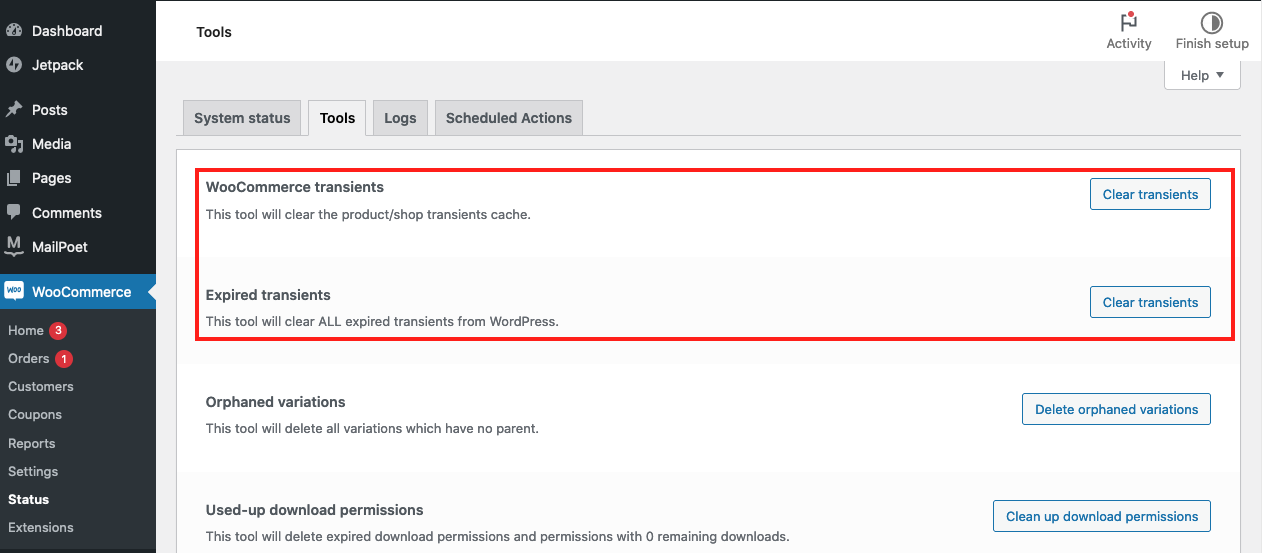%E2%80%9D)
2. Clear analytics cache by clicking the Clear button. If numbers still look off, try reimporting historical data.
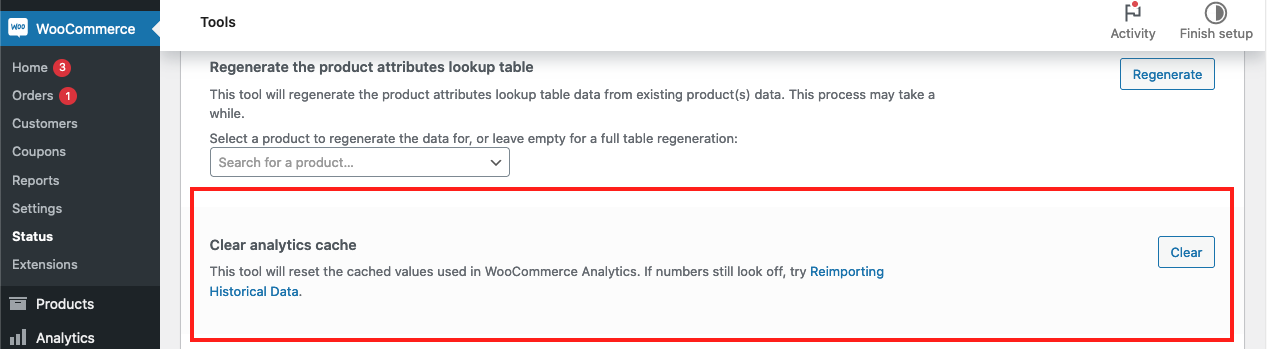%E2%80%9D)
Once you do this, check if the issue persists.
Let us know how it goes for you!
Forum: Plugins
In reply to: [WooCommerce] How to hide the coupon banner in checkout?Hi @dinaddd,
Thank you for reaching out.
To hide the “Have a coupon? Click here to enter your code” text, you can add a custom CSS code to your theme. Please note that custom code requests are out of our support scope.
However, you can try adding the code below to see if this makes any difference:
.woocommerce-form-coupon-toggle {
display: none;
}
This code will hide the banner but keep the coupon functionality active.
Be careful when adding custom CSS, as it can affect other parts of your site. Always have a backup of your site before making any changes.
I hope this helps.
Hi @kristinubute,
Thank you for reaching out.
The speed of your backend can be influenced by several factors including but not limited to your host and type of plugins used.
Here are a couple of general recommendations I would suggest you try:
- Update all your plugins, themes, and WordPress itself to their latest versions. Outdated versions can cause performance issues.
- Limit the number of plugins as every plugin adds some load to the server, so use only necessary ones.
- Optimize your database. You can use plugins to optimize your database.
- Use a good hosting provider. If your hosting provider is not up to the mark, it can affect the speed of your site.
- If you have a lot of traffic, consider using a Content Delivery Network (CDN) like Cloudflare.
You might also consider using a plugin specifically designed to optimize backend performance as well.
Here’s a guide from a trusted source that you can consider following: https://www.codeable.io/blog/speed-up-woocommerce-admin/
I hope these tips help.
Hi @sonic1243,
Thanks lub, that post has been updated today and it says “the issue is in the Paypal woocommerce plugin” and provides a way to manually edit the core files…. I might try this…. but I will start a thread on the “PayPal Payments” plugin support as that’s who needs to see this. Cheers.
Starting a thread on the “PayPal Payments” plugin support is a great idea.
While you can certainly try the manual edit suggested in the post, I must advise caution. Editing core files can sometimes lead to more complications if not done correctly.
With that said, allow me to mark this thread as solved now as we’ve identified the issue to be associated with the PayPal Payments and not the core WooCommerce plugin.
Thank you for your patience and understanding.
Hi @jesseslam,
I disabled it last night after I saw your reply and that does see to have stopped them thank you.
Glad to hear that temporarily deactivating the plugin stops the spam orders.
I assume once you’ve found a fix you’ll push an update out anyway?
Once we have a fix for, we will ensure to roll out an update as quickly as possible so that our users can continue using the plugins with ease.
Thank you for your patience and understanding to this matter.
Hi @marjoleinm,
Thank you for reaching out and sharing a detailed description about the issue you’re facing.
I understand you’re getting a ‘no results found’ on your pages except on the homepage. I was able to check your system status report but could not find any discrepancies.
In this case, please share with us a screen recording of how you are getting the error message so that we can try to replicate it from our end.
Forum: Plugins
In reply to: [WooPayments: Integrated WooCommerce Payments] Undefined array key “required”Hi @npalmigiano,
Thank you for reaching out.
I’m sorry to hear about the issue you’re facing when viewing your product pages.
Before we can dive deep into troubleshooting, I’d like to understand your site properly. Please share with us your system status report, which you can find via WooCommerce > Status > Get system report > Copy for support.
Once we have more information, we’ll be able to assist you further.
Forum: Plugins
In reply to: [WooCommerce] Coupon Names are not showing in the orderHi @bratan,
yes we used to see coupon names, it stopped maybe 3-4 months ago. Is there a way to change it so names showing again? It important for us to inow which coupon was applied.
Thanks for getting back to us.
Do you remember making any changes to your store before this issue started? It could be uninstalling/installing a plugin or deleting any custom code. This can help us understand how the changes were implemented in your store.
Forum: Plugins
In reply to: [WooCommerce] Bot attackHi @freeserv,
Thank you for confirming this with us.
I’ve passed this information to our engineers, and they’re looking into the issue. We’ll reach out here with a possible permanent solution to this.
In the meantime, we’ve got a couple of payment gateways that you can choose from. Please do take a look at them here.
All plugins have support forums that provide around the clock support from the WooCommerce team.
Thank you for your patience and understanding.
Forum: Plugins
In reply to: [WooCommerce] Spam Orders Getting past hooksHi @ashtonsanders,
We are using Credit Card Payments thorough paypal. The plugin is: WooCommerce PayPal Payments Version 2.9.4 | By WooCommerce
Thanks for confirming this with us.
As a step to investigate this issue further, are you able to temporarily (during off-peak hours) disable the WooCommerce PayPal Payments and check if the issue persists. You can use an alternate Payment Gateway to accept payments in the interim to check if this issue is related with the mentioned plugin.
Please let us know how this goes.
Forum: Plugins
In reply to: [WooCommerce] Fake SPAM OrdersHi @kirkdickinson,
Thank you for confirming this with us.
We are yet to fully understand how the attackers are gaining access to your store, therefore, in the meantime, to help investigate this issue further, please temporarily disable PayPal payments and check if the issue persists or otherwise.
Let us know how this goes.
Forum: Plugins
In reply to: [WooCommerce] Safely Bulk Deleting Images of Removed WooCommerce ProductsHi @digglikeseo,
I suggest that you start a new thread with your case, so that we don’t mix several troubleshooting sessions in one thread. Even if the symptoms are the same, perhaps the underlying problem is different in your case.
Forum: Plugins
In reply to: [Pinterest for WooCommerce] Add to cart event is not firingHi @titsmaker,
As I wrote earlier I don’t want to share all this information here, is it possible to contact plugin’s support via woocommerce.com or otherwise?
I understand your concern about privacy. Unfortunately, WooCommerce.com doesn’t directly provide support for free plugins. Our Happiness Engineers do provide support for these plugins in their respective forums.
Should you wish to share the information discreetly, you can use https://quickforget.com/ and set the timer to a longer period so that one of our agents can be able to access it.
Looking forward to hearing back from you.
Forum: Plugins
In reply to: [WooCommerce] Spam Orders Getting past hooksHi @ashtonsanders,
Thank you for reaching out.
I’m sorry to hear you’re facing issues with Spam orders in your store. As a first step, could you please help confirm what payment gateway you’re using in your store?
This way, we can understand how these spam orders are getting through.
Forum: Plugins
In reply to: [WooCommerce] Fake SPAM OrdersHi @kirkdickinson,
Thank you for reaching out.
I’m sorry to hear about the issue you’re facing with fake SPAM orders. So that we can be able to have a better understanding, could you please help confirm the payment gateways used in your store?