• Hello,

    I am experiencing an issue with the Google for WooCommerce plugin on my WordPress / WooCommerce website.

    After installing the latest version of the plugin, I received the following message:

    “Google for WooCommerce requires WooCommerce version 10.6 or higher. You are using version 10.2.1.”

    I have therefore temporarily reverted the plugin to version 3.6.2, while I properly test and prepare the WooCommerce update, as this seems to be a very recent requirement and I cannot update WooCommerce directly on production without prior checks.

    However, even with Google for WooCommerce versions 3.6.2 and 3.7.0, I still cannot access the plugin settings. The page displays the following message:

    “Oops! Something went wrong
    We apologize for the inconvenience. Please reload the page; you can also get help in the community forums.”

    When I click to view more details about the error, the main error message is:

    TypeError: Cannot read properties of undefined (reading ’email’)

    The error seems to come from the Google for WooCommerce plugin files:

    /wp-content/plugins/google-listings-and-ads/js/build/commons.js
    /wp-content/plugins/google-listings-and-ads/js/build/settings.js

    Here are the main details of my environment:

    • Website: https://www.laboutiquedupro.com
    • WooCommerce: 10.2.1
    • Google for WooCommerce tested versions: 3.6.2 and 3.7.0
    • The latest plugin version was also tested, but it requires WooCommerce 10.6 or higher

    Could you please let me know how I can restore access to the plugin settings, or how to properly reset the Google / Merchant Center connection in order to fix this email-related error?

    Thank you in advance for your help.

    Best regards,

Viewing 6 replies - 1 through 6 (of 6 total)
  • Hi @eneskaba!

    Thank you for providing those details.

    I understand that you don’t want to update WooCommerce directly on your live site without testing first, and that’s a sensible approach.

    Let me clarify, we provide support for the latest versions of both WooCommerce and Google for WooCommerce. Since you’re currently using WooCommerce 10.2.1, which is below the minimum requirement for the latest Google for WooCommerce release, we can’t guarantee compatibility with older versions.

    I recommend creating a staging site first, updating WooCommerce to the latest version there, and then installing the latest version of Google for WooCommerce. Test your store thoroughly on the staging site to ensure everything is working as expected. If everything looks good, you can then perform the same updates on your live site.

    If you prefer to remain on WooCommerce 10.2.1 for now, you could try manually installing an older version of the Google for WooCommerce plugin that is compatible with your WooCommerce version, rather than simply reverting from a newer version. This may help if the rollback left behind incompatible files or data.

    However, if the issue persists, updating both WooCommerce and Google for WooCommerce to their latest compatible versions will be the recommended solution, as that’s the configuration we actively support.

    Please let us know how it goes after testing on your staging site, and we’ll be happy to assist you further if needed.

    Hello,

    I’ve updated both WooCommerce and WordPress to their latest versions, but I’m still getting the following error in the Google for WooCommerce extension (Google Listings & Ads) when trying to access Google Merchant Center:

    Oops! Something went wrong.
    We’re sorry for the inconvenience. Please try reloading the page; you can also get help in the community forums.

    When I click “Click to learn more about the error”, I get this:

    TypeError: Cannot read properties of undefined (reading 'email')    at E (https://www.laboutiquedupro.com/wp-content/plugins/google-listings-and-ads/js/build/commons.js?ver=01b403308099715d9ea3:121:2730)    at div    at .../wp-includes/js/dist/components.min.js    at section    at .../google-listings-and-ads/js/build/settings.js    at WithAdminPageShell(Component)    ...

    The error originates in the plugin’s own commons.js / settings.js build files (Google Listings & Ads), and the page fails to load completely.

    What I’ve already tried:

    • Updated WooCommerce to the latest version
    • Updated WordPress to the latest version
    • Reloaded the page several times (the error persists)

    Could you please help me identify the cause and resolve this? I’m happy to provide any additional details (PHP version, full plugin list, site health report, etc.) if needed.

    Thank you for your help.

    Best regards,
    Enes

    Hi @eneskaba,

    Thanks for the update, and good move getting both WooCommerce and WordPress current.

    The error Cannot read properties of undefined (reading 'email') means the plugin is looking for your connected Google account’s email in its stored data and finding nothing there. This is likely caused by the version bouncing (from the latest → 3.6.2 → 3.7.0 → back to the latest), which can leave the plugin’s stored connection data in an inconsistent state that the current version can’t cleanly read.

    A couple of things to try:

    1. Clear your browser cache completely and reload the settings page. Sometimes old JS files from a previous version get cached
    2. Clear any server-side or plugin cache (LiteSpeed, WP Rocket, etc.) if you’re using one
    3. If the error persists, try a clean reinstall of the plugin: deactivate it, delete it entirely, then reinstall fresh from the WordPress plugin directory. This clears any stale option data left behind from the version changes

    Please also share your System Status Report at WooCommerce → Status → Get system report → Copy for support, and paste it at pastebin.com so we can see the full environment.

    Let us know your findings!

    Hello,

    It’s working again now, thank you.

    However, I’m still getting the following error:

    “Availability date is required if you set the product’s availability to backorder or pre-order [availabilityDate]”

    Could you please advise me on how to fix this?

    Not all of my products are physically in stock. Some products are being restocked, but they can still be ordered because I usually receive them within around 4 days and can then ship them to customers.

    Customers are clearly informed on the website that these products are not immediately available in stock.

    How can I correct this issue properly?

    Thank you in advance for your help.

    Best regards,

    https://prnt.sc/B0K5VCez6riY

    Hi there!

    Thank you for the update. I’m glad to hear that it’s working properly now.

    Regarding the new issue:

    Please note that this forum only provides support for WooCommerce core. Support for issues related to Google for WooCommerce is handled separately.

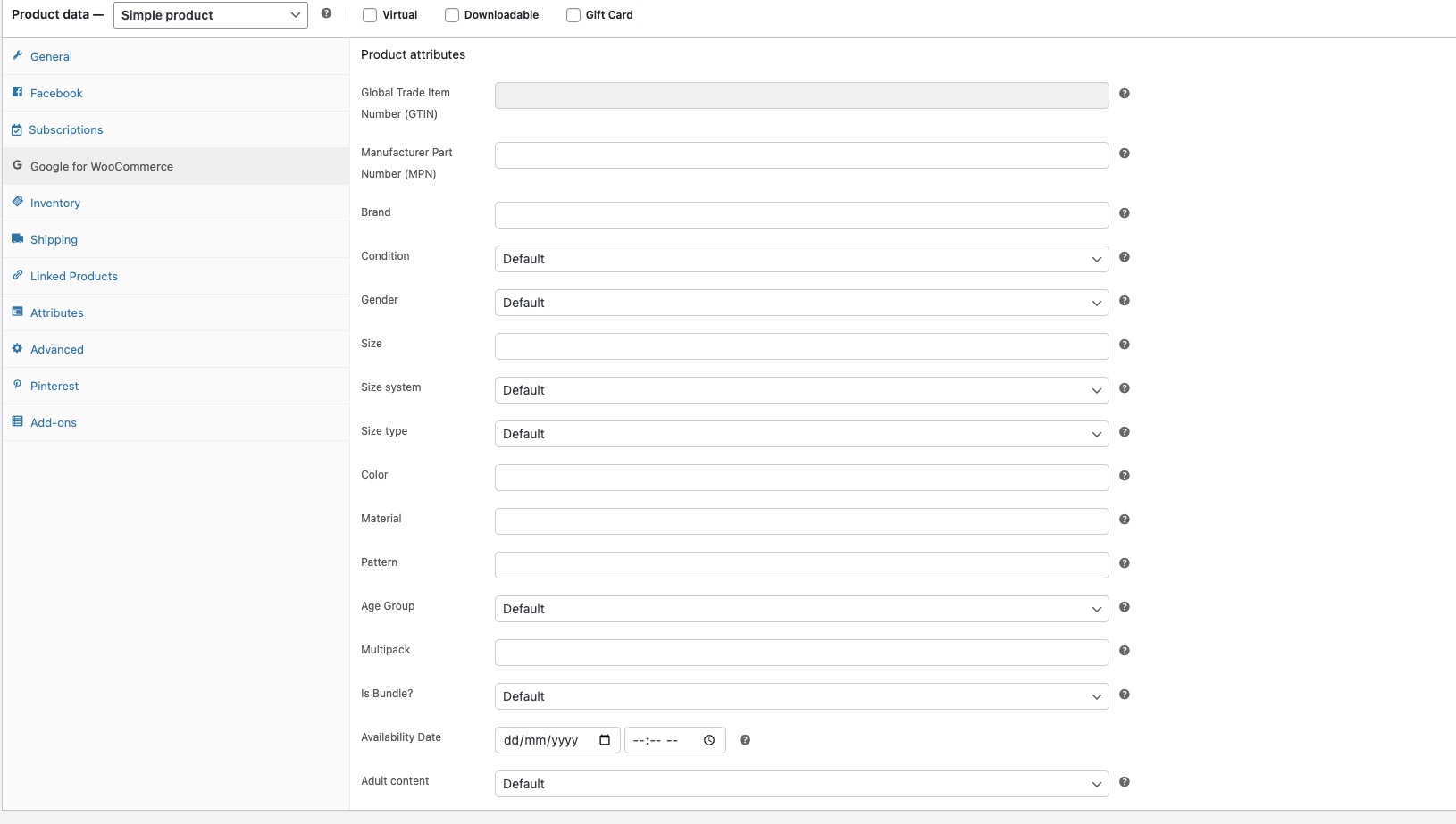
    However, before creating a new support ticket, could you please make sure you’ve set the Availability Date attribute value in the Google for WooCommerce attribute settings?

    Here’s a screenshot showing where you can find this attribute.

    • Go to WooCommerce > Products > All Products.
    • Click on the product you want to edit.
    • On the Edit Product page, scroll down to the Product data section.
    • You should see a “Google for WooCommerce” tab on the left-hand side.
    • Open that tab to access and edit Google product attributes.

    For more details, check out this guide:

     https://woocommerce.com/document/google-for-woocommerce/attribute-mapping/

    If that doesn’t help, please create a separate support ticket in the Google for WooCommerce forum here: https://wordpress.org/support/plugin/google-listings-and-ads/#new-topic-0 so we can assist you further with investigating and resolving the issue.

    Thank you for your cooperation and understanding.

    Plugin Support Kay U a11n

    (@kingsleyinfo)

    We haven’t heard back from you in a while, so I’m going to mark this as resolved – we’ll be here if and/or when you are ready to continue.

    If you have time, we’d be grateful for a review: https://wordpress.org/support/plugin/woocommerce/reviews/

Viewing 6 replies - 1 through 6 (of 6 total)

You must be logged in to reply to this topic.