Title: Read More text…
Last modified: August 22, 2016
---
# Read More text…
* [Nicolas Castrillon](https://wordpress.org/support/users/nicolascastrillon/)
* (@nicolascastrillon)
* [11 years, 5 months ago](https://wordpress.org/support/topic/read-more-text-3/)
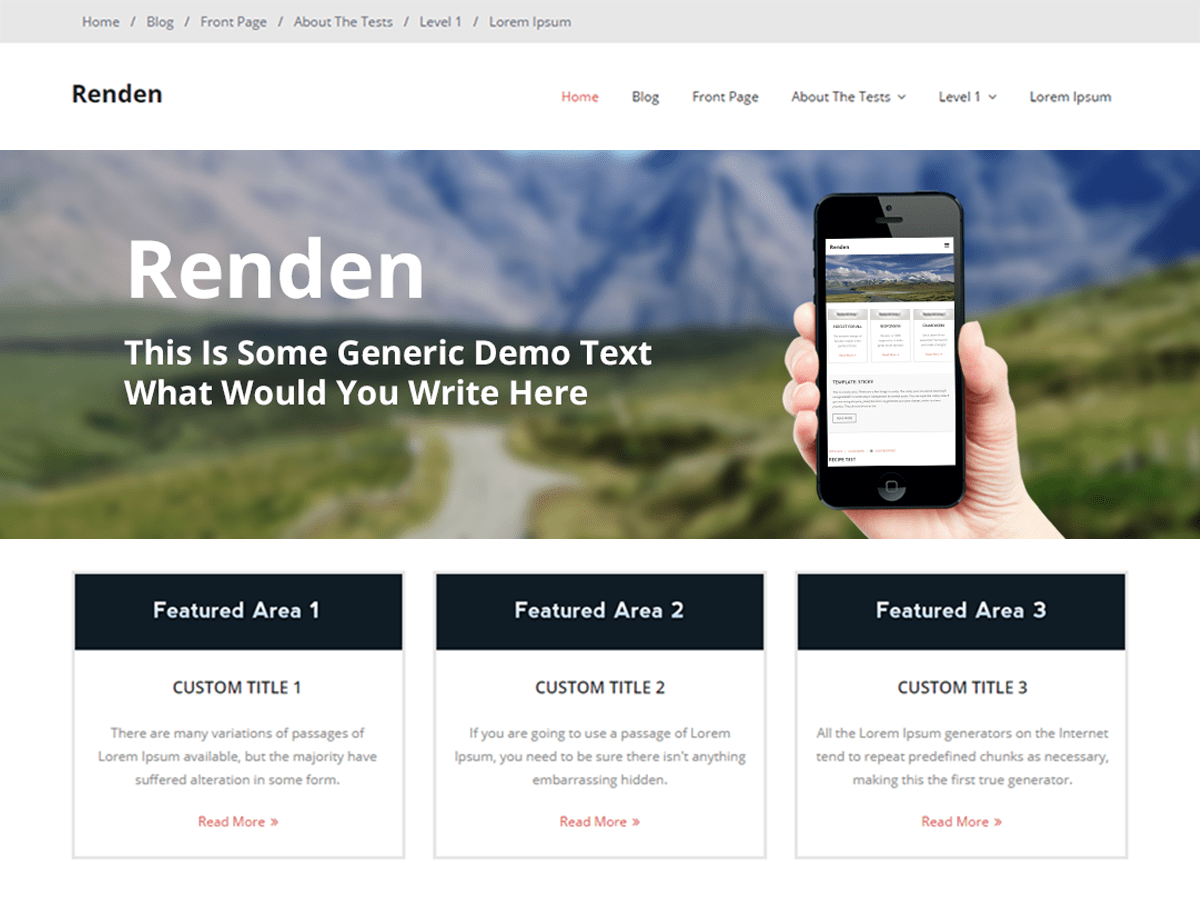
* Hi! How can I do to change the “read more” text than appears in the Featured
Areas and in each single post?
Thank you
Viewing 15 replies - 1 through 15 (of 18 total)
1 [2](https://wordpress.org/support/topic/read-more-text-3/page/2/?output_format=md)
[→](https://wordpress.org/support/topic/read-more-text-3/page/2/?output_format=md)
* [Bojan Radonic – WPMU DEV Support](https://wordpress.org/support/users/wpmudev-support4/)
* (@wpmudev-support4)
* [11 years, 5 months ago](https://wordpress.org/support/topic/read-more-text-3/#post-5696364)
* Hey there Nicola,
* Hope you’re well today!
* The easiest way to do that since the words are translatable to change them using
translation files. You can find more information on how to do that here:
* [http://codex.wordpress.org/Translating_WordPress](http://codex.wordpress.org/Translating_WordPress)
* An alternative would be to edit 02.homepage.php which is located in /wp-content/
themes/renden/admin/main/options/02.homepage.php. I strongly suggest not editing
theme core files, best way to do that would be to copy it in your [child theme](http://codex.wordpress.org/Child_Themes)
and make the changes there. Read more words are located on lines 202, 218, 234
and 250. Simply replace read more with the word of your choice.
* Hope this helps 🙂
* Best regards,
Bojan
* Thread Starter [Nicolas Castrillon](https://wordpress.org/support/users/nicolascastrillon/)
* (@nicolascastrillon)
* [11 years, 5 months ago](https://wordpress.org/support/topic/read-more-text-3/#post-5696393)
* Thank you very much!
It worked perfectly!
* [Bacilla](https://wordpress.org/support/users/bacilla/)
* (@bacilla)
* [11 years, 3 months ago](https://wordpress.org/support/topic/read-more-text-3/#post-5696673)
* Hello,
* And thanks for a great theme!
* I tried to do all of the above to change the text “Read more” but didn’t succeed.
I made a child theme and maybe there is something wrong with that? The changes
I do in my child theme don’t show on the site.
* I would also like to change the “Read more” that pops up on the slider, how do
I do that? (Guess it’s the same way as changing in the featured area…?)
* Best,
Cilla
* [Bojan Radonic – WPMU DEV Support](https://wordpress.org/support/users/wpmudev-support4/)
* (@wpmudev-support4)
* [11 years, 3 months ago](https://wordpress.org/support/topic/read-more-text-3/#post-5696674)
* Hey there Cilla,
* How are you today?
* Is your child theme working properly in the first place when you activate it
in Appearance >> Themes? Did you copy 02.homepage.php to your child theme and
made the changes there?
* I’m not sure about the read more button on the slider, no matter how much content
I add into the slider description field I’m not getting the read more button.
Is this the free version of the theme?
* Please let me know.
* Best regards,
Bojan
* [emaas](https://wordpress.org/support/users/emaas/)
* (@emaas)
* [11 years, 2 months ago](https://wordpress.org/support/topic/read-more-text-3/#post-5696679)
* Doesn’t work, “Read More” doesn’t translate because the po-file translates “Read
more…”, it doesn’t recognize “Read More”.
The only way to do it is to change
the core-php-file which is bad.
* Maybe the read-more-text can be replaced by a variable which we can alter in
the child-theme’s functions.php (or whatever?)
* [Bojan Radonic – WPMU DEV Support](https://wordpress.org/support/users/wpmudev-support4/)
* (@wpmudev-support4)
* [11 years, 2 months ago](https://wordpress.org/support/topic/read-more-text-3/#post-5696680)
* Hey there emaas, hope you’re well today!
* You could use jQuery to replace the words to the ones of your choice. Please
try using the following:
* `var replaced = jQuery("body").html().replace('read more','your text'); jQuery("
body").html(replaced);`
* This should change the read more text to what ever you want just replace your
text part with the text of your choice.
* Hope this helps 🙂
* Cheers,
Bojan
* [emaas](https://wordpress.org/support/users/emaas/)
* (@emaas)
* [11 years, 2 months ago](https://wordpress.org/support/topic/read-more-text-3/#post-5696681)
* Hey Bojan, thnx and sorry for replying this late, where do I put this code? When
I put in the functions.php in the child theme I get a blank screen…
* [Bojan Radonic – WPMU DEV Support](https://wordpress.org/support/users/wpmudev-support4/)
* (@wpmudev-support4)
* [11 years, 2 months ago](https://wordpress.org/support/topic/read-more-text-3/#post-5696682)
* Hey again emaas,
* If you’re looking to add this to your child theme functions.php you’d want to
add something like this:
* ```
add_action('wp_footer','my_js_function');
function my_js_function(){
?>
>”, this doen’t
translate too.
* [emaas](https://wordpress.org/support/users/emaas/)
* (@emaas)
* [11 years, 2 months ago](https://wordpress.org/support/topic/read-more-text-3/#post-5696688)
* Weel there is more to it than I thought, the submit-button for comments doen’t
translate too, it doesn’t work on any of the 5 installations I have. I guess
something is not going right with the translation of the whole theme, I mean
all the theme-strings that are not original WordPress-strings, they don’t translate.
* Is there a short way to add the unstranslated strings to the language-files?
I can get poedit to do that.
* [Bojan Radonic – WPMU DEV Support](https://wordpress.org/support/users/wpmudev-support4/)
* (@wpmudev-support4)
* [11 years, 2 months ago](https://wordpress.org/support/topic/read-more-text-3/#post-5696689)
* Hey there emaas,
* There is no easy way of adding untranslated strings that will be not be affected
by the theme update. Considering that the jQuery is not working properly either
I’ve been searching for an alternative solution for this.
* I’ve found this plugin and I’ve tested it using Renden theme and it’s working
fine. What it does is simply search and change the string to something else so
I guess you might want to try it out 🙂
* [https://wordpress.org/plugins/real-time-find-and-replace/](https://wordpress.org/plugins/real-time-find-and-replace/)
* Please let me know if this helps 🙂
* Best regards,
Bojan
* [emaas](https://wordpress.org/support/users/emaas/)
* (@emaas)
* [11 years, 2 months ago](https://wordpress.org/support/topic/read-more-text-3/#post-5696690)
* Thank you mate for this link, I was looking for something like this allready
too but didn’t find the right plugin, this one works fine and doesn’t slow down
the page.
* I allways look with debug = true and no errors or messages either, seems the
plugin is well written.
* I will contact them about one thing: it doesn’t change the “SUBMIT NOW” button
on comments.php, I guess that won’t be hard to code in a later plugin-upgrade.
* For now: thnx!!! You have been a great help
* [emaas](https://wordpress.org/support/users/emaas/)
* (@emaas)
* [11 years, 2 months ago](https://wordpress.org/support/topic/read-more-text-3/#post-5696691)
* Hi again, I have been looking further and now the “SUBMIT NOW” button is translated
too, I think it’s a strtoupper we are looking at on our browsers because it’s
lowercase in the source-code.
There are quite a few words in comments.php that
don’t translate too, this is the list to make Renden 100% in your own language(
the plugin is Case sensitive):
- Read More
- READ MORE
- Submit Now
- Your Message
- Leave a comment
- Your Name
- (Required)
- Your Email
- Your Website
* Unfortunately the plugin doesn’t have an “export-options”-option so with every
WP-installation you’ll have to tell him manually what to do, but after that it’s
showtime!
Thnx again
Viewing 15 replies - 1 through 15 (of 18 total)
1 [2](https://wordpress.org/support/topic/read-more-text-3/page/2/?output_format=md)
[→](https://wordpress.org/support/topic/read-more-text-3/page/2/?output_format=md)
The topic ‘Read More text…’ is closed to new replies.
* 
* Renden
* [Support Threads](https://wordpress.org/support/theme/renden/)
* [Active Topics](https://wordpress.org/support/theme/renden/active/)
* [Unresolved Topics](https://wordpress.org/support/theme/renden/unresolved/)
* [Reviews](https://wordpress.org/support/theme/renden/reviews/)
## Tags
* [featured area](https://wordpress.org/support/topic-tag/featured-area/)
* 18 replies
* 5 participants
* Last reply from: [Bojan Radonic – WPMU DEV Support](https://wordpress.org/support/users/wpmudev-support4/)
* Last activity: [10 years, 8 months ago](https://wordpress.org/support/topic/read-more-text-3/page/2/#post-5696708)
* Status: not resolved