Intermittently saving invalid State/County values in UK orders
-
Title: Intermittent issue: invalid placeholder text saved in WooCommerce State/County field for UK orders
I am experiencing an intermittent issue where WooCommerce orders are saved with placeholder text in the State/County field, even though the field is not displayed at checkout for UK customers.
Examples of values saved in the field include:
-Please select-County (optional)--None--
These values have appeared in the actual billing and/or shipping State/County fields when editing orders in the WordPress admin, rather than simply appearing incorrectly in formatted addresses.
The issue is occurring on two of my WooCommerce websites, which have different configurations:
- Site 1: Uses classic checkout via the
[woocommerce_checkout]shortcode, the OceanWP theme and the ThemeHigh Stripe payment gateway. - Site 2: Uses WooCommerce Checkout Block, the Woostify theme and the Payment Plugins for Stripe WooCommerce gateway.
The two sites therefore use different WordPress themes, different checkout types and different Stripe payment plugins. Both are hosted by SiteGround and use SiteGround Speed Optimizer. Both sites are running WooCommerce 11.2.1 although the problem has been happening for a few months now, so on previous versions of Woocommerce also.
The affected orders have involved UK billing and shipping addresses. The issue is intermittent, and I estimate that approximately 3% of orders on the first site have been affected.
I tested the classic checkout by changing the customer location between the UK and the USA. The State field appeared for the USA and disappeared again when I switched back to the UK, as expected.
As the problem occurs on two separate sites with different themes, checkout types and Stripe plugins, I would appreciate help identifying the underlying cause.
Questions:
- Is this a known WooCommerce issue affecting the handling of the State/County field or checkout form submissions?
- Could placeholder text be submitted and saved as the State/County value even when the field is hidden for UK addresses?
- What logs or diagnostic steps would help identify where these invalid values originate?
I would prefer to identify the cause before making changes to checkout or payment gateway configuration.


-
Since it happens on two sites with different themes, checkouts and gateways, I’d look at what they have in common: the Stripe express buttons (Apple Pay and Google Pay) and the speed optimizer plugin. First check the payment method on the affected orders. If they’re mostly wallet payments, the wallet is probably sending its own address data, placeholder text included. If they’re normal card orders, try excluding the checkout page and WooCommerce’s country-select script from JavaScript combining or deferring, because when that script loads late the hidden county field can be submitted with its placeholder option. As a safety net, you can hook
woocommerce_checkout_posted_datato blank billing_state and shipping_state for GB when the value isn’t a real county, and do the same for block checkout withwoocommerce_store_api_checkout_update_order_from_request.Thank you for the suggestions. I can confirm that all affected orders on both sites were paid by ordinary card payments, not Apple Pay or Google Pay.
The issue is intermittent and affects only a very small percentage of orders (approximately 3% on one site).
Both sites use SiteGround Speed Optimizer, but they have different themes, checkout types and Stripe payment plugins.
Given the intermittent nature of the problem, is there a way to identify what triggers it before changing JavaScript optimisation settings or adding code to modify the State/County values?
I would prefer to establish the cause before making changes that could affect checkout functionality.
Hi @dpr99,
Could placeholder text be submitted and saved as the State/County value even when the field is hidden for UK addresses?
Yes. WooCommerce has no list of UK counties, so for UK addresses County is a plain, optional text field. Whatever text is in it gets saved with the order, and nothing checks it against a list. That’s how it works in WooCommerce 11.2.1, on both the classic and the block checkout, so
--None--or-Please select-saves the same way a real county does.None of those three values come from WooCommerce. When WooCommerce shows a state dropdown, its placeholder option has an empty value, so it can’t be saved as text. “County (optional)” is the label WooCommerce puts on the UK field. So the value comes from whatever filled the field at checkout. I couldn’t find an existing WooCommerce bug report that matches this.
@eshbanbahadur s wallet check was worth doing, and your card-only result rules that path out. The late-loading script idea doesn’t fit UK addresses, though. County is a text field there, with no dropdown placeholder to submit.
One thing doesn’t match default WooCommerce. On the classic checkout, the County field stays visible for UK addresses. If it disappears on your site, something is hiding it, such as a checkout field plugin, custom code, or theme CSS. A field that’s only hidden from view is still part of the form, so its value is still sent with the order, and the customer never sees it.
Can you please check these three things? They don’t change anything on the sites:
- On the classic checkout site, pick the UK as the country, right-click where the County field would be, and choose Inspect. Post a screenshot of the
billing_statefield and the Styles panel next to it, so we can see what hides it. If County is hidden on the block checkout site too, a screenshot from there helps as well. - For a few affected orders, check whether the customer checked out as a guest or with an account, and what the Order attribution box on the order screen shows as the device type.
- For affected customers with an account, go to Users, edit the user, and check whether State / County under Customer billing address holds the same value.
If the junk value is sitting in a customer’s saved address, WooCommerce fills it into the form again on their next order. Share what you find, and we can narrow down the source from there.
To clarify the classic shortcode checkout behaviour:
- UK: The field is labelled “County (optional)” and accepts free text.
- USA: The field is labelled “State”, displays a dropdown list of states, and is mandatory.
The intermittent issue is that
Please Selectis saved in both the billing and shipping County fields on a small percentage of UK orders.I have manually corrected every affected order to prevent dispatch problems, so I no longer have the original incorrect order data available.
Could a value associated with the mandatory State dropdown be carried over into the optional UK County field when the country or checkout fields are processed? If not, what would you recommend investigating next?
I have found an example of an affected UK order which provides some additional information.
The customer checked out as a guest and paid by ordinary credit/debit card. Both the billing and shipping County fields contained
Select a State/Provincerather than a valid UK county.This is consistent with the other affected orders, where both fields contained
Please Select.This rules out the value being retrieved from a registered customer’s saved address, at least in this example.
Does this help narrow down where the placeholder value is coming from?
Hi @dpr99
Thanks for finding that guest example.
Could a value associated with the mandatory State dropdown be carried over into the optional UK County field when the country or checkout fields are processed?
No. On the classic checkout, switching the country from the USA to the UK replaces the State dropdown with a new, empty County text field. The dropdown’s placeholder,
Select an option…, has an empty value, so there’s nothing for it to carry over.Please SelectandSelect a State/Provincearen’t text from WooCommerce or from either of the Stripe plugins you use.Does this help narrow down where the placeholder value is coming from?
Yes, it takes saved account addresses off the list.
Can you please take a screenshot of the next affected order before you correct it, with the Order attribution box and the order notes in view (please hide any private information if needed)? The forum doesn’t allow image uploads, so you can upload it to Snipboard and share the link here. The device type and the notes on a few of these orders are the next things to compare.
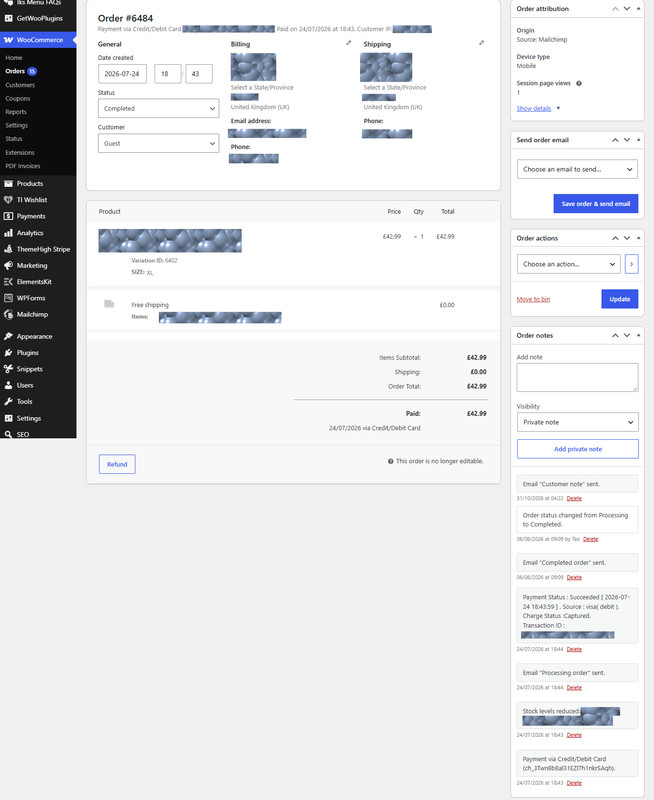
I’ve uploaded an edited screenshot of the order we discussed, with customer and sensitive information removed.
https://i.postimg.cc/Hsf6yqqz/Fire-Shot-Capture-328.jpg
As shown, it was a guest checkout using a mobile device, paid by ordinary credit/debit card. Both billing and shipping County fields contain
Select a State/Province.The Order attribution shows Mailchimp as the traffic source. However, the same issue has occurred on my other WooCommerce website, which does not use Mailchimp, so I don’t believe Mailchimp is responsible.
I’ll capture the details before correcting the next affected order, as requested.
Hi @dpr99, thanks for the screenshot and for confirming the guest, mobile and card details. That narrows it down a lot.
So far we’ve ruled out wallet payments (all card), saved account addresses (guest order), WooCommerce and both Stripe plugins (none of them use those words), and Mailchimp (your second site doesn’t use it).
The explanation that fits best is the browser’s address autofill on the customer’s device. Mobile browsers fill a whole saved address in one tap, including the County field. If a customer once saved an address somewhere with “Select a State/Province” or “Please Select” as the state, their browser can insert that text on your checkout. For UK addresses, County is an optional free-text field, so whatever is in it gets saved. It’s also easy to miss on a phone. That would explain why it’s intermittent, happens on both sites, and doesn’t depend on the theme, checkout type or payment plugin.
Two things would help confirm it before you change anything:
- Check the Order attribution box on a few more affected orders, ideally three to five from either site, and let us know the device type for each. If they’re mostly mobile, that supports the autofill explanation.
- Share a System Status Report from the classic checkout site: go to WooCommerce → Status → Get system report, copy it, paste it into https://pastebin.com/ and share the link here. We’ll check whether any plugin or snippet changes the checkout address fields, so we can rule that out too.
Once we have those, we can suggest the safest way to stop these values being saved.
I have another example from my second website, which uses WooCommerce Block checkout.
In this case, the order was for a UK address, but
Country (optional)was saved in both the billing and shipping County fields. The device type was Desktop PC, rather than Mobile as in the previous example.This is significant because the issue is occurring on both checkout types and on different devices. It makes me less convinced that mobile browser autofill alone explains the problem.
Regarding your request for three to five further examples, this could take several months. The problem is relatively rare, and I correct affected addresses as soon as orders arrive to prevent dispatch problems. Consequently, the original invalid values are usually no longer available for inspection. I can provide further examples if and when they occur, but I cannot realistically wait for several more before investigating this.
I have also provided the WooCommerce System Status Report from the website using classic checkout:
Does this additional example and the System Status Report change your thinking about the likely cause?
Hi @dpr99,
Thanks for the desktop example and the status report.
Does this additional example and the System Status Report change your thinking about the likely cause?
Yes. A desktop order on the block checkout means this isn’t limited to phones, so I’d rather catch the next one with the browser details than keep guessing.
I don’t see a checkout field plugin in the status report. Code Snippets is active, though, so can you please check whether any snippet there mentions
billing_state,shipping_stateorwoocommerce_checkout_fields?Can you also confirm the exact text on that order,
Country (optional)orCounty (optional)? WooCommerce labels the UK field County, and WooCommerce itself doesn’t use the words Country (optional) anywhere.The snippet below writes the County values and the customer’s browser to a log on every UK order with a County filled in. It only adds a log entry, so checkout works as before. You can still correct the address straight away, because the log keeps the original value. It works on both the classic and the block checkout, so you can add it on both sites with Code Snippets or a similar plugin.
// Provided by Woo Support on 2026-11-08
// Purpose: Log the County values and the shopper's browser on UK orders, to trace where invalid County text comes from. It only writes a log entry and doesn't change checkout or orders.
// Contact: support@woocommerce.com

function woo_support_log_uk_county( $order, $checkout_type ) {
	if ( ! $order instanceof WC_Order ) {
		return;
	}

	if ( 'GB' !== $order->get_billing_country() && 'GB' !== $order->get_shipping_country() ) {
		return;
	}

	$billing_state  = $order->get_billing_state();
	$shipping_state = $order->get_shipping_state();

	if ( '' === $billing_state && '' === $shipping_state ) {
		return;
	}

	wc_get_logger()->info(
		sprintf(
			'Order %1$s | checkout: %2$s | billing county: "%3$s" | shipping county: "%4$s" | browser: %5$s',
			$order->get_order_number(),
			$checkout_type,
			$billing_state,
			$shipping_state,
			$order->get_customer_user_agent()
		),
		array( 'source' => 'uk-county-check' )
	);
}

add_action(
	'woocommerce_checkout_order_processed',
	function ( $order_id, $posted_data, $order ) {
		woo_support_log_uk_county( $order, 'classic' );
	},
	10,
	3
);

add_action(
	'woocommerce_store_api_checkout_order_processed',
	function ( $order ) {
		woo_support_log_uk_county( $order, 'block' );
	}
);
When the next affected order comes in, can you please go to WooCommerce > Status > Logs, open the
uk-county-checklog, click Download, and share it through Pastebin the same way as the status report?Please note that even though we’re happy to share snippets like this, only core features are supported, so we aren’t in a position to:
- Troubleshoot any conflicts that may arise when using a custom snippet.
- Further modify the snippet’s behavior.
If you need further help with customizations, I’d recommend Codeable. They’re our official development partner and have vetted WooCommerce specialists.
I have another affected order from today on the classic checkout website.
This was a UK guest checkout order. Both the billing and shipping County fields contained the text
Please select.The order details are:
- Country: UK
- Customer: Guest checkout
- Device: Mobile
- Traffic source: Google Organic
- Checkout: Classic WooCommerce checkout
I have not installed the diagnostic snippet yet because I was concerned about the possibility of affecting the live checkout process.
Does this additional example help narrow down the cause? I would also appreciate your reassurance about the snippet’s safety before installing it on either live website.
Hi @dpr99,
Thanks for capturing the details on that order before correcting it.
Does this additional example help narrow down the cause?
Yes. Across your two sites, the County text has been
-Please select-,--None--,Please select,Select a State/Province,County (optional)andCountry (optional). A setting or plugin on your sites would write the same text each time, so I think it comes in with what each shopper’s checkout sends. WooCommerce then saves the UK County field as entered.Rather than wait months for more examples, the snippet below covers both needs. On UK addresses, it clears County text that looks like a form placeholder before the order is saved, then adds an order note with the original text and the shopper’s browser. You won’t need to correct these orders by hand, and the note keeps the evidence.
I would also appreciate your reassurance about the snippet’s safety before installing it on either live website.
It runs only during checkout, and it only changes the County field when the address is in the UK and the text contains “select” or “(optional)”, or reads “none”. Real counties such as County Durham stay as they are. It works on both the classic checkout and the checkout block in WooCommerce 11.2.1, and orders go through as usual.
It replaces the logging snippet from my last reply, so there’s no need to add that one. If you’d like to see it work first, a staging copy of the site is a good place to try it. You can add it on both sites with Code Snippets.
// Provided by Woo Support on 2026-11-15
// Purpose: On UK addresses, clear County text that is a form placeholder (like "Please select" or "County (optional)") before the order is saved, and add an order note with the original text and the shopper's browser.
// Contact: support@woocommerce.com

function woo_support_is_placeholder_county( $value ) {
	$value = strtolower( trim( (string) $value ) );

	if ( '' === $value ) {
		return false;
	}

	return false !== strpos( $value, 'select' )
		|| false !== strpos( $value, '(optional)' )
		|| 'none' === trim( $value, '- ' );
}

function woo_support_clear_uk_county( $order ) {
	if ( ! $order instanceof WC_Order ) {
		return;
	}

	$cleared = array();

	foreach ( array( 'billing', 'shipping' ) as $type ) {
		$get_country = 'get_' . $type . '_country';
		$get_state   = 'get_' . $type . '_state';
		$set_state   = 'set_' . $type . '_state';

		if ( 'GB' !== $order->$get_country() ) {
			continue;
		}

		$state = $order->$get_state();

		if ( woo_support_is_placeholder_county( $state ) ) {
			$cleared[] = $type . ' county "' . $state . '"';
			$order->$set_state( '' );
		}
	}

	if ( $cleared ) {
		$order->update_meta_data(
			'_woo_support_county_cleared',
			implode( ', ', $cleared ) . ' | browser: ' . $order->get_customer_user_agent()
		);
	}
}

function woo_support_note_uk_county( $order ) {
	if ( ! $order instanceof WC_Order ) {
		return;
	}

	$details = $order->get_meta( '_woo_support_county_cleared' );

	if ( ! $details ) {
		return;
	}

	$order->add_order_note( 'Placeholder County text cleared at checkout. Original: ' . $details );
	$order->delete_meta_data( '_woo_support_county_cleared' );
	$order->save();
}

// Classic checkout.
add_action( 'woocommerce_checkout_create_order', 'woo_support_clear_uk_county' );
add_action(
	'woocommerce_checkout_order_processed',
	function ( $order_id, $posted_data, $order ) {
		woo_support_note_uk_county( $order );
	},
	10,
	3
);

// Checkout block.
add_action( 'woocommerce_store_api_checkout_update_order_from_request', 'woo_support_clear_uk_county' );
add_action( 'woocommerce_store_api_checkout_order_processed', 'woo_support_note_uk_county' );
Please note that even though we’re happy to share snippets like this, only core features are supported, so we aren’t in a position to troubleshoot conflicts that may come up with a custom snippet or change how it behaves. For further customizations, Codeable is our official development partner, with vetted WooCommerce specialists.
If an order still arrives with placeholder text in County, a screenshot of that order’s notes will show exactly what was sent.
- On the classic checkout site, pick the UK as the country, right-click where the County field would be, and choose Inspect. Post a screenshot of the


You must be logged in to reply to this topic.