Hi @spiros,
The cURL Error 7 on noc1.wordfence.com means that the website can’t make the connection to our servers. If you have a shell on the server (or your host is willing to check for you), please try running curl -v https://noc1.wordfence.com/ and send us the output here. It’s not a perfect test since it’s not within PHP, but it may show if the server’s resolver is getting the wrong IP. Our IPs are available here: https://www.wordfence.com/help/advanced/#servers-and-ip-range
The 500 error reported by the “Connecting back to this site” test occurs when your site tries to connect to itself with wp_remote_post(), which is unrelated to Wordfence. The best option will be to have your hosting provider look into that 500 internal server error to see if they are seeing anything in the logs to help with that. You can copy/paste that error for them and let them know the site is having difficulty communicating with itself.
Please let us know how it goes!
Thanks,
Margaret
Thread Starter
 spiros
(@spiros)
I allowlisted the IPs and now I see this:
curl -v https://noc1.wordfence.com
* About to connect() to noc1.wordfence.com port 443 (#0)
*   Trying 52.25.185.95...
* Connected to noc1.wordfence.com (52.25.185.95) port 443 (#0)
* Initializing NSS with certpath: sql:/etc/pki/nssdb
*   CAfile: /etc/pki/tls/certs/ca-bundle.crt
  CApath: none
* SSL connection using TLS_ECDHE_RSA_WITH_AES_128_GCM_SHA256
* Server certificate:
*       subject: CN=noc1.wordfence.com
*       start date: May 12 00:00:00 2024 GMT
*       expire date: Jun 11 23:59:59 2025 GMT
*       common name: noc1.wordfence.com
*       issuer: CN=Amazon RSA 2048 M02,O=Amazon,C=US
> GET / HTTP/1.1
> User-Agent: curl/7.29.0
> Host: noc1.wordfence.com
> Accept: */*
>
< HTTP/1.1 200 OK
< Date: Tue, 28 May 2024 17:25:31 GMT
< Content-Type: text/plain
< Content-Length: 108
< Connection: keep-alive
< Server: nginx
< X-Frame-Options: SAMEORIGIN
< X-XSS-Protection: 1; mode=block
< X-Content-Type-Options: nosniff
< Strict-Transport-Security: max-age=31536000; includeSubDomains
<
* Connection #0 to host noc1.wordfence.com left intact
{"errorMsg":"Wordfence API error: Your site did not send an API key when contact
Hi @spiros,
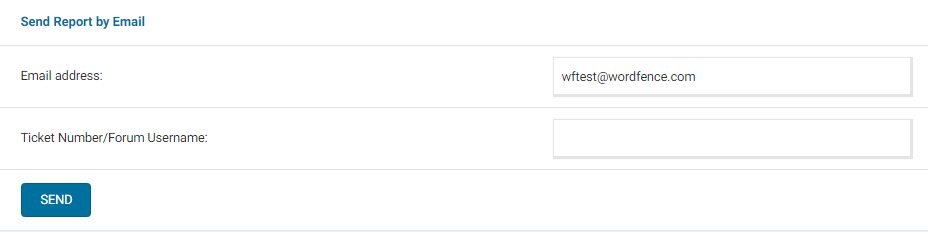
Thanks for following up! From that cURL output, the connection is now being made successfully to noc1.wordfence.com. If you’re still seeing an error under Wordfence > Tools > Diagnostics > Connectivity, can you send a diagnostic report to wftest @ wordfence . com? You can find the link to do so at the top of the Wordfence > Tools > Diagnostics page. Then click on “Send Report by Email”. Please add your forum username where indicated and respond here after you have sent it.
NOTE: It should look as follows – Screenshot of Tools > Diagnostic > Send by Email
Thanks,
Margaret