Hello,
please open this file http://oceanviewcottagecapebreton.com/wp-content/plugins/booking/css/client.css
at line: 109
and make modifications from this code:
.widget_wpdev_booking .datepick-inline table.datepick td {
  height: 25px;
  line-height: 25px;
}
to this code:
.widget_wpdev_booking .datepick-inline table.datepick td a {
  height: 25px;
  line-height: 25px;
  width: 33px;
}
Hi,
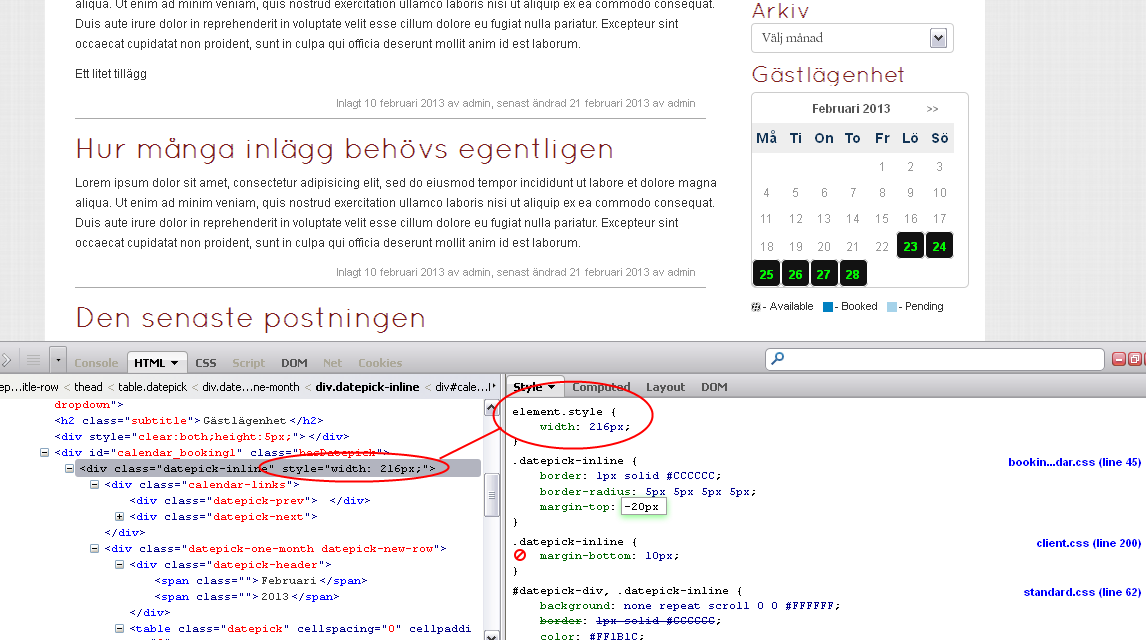
I have problem with the calendar width. The inside elements I can find but since the frame is set only with a style tag and no class it’s hard to find. The link displays the look of my calendar now and you can see that the weekdays row is not as wide as the frame. You can also see the code in the Firebug window at the bottom.
http://www.fjutt.se/download/calendarwidth.png
Hello,
please send the link to that page.
Thanks.
Not possible. It’s on localhost.
Hello,
You can control the width of the elements using the CSS “class” of those elements and also add the “!important” term.
For example like this:
.datepick-inline {
width: 216px !important;
}
and some other elements, like this:
.datepick-header{
width: 216px !important;
}
…