Title: Webot Anchor Check
Author: Suraj Dev
Published: October 31, 2026
Last modified: October 31, 2026
---
Search plugins
# Webot Anchor Check
By [Suraj Dev](https://profiles.wordpress.org/surajdev/)
[Download](https://downloads.wordpress.org/plugin/webot-anchor-check.1.0.0.zip)
* [Details](https://wordpress.org/plugins/webot-anchor-check/#description)
* [Reviews](https://wordpress.org/plugins/webot-anchor-check/#reviews)
* [Installation](https://wordpress.org/plugins/webot-anchor-check/#installation)
* [Development](https://wordpress.org/plugins/webot-anchor-check/#developers)
[Support](https://wordpress.org/support/plugin/webot-anchor-check/)
## Description
A button says “Pricing” and links to `#pricing`, but that section’s ID was renamed
or deleted. Nothing happens when a visitor clicks it, and no broken-link checker
tells you, because the page itself still loads.
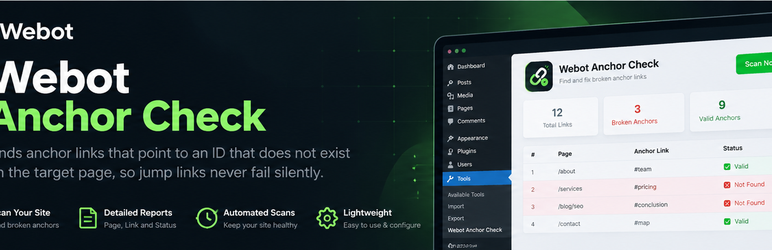
Webot Anchor Check scans your published pages and posts, reads the rendered HTML(
so menus, headers, footers and page-builder output are included), and checks that
every `#fragment` link points to an element ID or `` that really exists
on the target page.
**What you get**
* A full scan log of every page and every #anchor link, each marked OK, Broken,
Failed, Skipped or Unchecked
* Filter and search the log, switch between a Links view and a Pages view
* A live progress terminal while the scan runs
* Failed pages are listed with the reason (for example HTTP 404), so nothing is
skipped silently
* One-click edit links to the page that contains the broken link
* Optional weekly scan with a dashboard notice
* CSV export of the full log
* An ignore list for IDs that JavaScript creates after the page loads
* No external services, no account, no tracking. Everything stays on your site.
**What it skips on purpose**
* `#top` (browsers scroll to the top without an ID)
* `#!` and `#/` style links used by JavaScript routers
* Text fragments (`#:~:text=`)
* Links to other websites
## Screenshots
[⌊The dashboard displays pages scanned, total anchor links, broken anchors and scan
status.⌉⌊The dashboard displays pages scanned, total anchor links, broken anchors
and scan status.⌉[
The dashboard displays pages scanned, total anchor links, broken anchors and scan
status.
[⌊The initial dashboard provides the Scan my site action and weekly scan settings.⌉⌊
The initial dashboard provides the Scan my site action and weekly scan settings.⌉[
The initial dashboard provides the Scan my site action and weekly scan settings.
[⌊The Links view displays anchor IDs, source pages, link text and individual scan
results.⌉⌊The Links view displays anchor IDs, source pages, link text and individual
scan results.⌉[
The Links view displays anchor IDs, source pages, link text and individual scan
results.
## Installation
1. Upload the `webot-anchor-check` folder to `/wp-content/plugins/`, or install it
from the Plugins screen.
2. Activate the plugin.
3. Go to Tools > Anchor Check and click Scan my site.
## FAQ
### Why does it report an anchor that works on my site?
Some tabs, accordions and sliders create their IDs with JavaScript after the page
loads. The plugin reads the server-rendered HTML, so it cannot see those IDs. Add
them to the ignore list under Tools > Anchor Check > Settings. Use * at the end
to match a prefix, for example `tab-*`.
### Does it check links to other websites?
No. Only links to pages on your own site are checked.
### Will it slow down my site?
Visitors are not affected. A scan requests your pages the same way a visitor would,
in small batches, and only when you start it or when the weekly scan runs.
### My site is behind a password or maintenance mode.
Pages that do not return a normal 200 response are skipped, because their anchors
cannot be checked.
### Does it change my content?
No. It only reads and reports.
### What data does it store?
The latest scan results and log, your settings and short-lived cached ID lists,
all in your own database. Everything is removed when you delete the plugin.
## Reviews
There are no reviews for this plugin.
## Contributors & Developers
“Webot Anchor Check” is open source software. The following people have contributed
to this plugin.
Contributors
* [ Suraj Dev ](https://profiles.wordpress.org/surajdev/)
[Translate “Webot Anchor Check” into your language.](https://translate.wordpress.org/projects/wp-plugins/webot-anchor-check)
### Interested in development?
[Browse the code](https://plugins.trac.wordpress.org/browser/webot-anchor-check/),
check out the [SVN repository](https://plugins.svn.wordpress.org/webot-anchor-check/),
or subscribe to the [development log](https://plugins.trac.wordpress.org/log/webot-anchor-check/)
by [RSS](https://plugins.trac.wordpress.org/log/webot-anchor-check/?limit=100&mode=stop_on_copy&format=rss).
## Changelog
#### 1.0.0
* First release.
## Meta
* Version **1.0.0**
* Last updated **1 day ago**
* Active installations **Fewer than 10**
* WordPress version ** 5.8 or higher **
* Tested up to **7.1.4**
* PHP version ** 7.4 or higher **
* Tags
* [anchor links](https://wordpress.org/plugins/tags/anchor-links/)[audit](https://wordpress.org/plugins/tags/audit/)
[broken links](https://wordpress.org/plugins/tags/broken-links/)[jump links](https://wordpress.org/plugins/tags/jump-links/)
[seo](https://wordpress.org/plugins/tags/seo/)
* [Advanced View](https://wordpress.org/plugins/webot-anchor-check/advanced/)
## Ratings
No reviews have been submitted yet.
[Your review](https://wordpress.org/support/plugin/webot-anchor-check/reviews/#new-post)
[See all reviews](https://wordpress.org/support/plugin/webot-anchor-check/reviews/)
## Contributors
* [ Suraj Dev ](https://profiles.wordpress.org/surajdev/)
## Support
Got something to say? Need help?
[View support forum](https://wordpress.org/support/plugin/webot-anchor-check/)