Title: Sell.AI Stock – Multi-Warehouse & Suppliers for WooCommerce
Author: creatywniwsiecipl
Published: November 4, 2026
Last modified: November 4, 2026
---
Search plugins
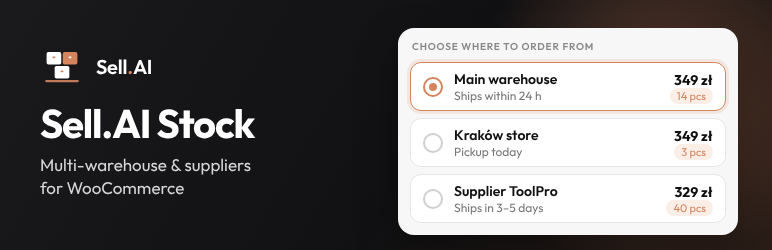

# Sell.AI Stock – Multi-Warehouse & Suppliers for WooCommerce
By [creatywniwsiecipl](https://profiles.wordpress.org/creatywniwsiecipl/)
[Download](https://downloads.wordpress.org/plugin/sell-ai-stock.2.0.0.zip)
* [Details](https://wordpress.org/plugins/sell-ai-stock/#description)
* [Reviews](https://wordpress.org/plugins/sell-ai-stock/#reviews)
* [Installation](https://wordpress.org/plugins/sell-ai-stock/#installation)
* [Development](https://wordpress.org/plugins/sell-ai-stock/#developers)
[Support](https://wordpress.org/support/plugin/sell-ai-stock/)
## Description
Sell.AI Stock lets a WooCommerce store sell the same product from several warehouses
or suppliers. Each warehouse has its own stock and, optionally, its own price.
**Store**
* Central warehouse registry with name, shipping info, minimum order value and
allowed shipping methods.
* “Stock & prices” table: all products and variations in one editable grid (stock
and price per warehouse), with search, filters, paging, conflict detection and
saving of changed rows only.
* CSV export and import of stock and prices (Excel-friendly), with a preview of
every change before it is applied.
* Data exchange log in plain language: what changed, product by product, and what
to do about problems.
* “Warehouses” tab in the product editor and a warehouse table in every variation.
The WooCommerce stock is kept equal to the sum of the warehouse stocks.
* Warehouse selector on the product page in 5 styles (cards, compact list, buttons,
drop-down, minimal), with accent colour and corner settings, plus a warehouse
picker for product tiles.
* Automatic warehouse assignment when the customer adds a product without choosing(
first warehouse with stock, or the cheapest one).
* The same product from different warehouses becomes separate cart lines with per-
warehouse prices. The customer can change the warehouse in the cart.
* One shipping package per warehouse, with per-warehouse shipping methods and minimum
order values.
* The warehouse is shown on order lines, in emails and in the admin. Warehouse
stock follows the order: placed, cancelled, edited in wp-admin, refunded with
restock. You can change the warehouse of a line in the order editor.
* Classic and block cart/checkout. Works with any theme through standard WooCommerce
hooks. Compatible with HPOS.
**Integrations**
* Authenticated REST API (`/wp-json/sell-ai-stock/v1/`) with bulk, idempotent upsert
of stock and prices by SKU or product ID, dry-run mode and out-of-order protection.
* Deny-by-default authentication: hashed API token in a header, or a user / application
password with the `manage_woocommerce` capability.
* Per-warehouse stock in the standard WooCommerce REST API (products, variations,
batch, order lines).
* WP-CLI commands (sync from a JSON file, CSV export and import). Filters and actions
for custom adapters. The full API reference is in README.md.
**Sell.AI Stock Pro (paid add-on)**
Everything above is free and complete. The separate Sell.AI Stock Pro add-on (sold
on trysellai.com) adds automatic updates from other systems:
* Base (Baselinker) connector: choose the catalog, warehouses and price groups
from lists.
* Wholesaler files (XML, CSV, JSON) with field mapping and a schedule.
* Compatibility mode for the official Base integration.
* Signed outgoing webhooks for stock changes and orders.
The “Data sources” tab of this plugin shows what the add-on does when it is not
installed. Nothing of the add-on is included in this plugin.
### External services
This plugin does not connect to any external service and sends no data anywhere.
Other systems can send stock to the shop through its REST API; that happens only
when the store administrator creates an API token and gives it to such a system.
The “Data sources” tab links to the page of the Sell.AI Stock Pro add-on on trysellai.
com; nothing is loaded from that site.
## Screenshots
[⌊Product page: the customer chooses the warehouse or supplier – each with its own
price, stock and shipping time.⌉⌊Product page: the customer chooses the warehouse
or supplier – each with its own price, stock and shipping time.⌉[
Product page: the customer chooses the warehouse or supplier – each with its own
price, stock and shipping time.
[⌊Checkout: products from different warehouses ship as separate parcels, each with
its own shipping method.⌉⌊Checkout: products from different warehouses ship as separate
parcels, each with its own shipping method.⌉[
Checkout: products from different warehouses ship as separate parcels, each with
its own shipping method.
[⌊"Stock & prices": all products and variations in one editable table, stock and
price per warehouse.⌉⌊"Stock & prices": all products and variations in one editable
table, stock and price per warehouse.⌉[
“Stock & prices”: all products and variations in one editable table, stock and price
per warehouse.
[⌊CSV import: every change is shown before it is applied.⌉⌊CSV import: every change
is shown before it is applied.⌉[
CSV import: every change is shown before it is applied.
[⌊Warehouses: names customers see, shipping info, minimum order value and allowed
shipping methods.⌉⌊Warehouses: names customers see, shipping info, minimum order
value and allowed shipping methods.⌉[
Warehouses: names customers see, shipping info, minimum order value and allowed
shipping methods.
[⌊Product editor: the "Warehouses" tab with stock and price per warehouse.⌉⌊Product
editor: the "Warehouses" tab with stock and price per warehouse.⌉[
Product editor: the “Warehouses” tab with stock and price per warehouse.
[⌊Order: the warehouse of every line and one shipping line per warehouse.⌉⌊Order:
the warehouse of every line and one shipping line per warehouse.⌉[
Order: the warehouse of every line and one shipping line per warehouse.
[⌊Five styles of the warehouse choice with a live preview.⌉⌊Five styles of the warehouse
choice with a live preview.⌉[
Five styles of the warehouse choice with a live preview.
[⌊Data exchange log in plain language.⌉⌊Data exchange log in plain language.⌉[
Data exchange log in plain language.
[⌊Details of one sync: what changed, product by product, and codes not found in
the shop.⌉⌊Details of one sync: what changed, product by product, and codes not
found in the shop.⌉[
Details of one sync: what changed, product by product, and codes not found in the
shop.
[⌊"Start here" checklist that walks a shop owner through the setup.⌉⌊"Start here"
checklist that walks a shop owner through the setup.⌉[
“Start here” checklist that walks a shop owner through the setup.
## Installation
1. Upload the plugin (Plugins Add New Upload Plugin) and activate it. WooCommerce
must be active.
2. Open WooCommerce Warehouses Start here and follow the four steps: add warehouses(
just names), enter stock and prices (table or CSV), choose the look, and optionally
connect Base or a wholesaler with the Pro add-on.
## FAQ
### I already use the official Base integration. Do I have to switch it off?
No. With the Sell.AI Stock Pro add-on, choose under Settings “Another integration
updates the WooCommerce stock” and the warehouse it belongs to: its stock becomes
that warehouse and your other warehouses are added to the total. Without the add-
on, products that use warehouses get their WooCommerce stock from the warehouses,
so another integration should not write it.
### Does it work with the block cart and checkout?
Yes. Prices, packages, validation and order data work the same way. A panel in the
order summary lets customers change the warehouse of an item.
### How does the API authenticate?
Generate a token in WooCommerce Warehouses API & integrations and send it in the`
X-SellAI-Stock-Token` header (or `Authorization: Bearer`). The token is stored only
as a hash. Requests without valid credentials are rejected.
### Does it need WP-Cron?
Only to clean the data exchange log once a day. Scheduled updates from Base or wholesalers(
Pro add-on) can also run from a system cron.
## Reviews
There are no reviews for this plugin.
## Contributors & Developers
“Sell.AI Stock – Multi-Warehouse & Suppliers for WooCommerce” is open source software.
The following people have contributed to this plugin.
Contributors
* [ creatywniwsiecipl ](https://profiles.wordpress.org/creatywniwsiecipl/)
[Translate “Sell.AI Stock – Multi-Warehouse & Suppliers for WooCommerce” into your language.](https://translate.wordpress.org/projects/wp-plugins/sell-ai-stock)
### Interested in development?
[Browse the code](https://plugins.trac.wordpress.org/browser/sell-ai-stock/), check
out the [SVN repository](https://plugins.svn.wordpress.org/sell-ai-stock/), or subscribe
to the [development log](https://plugins.trac.wordpress.org/log/sell-ai-stock/)
by [RSS](https://plugins.trac.wordpress.org/log/sell-ai-stock/?limit=100&mode=stop_on_copy&format=rss).
## Changelog
#### 2.0.0
* The Base (Baselinker) connector, wholesaler files (data sources), the compatibility
mode for another stock integration and webhooks moved to the new Sell.AI Stock
Pro add-on. Their settings and sources are kept: install the add-on to use them
again.
* Without the add-on, the “Data sources” tab explains what it does.
* New extension points for add-ons: tabs, settings rows, Start steps, log channels
and hints, API endpoint list.
* Translations are delivered by translate.wordpress.org; the setup reminder shows
only on the Plugins screen.
* Tested with WordPress 7.1 and WooCommerce 11.2. Database queries use identifier
placeholders; small layout fix for the filters of the stock table.
#### 1.9.2
* Compatibility mode also catches integrations that set the stock with the WooCommerce
stock function (wc_update_product_stock) instead of saving the product. Requests
that change the stock of an order are never mistaken for such a write.
#### 1.9.1
* Compatibility mode: when the integration sends the same stock the warehouse already
has, the shop now keeps showing the total of all warehouses (before, it was left
at the integration’s value).
#### 1.9.0
* Compatibility mode (Settings “Another integration updates the WooCommerce stock”):
keep the official Base integration or another plugin that writes the WooCommerce
stock. Switching it on copies the current stock to the chosen warehouse; stock
written later by the integration goes to that warehouse and the shop shows the
total of all warehouses. Changes made by a person in the WooCommerce admin are
treated as changes of the total. Orders work as before. All changes from outside
are listed in the Log.
* The Settings tab now shows its “Settings saved” messages.
#### 1.8.1
* The data source wizard offers a wholesaler file link and Base (Baselinker). The
ERP connection is marked “Coming soon” until it is tested on real ERP systems;
sources created earlier keep working.
#### 1.8.0
* Base (Baselinker) connector: paste the API token, click “Connect to Base”, choose
the catalog and pick from lists where each Base warehouse and price group goes
in the shop. Products and variants are matched by SKU or EAN; several Base warehouses
can be added up into one.
* Warnings for a price group in another currency, and automatic VAT removal when
the shop enters prices without tax.
* Plain hints in the log for a rejected Base token and the Base request limit.
#### 1.7.0
* “Start here” checklist with a progress bar (warehouses stock look connect
a system) and a dashboard reminder until the setup is done.
* Warehouses need only a name: the code is made from it automatically and shown
only on request.
* New data source starts with a choice: “a file link from a wholesaler” (just paste
the link; login fields appear only when the link needs them) or “an ERP with
an API” (full form).
* Warning with step-by-step Plesk / cPanel instructions when scheduled updates
do not run on the server.
* “?” explanations next to the less obvious fields; developer tabs and theme selectors
are hidden until needed.
#### 1.6.1
* Security: requests into the local network (data source option) can only be enabled
by administrators.
* CSV upload uses the standard WordPress upload handling.
* Readme: external services section, shorter summary.
#### 1.6.0
* Data exchange log (new “Log” tab): every data source run, API sync and CSV import
in plain language – what changed product by product, problems with a hint what
to do, codes not found in the shop; filters, product history search and a box
in the product editor. Kept 30 days by default (configurable).
* Simpler field mapping: “Fetch an example product” shows one product as a table
with real values and a “What is it?” choice per field; the product list and the
product code are found automatically.
* Mapping cards with a plain sentence and a worked example; options named for shop
owners (reserve, maximum, net price + VAT, markup %, rounding, minimum price).
The raw data tree stays available for advanced users.
#### 1.5.0
* Data sources rebuilt around field rules: “source field WooCommerce target” with
targets warehouse stock / price, WooCommerce stock quantity, regular price, sale
price and custom fields.
* Field picker: fetch a sample and click the fields in a tree; paths with list
filters (`stocks[store=W1].qty`), sums (`[*]`, `a + b`) and conditions.
* Adjustments: safety stock, maximum, “below N show 0”, multiplier, amount, net
gross VAT, rounding (.99 / .90 / whole), minimum price.
* XML and CSV sources (attributes, prefixed tags, Windows-1250), authorisation
types with an encrypted secret, local network option.
* Matching by GTIN / EAN in batches; products not found in the shop are listed.
* Test shows every change (now from the source) before anything is saved; each
run stores its result.
* Large sources are applied in the background (Action Scheduler); schedules every
15 minutes, hourly or daily.
* Sources created before keep working unchanged (“warehouses named by the source”).
#### 1.4.2
* Deleting a warehouse from the registry now also removes its stock and price from
all products and variations (with a confirmation), and the WooCommerce stock
is recalculated. Leftovers of warehouses deleted earlier are cleaned up once
after the update.
* New action `sellai_stock_warehouses_removed`.
#### 1.4.1
* Removed the Tools tab with a one-off data migration that only applied to a single
site.
#### 1.4.0
* CSV export and import of warehouse stock and prices on the “Stock & prices” tab:
Excel-friendly format (semicolon + decimal comma, or comma + dot), preview with
before/after values and errors, apply or cancel.
* WP-CLI: `wp sellai-stock export ` and `wp sellai-stock import [--
dry-run]`.
* Fix: the Polish translation file now also loads on WordPress 6.2–6.4 (legacy
MO reader).
#### 1.3.0
* New “Stock & prices” table for all products and variations.
* Prices accept both comma and dot as decimal separator (table and product editor).
#### 1.2.0
* Universal connector: data sources (pull with field mapping, presets, pagination,
dry-run test), outgoing signed webhooks with retry queue, `sellai_stock` field
in the WooCommerce REST API, warehouse on order lines in /wc/v3/orders.
* WP-CLI: `wp sellai-stock pull | webhooks retry | sync`.
* Fix: with “replace”, an omitted price now keeps the current warehouse price (
as documented).
* Scheduled events are cleared on deactivation.
#### 1.1.0
* Cart & Checkout blocks support (Store API extension, order summary panel).
* Warehouses for variations: editor table per variation and product page selector.
* 5 selector styles with live preview, corner setting.
* Warehouse stock follows wp-admin order edits, removed lines and refunds with
restock; warehouse can be changed per order line; admin-added lines get a warehouse.
* Raw warehouse meta hidden in the order editor.
#### 1.0.0
* First release.
## Meta
* Version **2.0.0**
* Last updated **8 hours ago**
* Active installations **Fewer than 10**
* WordPress version ** 6.2 or higher **
* Tested up to **7.1.4**
* PHP version ** 7.4 or higher **
* Tags
* [inventory](https://wordpress.org/plugins/tags/inventory/)[multi-warehouse](https://wordpress.org/plugins/tags/multi-warehouse/)
[stock](https://wordpress.org/plugins/tags/stock/)[suppliers](https://wordpress.org/plugins/tags/suppliers/)
[woocommerce](https://wordpress.org/plugins/tags/woocommerce/)
* [Advanced View](https://wordpress.org/plugins/sell-ai-stock/advanced/)
## Ratings
No reviews have been submitted yet.
[Your review](https://wordpress.org/support/plugin/sell-ai-stock/reviews/#new-post)
[See all reviews](https://wordpress.org/support/plugin/sell-ai-stock/reviews/)
## Contributors
* [ creatywniwsiecipl ](https://profiles.wordpress.org/creatywniwsiecipl/)
## Support
Got something to say? Need help?
[View support forum](https://wordpress.org/support/plugin/sell-ai-stock/)