Title: BytCrush Image Compression
Author: Warcal
Published: October 18, 2026
Last modified: October 25, 2026
---
Search plugins

# BytCrush Image Compression
By [Warcal](https://profiles.wordpress.org/warnz/)
[Download](https://downloads.wordpress.org/plugin/bytcrush-image-compression.1.0.3.zip)
* [Details](https://wordpress.org/plugins/bytcrush-image-compression/#description)
* [Reviews](https://wordpress.org/plugins/bytcrush-image-compression/#reviews)
* [Installation](https://wordpress.org/plugins/bytcrush-image-compression/#installation)
* [Development](https://wordpress.org/plugins/bytcrush-image-compression/#developers)
[Support](https://wordpress.org/support/plugin/bytcrush-image-compression/)
## Description
BytCrush is Warcal’s own image-compression engine, built into a WordPress plugin.
It runs entirely on your own server, with no API keys, no monthly quotas and no
images leaving your site.
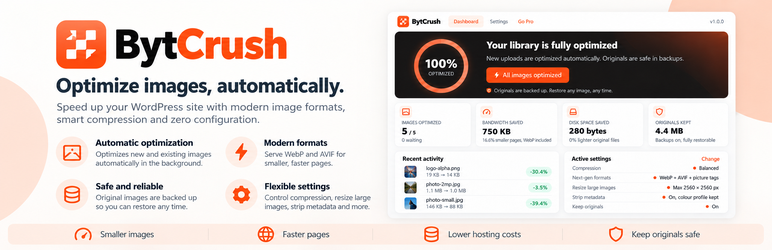
* **One click, whole library.** Press “Optimize all images” and watch it work,
with a live progress ring, savings counter and activity log. Pause and resume
any time.
* **Originals are never lost.** Every file is backed up byte-for-byte before it
is touched. Restore one image or your entire library with a click.
* **Every size, not just the original.** Thumbnails and every size WordPress or
your theme generates are optimized too.
* **WebP and AVIF, served automatically.** Via `` tags that work on any
host and CDN, or via server rewrite rules on Apache/LiteSpeed.
* **Tuned for quality.** EXIF rotation is applied before metadata is removed, colour
profiles are preserved, JPEG quality is never raised above the source’s own,
and a file is never replaced by a bigger one.
* **Automatic.** New uploads are optimized as soon as WordPress creates their sizes.
#### Best-practice defaults
* Balanced compression: JPEG 82 progressive with 4:2:0 chroma, lossless-max PNG,
WebP 80 (the BytCrush engine’s recommended setting)
* Metadata stripped, colour profile kept
* Originals over 2560px scaled down
* WebP generated and served with picture tags
* Backups on, auto-optimize on
* Background optimization: click once and close the tab, and the whole library
keeps optimizing on your server
#### BytCrush Pro (separate add-on)
Everything above is free and fully functional. BytCrush Pro is a separate paid plugin
from Warcal that adds:
* Page speed audit: opens any page on a phone and a laptop, scores its images,
explains every problem (late main image, oversized files, layout shift, missing
WebP) and fixes it in one click, with no API keys
* Ultra compression level (palette PNGs)
* Smart target file size (100 / 200 / 500 KB presets), the BytCrush Auto-Compress
algorithm
### External services
Image optimization runs entirely on your own server. Your images are never uploaded
anywhere.
This plugin uses [Freemius](https://freemius.com/) for opt-in usage data, license
activation and Pro upgrades. It connects to Freemius only when you:
* opt in on the welcome screen, which sends your site URL, WordPress and PHP versions,
plugin version, and your name and email address;
* activate a license key or start the Pro trial, which sends the license key and
your site URL;
* open the upgrade or pricing page, which loads the Freemius checkout.
If you skip the opt-in, nothing is sent until you choose to activate a license or
upgrade. Freemius [terms of service](https://freemius.com/terms/) and [privacy policy](https://freemius.com/privacy/).
## Screenshots
[⌊One-click dashboard: live progress, savings, and every original kept safe.⌉⌊One-
click dashboard: live progress, savings, and every original kept safe.⌉[
One-click dashboard: live progress, savings, and every original kept safe.
[⌊Page speed audit (BytCrush Pro add-on): phone and laptop scores, every image problem
explained, fixed in one click.⌉⌊Page speed audit (BytCrush Pro add-on): phone and
laptop scores, every image problem explained, fixed in one click.⌉[
Page speed audit (BytCrush Pro add-on): phone and laptop scores, every image problem
explained, fixed in one click.
[⌊Settings with tuned, best-practice defaults.⌉⌊Settings with tuned, best-practice
defaults.⌉[
Settings with tuned, best-practice defaults.
[⌊Per-image savings and one-click restore right in the Media Library.⌉⌊Per-image
savings and one-click restore right in the Media Library.⌉[
Per-image savings and one-click restore right in the Media Library.
## Installation
1. Upload the plugin and activate it.
2. Go to **BytCrush** in the admin menu.
3. Click **Optimize all images**.
## FAQ
### Where are my originals?
In a private folder inside `wp-content/uploads/` named `bytcrush-backups-` plus
a random code that is unique to your site, mirroring your uploads folder. Settings
shows the exact name. The random name keeps the originals (which still contain camera
metadata) from being guessed, including on Nginx servers that ignore .htaccess protection.
### Does my server support it?
BytCrush needs the Imagick (preferred) or GD PHP extension, which almost every host
provides. The Settings screen shows whether your server can create WebP and AVIF.
### Which PHP and WordPress versions are supported?
PHP 7.2 to 8.5 and WordPress 5.3 to 7.1. Every release is tested on each of those
versions, on a strict shared-hosting setup (GD only, 64 MB memory, 30-second time
limit) as well as on Nginx. WebP needs an image library built with WebP support;
AVIF needs PHP 8.1+ with GD, or Imagick with AVIF support. The Settings screen shows
what your server can do.
### I use Nginx.
Use the default “Picture tags” delivery method. It works on every server.
### How do I exclude an image from picture-tag delivery?
Add the class `no-bytcrush` or the attribute `data-bytcrush-skip` to the `![]() `
tag.
## Reviews
There are no reviews for this plugin.
## Contributors & Developers
“BytCrush Image Compression” is open source software. The following people have
contributed to this plugin.
Contributors
* [ Warcal ](https://profiles.wordpress.org/warnz/)
* [ Freemius ](https://profiles.wordpress.org/freemius/)
[Translate “BytCrush Image Compression” into your language.](https://translate.wordpress.org/projects/wp-plugins/bytcrush-image-compression)
### Interested in development?
[Browse the code](https://plugins.trac.wordpress.org/browser/bytcrush-image-compression/),
check out the [SVN repository](https://plugins.svn.wordpress.org/bytcrush-image-compression/),
or subscribe to the [development log](https://plugins.trac.wordpress.org/log/bytcrush-image-compression/)
by [RSS](https://plugins.trac.wordpress.org/log/bytcrush-image-compression/?limit=100&mode=stop_on_copy&format=rss).
## Changelog
#### 1.0.3
* Settings: a link to rate BytCrush on WordPress.org.
#### 1.0.2
* Updated the bundled Freemius SDK to 2.13.5.
#### 1.0.1
* Server-friendly by design: BytCrush now checks how much memory an image needs
before opening it, and skips images that are too large for the server (or hands
them to ImageMagick) instead of risking an error.
* Batches adapt to your host’s time limit and proxy timeouts, and never start an
image that could not finish in time.
* Optimization is paced by server load: it pauses between images when the server
is busy, backs off when it is overloaded, and uses at most half the CPU when
the load cannot be measured, so visitors keep priority.
* ImageMagick is limited to one thread and a memory budget that matches PHP’s.
#### 1.0.0
* Initial release.
## Meta
* Version **1.0.3**
* Last updated **7 hours ago**
* Active installations **Fewer than 10**
* WordPress version ** 5.3 or higher **
* Tested up to **7.1.3**
* PHP version ** 7.2 or higher **
* Tags
* [AVIF](https://wordpress.org/plugins/tags/avif/)[compress images](https://wordpress.org/plugins/tags/compress-images/)
[image optimization](https://wordpress.org/plugins/tags/image-optimization/)[performance](https://wordpress.org/plugins/tags/performance/)
[webp](https://wordpress.org/plugins/tags/webp/)
* [Advanced View](https://wordpress.org/plugins/bytcrush-image-compression/advanced/)
## Ratings
No reviews have been submitted yet.
[Your review](https://wordpress.org/support/plugin/bytcrush-image-compression/reviews/#new-post)
[See all reviews](https://wordpress.org/support/plugin/bytcrush-image-compression/reviews/)
## Contributors
* [ Warcal ](https://profiles.wordpress.org/warnz/)
* [ Freemius ](https://profiles.wordpress.org/freemius/)
## Support
Got something to say? Need help?
[View support forum](https://wordpress.org/support/plugin/bytcrush-image-compression/)
`
tag.
## Reviews
There are no reviews for this plugin.
## Contributors & Developers
“BytCrush Image Compression” is open source software. The following people have
contributed to this plugin.
Contributors
* [ Warcal ](https://profiles.wordpress.org/warnz/)
* [ Freemius ](https://profiles.wordpress.org/freemius/)
[Translate “BytCrush Image Compression” into your language.](https://translate.wordpress.org/projects/wp-plugins/bytcrush-image-compression)
### Interested in development?
[Browse the code](https://plugins.trac.wordpress.org/browser/bytcrush-image-compression/),
check out the [SVN repository](https://plugins.svn.wordpress.org/bytcrush-image-compression/),
or subscribe to the [development log](https://plugins.trac.wordpress.org/log/bytcrush-image-compression/)
by [RSS](https://plugins.trac.wordpress.org/log/bytcrush-image-compression/?limit=100&mode=stop_on_copy&format=rss).
## Changelog
#### 1.0.3
* Settings: a link to rate BytCrush on WordPress.org.
#### 1.0.2
* Updated the bundled Freemius SDK to 2.13.5.
#### 1.0.1
* Server-friendly by design: BytCrush now checks how much memory an image needs
before opening it, and skips images that are too large for the server (or hands
them to ImageMagick) instead of risking an error.
* Batches adapt to your host’s time limit and proxy timeouts, and never start an
image that could not finish in time.
* Optimization is paced by server load: it pauses between images when the server
is busy, backs off when it is overloaded, and uses at most half the CPU when
the load cannot be measured, so visitors keep priority.
* ImageMagick is limited to one thread and a memory budget that matches PHP’s.
#### 1.0.0
* Initial release.
## Meta
* Version **1.0.3**
* Last updated **7 hours ago**
* Active installations **Fewer than 10**
* WordPress version ** 5.3 or higher **
* Tested up to **7.1.3**
* PHP version ** 7.2 or higher **
* Tags
* [AVIF](https://wordpress.org/plugins/tags/avif/)[compress images](https://wordpress.org/plugins/tags/compress-images/)
[image optimization](https://wordpress.org/plugins/tags/image-optimization/)[performance](https://wordpress.org/plugins/tags/performance/)
[webp](https://wordpress.org/plugins/tags/webp/)
* [Advanced View](https://wordpress.org/plugins/bytcrush-image-compression/advanced/)
## Ratings
No reviews have been submitted yet.
[Your review](https://wordpress.org/support/plugin/bytcrush-image-compression/reviews/#new-post)
[See all reviews](https://wordpress.org/support/plugin/bytcrush-image-compression/reviews/)
## Contributors
* [ Warcal ](https://profiles.wordpress.org/warnz/)
* [ Freemius ](https://profiles.wordpress.org/freemius/)
## Support
Got something to say? Need help?
[View support forum](https://wordpress.org/support/plugin/bytcrush-image-compression/)