
Description
xili-language provides for a bilingual (or multilingual) website an automatic selection of language (.mo) in theme according to the language of current post(s) or page. Theme’s behaviour can be fully personalized through settings, hooks and api. Ready for CMS developers and designers.
-
W A R N I N G – see tab and chapters in changelog – further versions are in github repository
-
xili-language plugin provides an automatic selection of language in theme according to the language of displayed post, series of posts, page or articles. If the post is in gaelic, the texts of the theme will be in gaelic if the author checks the post as gaelic and if the theme contains the right .mo file for this target language.
-
A very readable interface with a list of titles (and links) to help you write/edit/modify articles and their translations.
-
To help authoring, current user can choose language of his dashboard.
-
xili-language select on the fly the multilingual .mo files present in the theme’s folder (no cookies, no redirections like “301”).
-
xili-language uses a custom taxonomy to specify language of post, page and custom post. Full compatible with WP JSON REST API
-
xili-language plugin works on WordPress installation in mono (standalone) or on one site belonging to a multisite (network) install.
-
xili-language plugin works on WordPress installation for WebApp with JSON REST API – see changelog because WP JSON REST API 1.2.1 in under full development but yet powerful.
- As educational plateform in constant changing since 2009, xili-language trilogy tries to use most of the WordPress Core functions and features (Custom taxonomy, API, metabox, pointer, help, pomo libraries, …). The options are adjustable.
TESTERS WANTED
According some users, current versions can be stable with recent WP versions. BUT since 2 years, a new version is fully rewritten and tested in few websites. These new versions are available in Github and here in WP repository in tag Advanced View. Your feedback will be very valuable.
Version 2.21.2
- Last Updated 2017-04-17 (readme for new look of plugins repository – tested in websites with WP 4.7.3), further versions are in github
- W A R N I N G – see tab and chapters in changelog
For bbPress users, xili xl-bbp-addon plugin is no more a plugin. Components are optionally (if bbPress active) included. An option is also added in Experts tab of settings.
Prequisite
- A project of a website with articles in different languages.
- A localizable theme : Every themes with localization (or translation-ready like twentyfourteen) can be easily used (and improved) for realtime multilingual sites.
- A tool to translate .po files of the theme and built .mo files (poEdit or better xili-dictionary – see below ).
- see this page in wiki.xiligroup.org.
What to prepare before and during installation before activating
- verify that your theme is translation-ready. Collect .po files of theme for target languages.
- if rtl languages are used, verify that theme contains rtl.css file.
Links and documentation to read before activating
- Check out the screenshots to see it in action and other tabs here.
- latest news inside twentyfourteen-xili example,
- latest bundled child theme of twentyfifteen: twentyfifteen-xili example,
- xili wiki,
- news and history,
- forum to read experience of users and obtain some support,
- For webmaster: Before to be moved in wiki, table summarizes all the technical features (widgets, template tags, functions and hooks) of this powerful plugin for personalized CMS created by webmaster,
-
For german speaking webmaster some documentations and posts are written by YogieAnamCara of sensorgrafie
-
and finally the source code of the plugin itself if you read php!
Themes provided as examples
- Since WordPress 4.1, the default theme named twentyfifteen can be used without php coding for a multilingual site as shown here twentyfifteen-xili.
- Other child theme examples of bundled parent themes: twentyeleven twentyeleven-xili, twentytwelve twentytwelve-xili, twentythirteen twentythirteen-xili, twentyfourteen twentyfourteen-xili, twentyfifteen twentyfifteen-xili.
Other compatible plugins by xiligroup dev
TRILOGY FOR MULTILINGUAL CMS WEBSITE
including xili-language plugin
Please verify that you have installed the latest versions of:
- xili-dictionary plugin: With xili-dictionary, it is easier to create or update online, via admin/dashboard UI, the files .mo of each language.
- xili-tidy-tags plugin: With xili-tidy-tags, it is now possible to display sub-selection (cloud) of tags according language and semantic trans-language group (trademark,…).
That this plugin does not
With around 8000 php lines, xili-language is not everything…
-
xili-language plugin does not create additional tables in the database, do not create cookies and only use 4 lines in Options table. xili-language simply makes proper use of the taxonomy tables and postmeta table offered by WordPress to define language and link items between them. Because xili-language plugin does not modify deeply the post edit UI, it is possible to use iPhone / iPod Touch WordPress app to prepare and draft the post.
-
xili-language plugin does not replace the author or the editor. No automatic translation. Content strategist is the master of the languages, the contents and the navigation inside the website. With xili-dictionary, webmaster can translate the theme’s items and when .mo files are in place, xili-dictionary can be deactivated. For design, the creator is free to choose text or graphic. xili-language does not provide flags (or few as example in child-theme example like twentytwelve-xili )!
Newbie, WP user, Developer,…
-
Dear Newbie: originally built for webmaster and developer, the plugin trilogy progress since 6 years to be more and more plug and play for newbies who can read and spend a little time mainly for translation.
-
xili-language is also dedicated for theme’s creator or webmaster with knowledges in CMS and WP and having (or not) tools to create .mo language files. Through API (hook), the plugin add automatic tools (or links or filters) for sidebar or top menus. Categories or Archives lists are translated also.
- xili-language provides also series of functions which can be hooked in the functions.php file of the theme that you create i.e. for a cms like multilingual website.
Licence, donation, services, “as is”, …
Contrary to popular belief, GPL doesn’t say that everything must be zero-cost, just that when you receive the software (plugin or theme) that it not restrict your freedoms in how you use it. Free open source plugin does not mean free services
- Texts of licence: GPLv2
- Donation link via paypal in sidebar of dev.xiligroup site
- Services : As authors of plugin, dev.xiligroup team is able to provide services (consulting, training, support) with affordable prices for WP multilingual contexts in corporate or commercial websites.
- Plugin is shipped as is : see no warranty chapter in license GPLv2.
Roadmap
- Improved documentation for getting starts, template tags and functions – here in news or here by Vladimir.
- Delivery of a premium services kit (with powerful features and attractive fees) packaged with professional training and support.
- Updating sources (parts are 6 years old) with new libraries provided since WP 4.2.
- Contributions are welcome 😉
More infos
- Technical infos
1.1. Prerequisite
1.2. CMS
1.3. Documentation for developers
1.4. More infos and docs - Flags
- Compatibility
1. Technical infos
- REMEMBER : xili-language follows the WordPress story since more than 6 years. Initially designed for webmasters with knowledge in WP, PHP,… step by step the plugin will improved to be more and more plug and play. So don’t forget to visit this latest demo and news, see this other demo and Forum.
1.1. Prerequisite
Verify that your theme is international (translation ready) compatible (translatable terms like _e('the term','mythemedomaine') and no displayed texts ‘hardcoded’ (example in default bundled themes of WP named twentyfourteen or twentyfifteen ).
- This latest version works with WP 4.0+ in mono or multisite.
1.2. CMS
- CMS = Content Management System
- Contains features dedicated to multilingual theme’s creators and webmasters. Don’t forget to read documented source code.
1.3. Documentation for developers
A table summarizes all the technical features (widgets, template tags, functions and hooks) of this powerful plugin for personalized CMS created by webmaster.
- Provides infos about text direction ltr ou rtl of languages (arabic, hebraic,…) of theme and of each post in loop
- unique id for category link hook see expert’s corner posts
- hooks to define header metas or language attributes in html tag.
1.4. More infos and docs
- Other posts, articles and more descriptions here and here in action.
- Visit also Forum to obtain more support or contribute to others by publishing reports about your experience.
2. Flags
Default flags provided in bundled child themes like TwentyFourteen-xili 2014 came from famfamfam. To be compliant to the design and look, choose your own series of flags. Be aware of size and file naming.
3. Compatibility
xili-language is compatible with the plugin xili-dictionary which is able to deliver .mo files on the fly through the WP admin UI (and .po files translatable by other translators). xili-dictionary used a specific taxonomy without adding tables in WP database.
xili-language is compatible with the plugin xili-tidy-tags. xili-tidy-tags lets you create multiple group of tags. That way, you can have a tag cloud for tags in English, another cloud for French tags, another for Spanish ones, and so on. You can also use the plugin for more than multilingual blogs. Basically, you can create any group of tags you want.
xili-language is full compatible with the plugin xilitheme-select to be used with iPhone, iPod Touch or other mobiles. Also with xili re/un-attach media !
More informations about other plugins in the website dev.xiligroup.com or in WP Repository
The plugin is frequently updated. Visit Other versions.
See also the dev.xiligroup Forum.
* Tags from previous readme : theme, post, plugin,posts,page,category,admin, bilingual, dictionary,.po file, widget,international, i18n, l10n, WP network, multisite, blogroll, japanese, khmer, rtl, translation-ready, bbpress, jetpack, polylang
© 2008-2018 – MS – dev.xiligroup.com
Screenshots

An example of wp-content/themes folder and his languages sub-folder containing mo and po files. 
Source coding extract with 'international' text in 'xiliphone' theme. 
The plugin settings UI - first tab: the languages list and edit form to add or edit. 
The plugin settings UI - second tab: Settings of front side (front-end) and languages behaviour. 
The language dashboard in post writting UI under the content textarea. For more infos and how to, visit the wiki website. 
List of posts with language column and infos about linked posts. For more infos and how to, visit the wiki website. 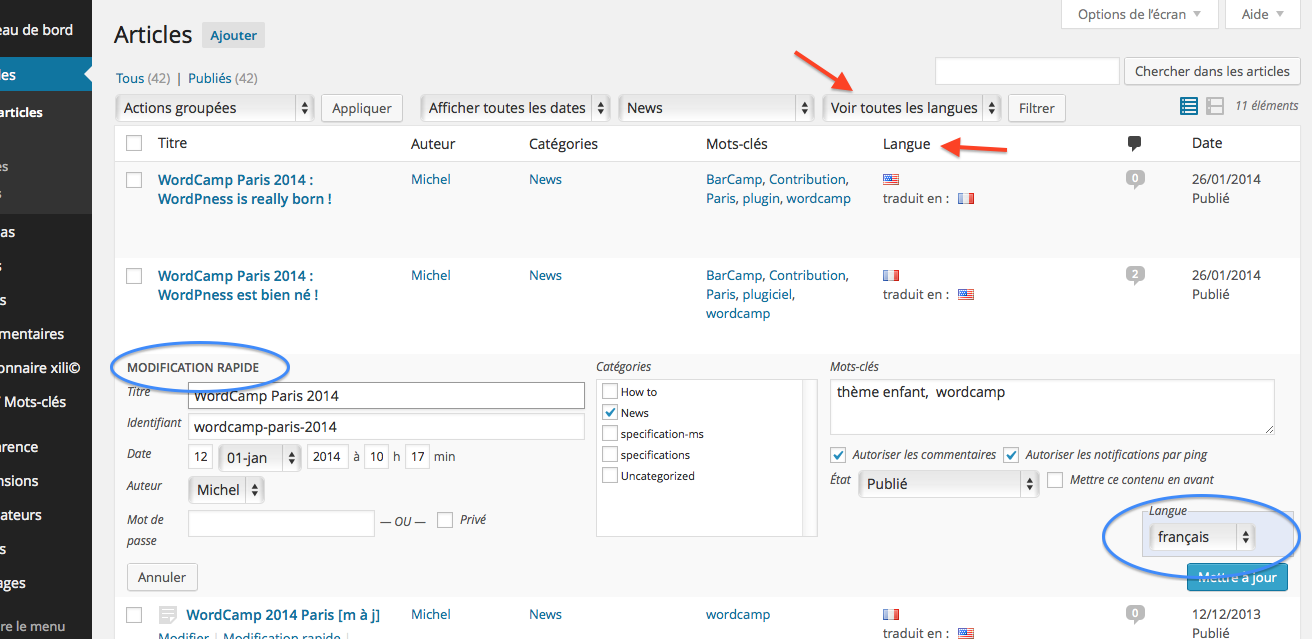
Dashboard: Posts edit list with language sub-selection, quick edit and bulk edit available. 
Tab in settings to manage language files. 
xili-tidy-tags: Admin Tools UI - see this compatible plugin to group tags according languages. 
xili-language widget: Admin widgets UI - since 0.9.9.6, "multiple" languages list widget. 
xili-language: Widget to display recent posts in choosen target language. 
Blogroll and bookmarks taxonomies and language sub-selection. 
Since 2.2.0, new xili-language trilogy menu in admin bar menu to group main settings for multilingual website. 
Since 2.12.0, Authoring settings (Custom post types, bookmarks) (rules propagation of post features) when creating translated posts are ajustable through the 5th settings tab.
Installation
READ CAREFULLY ALL THE README FILE AND PREREQUISITES
Read this recent page and also wiki for older versions and features.
- Upload the folder containing
xili-language.phpand language files to the/wp-content/plugins/directory, - Verify that your theme is international compatible – translatable terms like
_e('the term','mytheme')and no text hardcoded – and contains .mo and .po files for each target language – (application poEdit and/or plugin xili-dictionary can be used) - Verify that a domain name is defined in your theme – see note at end list below,
- Activate the plugin through the ‘Plugins’ menu in WordPress,
- Go to the dashboard settings tab – languages – and adapt default values if necessary by adding your languages in the catalog. You can set the order (1,2,3…) of the series. (used in
language_attributes()template_tag). - Modify each post by setting (checking) the language in xili-language box (under the content box) before publishing.
- Other settings and parts (Browser detection, widgets, shortcode, template tags) see below… and examples.
Some steps to prepare a rich installation:
Tabs of settings
Settings are progressively reorganized in 6 tabs:
- Languages list: Where you define the list of languages needed in your multilingual website.
- Languages front-end settings: Where you define some rules and behaviour when visitor arrives in the website or navigates inside.
- Settings for experts: Where experts are able to set and recovers previous sets. (backwards compatibility)
- Managing language files: To import .mo files for theme or dashboard (if available in GlotPress or Automattic servers).
- Managing Authoring rules: To define rules and settings in the dashboard side and help authoring.
- xili-language support: A form to send an email to xiligroup support.
(online help on the top right tab for each settings page)
Additional infos
- Before using your own theme, to understand how xili-language works, install the example child theme of one of the bundled themes like TwentyFourteen shown in this commented demo site.
- Child of bundled themes include a navigation menu – see links in FAQ -. In xili-language settings, it is possible to insert automatically languages list in the menu previously set by you.
- If you are webmaster and want to add lot of personalizations in your theme, read source and visit latest news.
Browser detection for visitors or authors
To change the language of the frontpage according to the language of the visitor’s browser, check the popup in right small box in settings.
To change the default language of a new post according to the language of the author’s browser, check the popup in right small box in settings.
xili-language and widgets
Three widgets are created to enrich sidebar : list of languages, recent posts and recent comments with sub-selection according current language.
xili-language and shortcode
SHORTCODE to add a link to other language inside content of a post like:
[linked-post-in lang="fr_fr"]Voir cet article[/linked-post-in]
by default use context ‘linktitle’ for translation ‘A similar post in %s’ text of link title attribut.
SHORTCODE to display only content if current language:
[xili-show-if lang=fr_FR ]contenu de la page boutique multilingue[/xili-show-if]
param lang can be ISO or slug.
SHORTCODE to insert translated msgid content according current language
Easy to insert .mo item in your current content.
[xili18n msgid=’yes’]
domain by default is here theme textdomain
[xili18n msgid=’yes’ ctxt=’front’ textdomain=’default’]
above it is the WP core textdomain
SHORTCODE to insert URL of flag set with a language:
[xili-flag lang=’fr_FR’] returns url of french flag
xili-language and template tags
- xili-language “translates” template tags and permits some variations for webmasters:
The most current template tags don’t need special work: wp_list_categories(), wp_title(),…
wp_get_archives
Possible that very special permalinks need to use hook named xiliml_get_archives_link. –
Sub selection of archives for wp_get_archives() with &lang= (see § below)
wp_list_pages() with optional query tag &lang=
-
xili-language “provides” new template tags (or widgets) to solve issues from WP core or add new features for CMS:
xili_language_list() – outside loop (sidebar) display the languages of the site (used also by widget)
xiliml_the_category() – replace the_category() template tag of WP Core
improved xiliml_the_others_posts() function and theme tag to be used in multilingual category loop and by option (array) to return an array of linked posts in other languages (useful for CMS webmasters) (array of lang and id ) – the id is easily transformable in permalink with function get_permalink() when using this array.
xili-language and specific functions
Requires knowledges in php and WP !
After class in sources files, some functions are available – see sources for details.
the_curlang()returns by default the slug of the current language of the displayed webpage (aliasxili_curlang()since 2.11+). If param is specified, return ISO, Full Name or alias of current webpage – see sources –-
is_xili_curlang( $lang )tests (returns true or false) after testing language of current webpage. Param can be a language slug (as string) or a list of slugs (as an array). Example:is_xili_curlang( 'fr_fr' )returns true if webpage is in french – since 2.11+ -
widget for recent comments that can subselect those for current language. (a function
xiliml_recent_comments()is also available if you want to create a template tag with resulting objects array).
Archives selection
Archives tags is a very complex template tag in his background and not very easy source hookable. So we decided to add few features : by adding query in vars of the function, it will be possible to display a monthly list of archives for a selected language – wp_get_archives('..your.vars..&lang=fr_fr') – or the current the theme language – wp_get_archives('..your.vars..&lang=') -. The displayed list of links will be translated and link restrited to display only archives of this language.
FAQ
-
What is menus insertion point in navigation menus ?
-
It is the most recent way to add multilingual menus at a location in a theme. This method uses insertion point that will live choose the menu structure according current targeted language.
-
XL version > 2.9.10 : In appareance/menus, I do not see the boxes of insertion point (languages list, sub-selection pages or sub-selection menus) ?
-
To show insertion point metaboxes, remember to check them inside Screen Options. (top right tab near Help tab)
-
What about WP Network (previous WPMU) and the trilogy ?
-
xili-language, xili-tidy-tags, xili-dictionary
Since WP 3.0-alpha, if multisite is activated, the trilogy is now compatible and will include progressively some improvements dedicaded especially for WP Network context. Future specific docs will be available for registered webmasters. -
How to see post or page ID in dashbord ?
-
IDs of all types of post (post, page, CPT) are listed in Translation box (second column) under the content.
-
What about rtl languages ?
-
If your theme follow the WP core rules (like in Twenty Twelve) with rtl.css file, RTL languages are well displayed.
-
Where can I see websites using this plugin ?
-
Twenty Fifteen 2015
Twenty Fourteen 2014
Twenty Thirteen 2013
Responsive responsive
Twenty Twelve 2012
Twenty Eleven 2011
Twenty Ten 2010
dev.xiligroup.com here and examples child theme below:
And as you can see in stats, thousand of sites use xili-language (Stats in March 2015 are not good and must be fixed due to bad versioning sorting).
-
For commercial websites, is it possible to buy support ?
-
Yes, use contact form here. Multiple commercial theme were customized for clients using multilingual CMS.
-
What is gold functions ?, is it possible to buy them ?
-
Some gold functions (in xilidev-libraries) are explained here and some belong to pro services for commercial websites.
Yes, use contact form here. -
Support Forum or contact form ?
-
Effectively, prefer forum to obtain some support.
-
Does xiligroup provide free themes ?
-
Yes, example child themes of official themes like Twenty Twelve or Twenty Thirteen – see list above in previous question.
-
Is poEdit mandatory to edit .po and to build .mo file ?
-
xili-dictionary avoids to use poEdit to update .mo files with contents of terms of your database (categories, …)
-
What about plugin admin settings UI localization ?
-
It is simple, if you have translated the settings UI of plugin in your mother language, you send us a message through the contact form that contains the link to your site where you have add the .po and .mo files. Don’t forget to fill the header of the .po file with your name and email. If all is ok, the files will be added to the xili-language WP plugins repository. Because I am not able to verify the content, you remain responsible of your translation.
-
What about bookmarks and sub-selection according current language of displayed loop ?
-
Since version 1.8.5, xili-language has inside his class filters and actions to permit displaying sub-selection of links and bookmarks.
- case of default widget-links : in xili-language settings, only check link categories where sub-selection is wanted.
- case of template tags :
<?php wp_list_bookmarks( array( 'lang'=>the_curlang() ) ; ?>here this new arg named lang is set to the current language.
Visit links list editor settings page and set for each link the language.
-
What happens if frontpage is a page ?
-
The page as frontpage must have its clones in each other languages. Like for posts, if the user’s browser is not in the default language, xili-language will display the page in the corresponding language if set by the editor. home page of website dev.xiligroup.com uses this feature.
-
How to enlarge languages list of the dashboard ?
-
Since version 2.8, the current user (author) can choose language of his dashboard. To enlarge list of available languages, you must upload the xx_YY.mo files of other localized WP installs in the folder wp-content/languages/. For example, here a list for a trilingual website (english, french, german : fr_FR.mo, de_DE.mo.
See this codex page about WP in your language to find kit containing wanted files.Since 2.8.8, xili-language is able to help you to download admin translation files from Automattic and GlotPress site. See the 4th tab in settings. For official embedded themes ( Twentyten and others), the .mo files can also be downloaded.
Reviews


Contributors & Developers
“xili-language” is open source software. The following people have contributed to this plugin.
Contributors
“xili-language” has been translated into 1 locale. Thank you to the translators for their contributions.
Translate “xili-language” into your language.
Interested in development?
Browse the code, check out the SVN repository, or subscribe to the development log by RSS.
Changelog
Also read latest news (and infos) on this multilingual website.
future version
- (2018-05-22) in github repository and visible here.
- first tests with twentyseventeen bundled theme 2017-xili
- testers wanted – please contact me
version 2.21.2
- (2017-04-11) (readme for new look of plugins repository)
- verified with 4.5.3 and tested with 4.6-rc1
version 2.21.1 (2016-01-24)
- default mo behaviour (parent priority)
version 2.21.0 (2015-09-28)
- widget xili-language list now has 3 styles (list, with images/flags, both images+texts) – generates css only if widget(s) active and visible
- more deep tests to recover Polylang previous install with xili-tidy-tags (1.11.2) and xili-dictionary (2.12.2+) see github – the process is semi-automatic and needs a special preparation (backup, activation,…) Soon docs… Ask in support form.
version 2.20.3 (2015-09-17)
- new option to add in widgets form, visibility rules according current language.
this new option is not set by default because in some multilingual themes, the visibility according language is set at the sidebar level (and not at each widget level).
- fixes admin side taxonomies translations
- fixes nav-menus js (selector) – WP 4.3
- improves first default languages list
- first tests to recover Polylang previous install
version 2.20.2 (2015-09-14) – 2.20.1 (2015-09-03)
- updated languages list (JetPack 3.7)
- updated commun messages
- fixes error “/theme-multilingual-classes.php on line 1014”
version 2.20.0 (2015-08-31)
- now includes special optional functions provided in example themes (201x-xili child series) to insert language at beginning for the permalink. Options are now in expert tab. (These functions were reserved formerly for donators and contributors)
If using or customizing 201x-xili child-theme series: it is fully recommanded to (re)visit and verify languages list and permalink settings page (flush fired).
- first tests with twentysixteen bundled theme 2016-xili
- tests with WP 4.3 shipped
- add “alternate x-default” in head
- notices, fixes with WooCommerce wizard
version 2.19.3 (2015-08-16)
- tests with WP 4.3-RC2 and WooCommerce 2.4.4 (kit)
- limitations with WP 4.3-RC2: don’t use new theme customizer to set dynamic menus with insertion points. Bundled theme translations need to be updated (ex. 2015 v1.3)
- fixes
show_in_nav_menusparam - add param
show_in_restfor REST API plugin
version 2.19.0 (2015-07-05) 2.19.1 (2015-07-08)
- add link in post edit to view
- add shortcode [linked-post-in] as
[linked-post-in lang="fr_fr"]Voir cet article[/linked-post-in] - ready to translate theme_mob values (like in config.xml) see multilingual child theme twentyfifteen-xili example
- pre-tests with WP 4.3-beta1: fixes for WP Theme Customizer Menus
- fixes
version 2.18.1 (2015-06-01)
- fixes, improves media editing page (cloning part, admin side)
version 2.18.0 (2015-05-14)
- integration of xl-bbp-addon (no more a plugin),
- fixes/adds ‘menu-item-has-children’ class in menus build by selector (as used in twentyfourteen / twentyfifteen theme css for sub-menu on left sidebar to show small arrow),
- fixes propagation options,
- better management of dashboard language and user profil (thanks to Renoir),
- selected value of languages in general settings set to get_option(‘WPLANG’) (and not filtered locale).
version 2.17.1 (2015-04-24)
- tested with WP 4.2
- detect pre-registered xili-widgets in theme
- online help updated (flags)
- adds get_the_archive_description filter twenty-fifteen-xili example theme dont need child archive.php
- (security) fixes
version 2.17.0 (2015-04-17)
- tested with WP 4.2-RC1
- tested with WP JSON REST API version 1.2.1 – see tests for Webapp with Framework7
- WARNING : users of child theme examples (bundled series like twentyten to twentyfifteen-xili) must update and use latest releases soon available in github – backup before langs subfolder to keep previous translations –
version 2.16.6 (2015-04-01)
- WP-REST-API – json compatibility
- fixes is_main_query and option stickies
version 2.16.4 (2015-03-23)
- intermediate version before 2.17 for WP 4.2 (tested with beta2) – used with WP 4.1.x
- custom_xili_flag for admin side (admin side flag are uploadable – no need to take attention to name or type (.png, .jpg, gif)
- custom_xili_flag (frontend): if not ready or declared in customised theme, search in subfolder theme/images/flags (only .png)
- better selection of active widgets (new Categories widget with good counting if language selection must be enabled in 5th tab)
- improved permalink class (View term links in admin side)
- improved code in core query
version 2.16.3 (2015-03-06)
- fixes warning of archives link w/o perma
- widget archives filtered if curlang
- add xili_Widget_Categories class (need registering by author)
version 2.16.2 (2015-02-28)
- fixes warning if dropdown categories,
- improves translation
version 2.16.1 (2014-12-21)
- fixes find_files if no wp-content/languages/themes
version 2.16.0 (2014-12-18)
- ready for Twenty Fifteen and 4.1 Dinah, see multilingual child theme named twentyfifteen-xili !
- now search also parent mo files in WP_LANG_DIR/themes if not in theme folder
version 2.15.4 (2014-12-16)
- ready for twentyfifteen and 4.1-RC1
- fixes links rights
- new filters for description (nav menu of Twenty Fifteen new bundled theme)
version 2.15.3 (2014-11-17)
- ready for WP 4.1 beta1 and Twenty Fifteen new bundled theme
version 2.15.2 (2014-09-08)
- change WP_LANG constant to get_WPLANG() to be compatible with WPLANG option since WP 4.0 (and obsolete constant)
- fixes bbPress compatibility
version 2.15.1 (2014-08-24)
- params in add_theme_support ( ‘custom_xili_flag’, $args ) – possible default flags in theme (see twentythirteen-xili as example) – Default flags provided in bundled child theme came from famfamfam
- improved get_listlanguages() function
Version 2.15.0 (2014-07-27)
- new way to use flag in language list (switcher) style new ‘current_theme_supports’ named ‘custom_xili_flag’ (automatically set for 5 bundled themes like 2014)
- new shortcode xili-flag (url of custom flag)
[xili-flag lang='fr_FR']returns url of french flag
Version 2.14.1 (2014-06-15)
- settings news pointer, css improved
- add debug options
- fixes xili-findposts.js (WP 3.9 broken)
Version 2.14.0 (2014-06-10)
- Richer ways to manage plugin terms translations,
- permalinks class improved for CPT and CT,
- new shortcode
[xili-show-if lang=fr_FR ]contenu de la page boutique multilingue[/xili-show-if]– content displayed if lang = current language…
Version 2.13.2 b (2014-06-02)
- fixes settings for new CPT, authorized_custom_post_type fixed
- better selector (msgid for XD), XD again in bar admin,
- widget language file merged in main file of plugin
Version 2.13.1 (2014-05-28)
- fixes theme customize broken,
- issue fixed with xx-YY.mo file if no child
Version 2.13.0 (2014-05-26)
- xml import improved,
- GlotPress importation improved.
Version 2.12.1 (2014-05-16)
- improved choice in parent/child .mo files priority,
- try to search local-xx_YY in wp-content/languages/themes (WP_LANG_DIR)
- improved All content xml export for all authorized CPTs.
Version 2.12.0 (2014-05-12)
- 2nd tab in settings UI reorganized to adjust front side (visitor side).
- 5th tab to set dashboard side (authoring and various technical settings).
- includes authoring propagate options previously available only in theme’s class (see new 5th tab in settings UI).
- WARNING : users of child theme examples (bundled series like twentyten to twentyfifteen-xili) must update and use latest releases now available in github – backup before langs subfolder to keep previous translations –
- widgets adapted for theme customize appearance screen (WP 3.9+).
- fixes – returns from developers and webmasters are welcome.
- code cleanup.
- tested with WP 3.9.1
Version 2.11.3 (2014-04-21)
- minor fixes – style improved in translations metabox
Version 2.11.2 (2014-04-13)
- more tests with 3.9
- accurate counter for CPT
- improving nav menu classes assignation with _wp_menu_item_classes_by_context – ancestor and parent class are now available in menus insertion point results
Version 2.11.1 (2014-03-17)
- add filter to enable Featured_Content class of current theme and disable Featured_Content class of JetPack.
- improved languages list for post_format and date (permalinks option – donators)
- first adaptation for WP 3.9 (beta1): Ajax/Json findposts js
Version 2.11.0 (2014-03-10)
- function added is_xili_curlang( $lang ).
- improves infos in form for alias refreshing in permalinks,
- new locales (based on jetpack)
- clean wp-pointer params
Version 2.10.1 (2014-02-27)
- fixes issues and improves permalink class
- new type of menu for singular (dont display menu item if linked post in target language dont exists)
- fixes style in menu insertion point
Version 2.10.0 (2014-02-01)
- new versioning rules
- improved GlotPress and Automattic downloading of mo files (recent changes in these servers…)
- screenshots in assets
- updated help
- full tests with WP 3.8.1
Version 2.9.30 (2013-12-12)
- new class for permalinks options (reserved for donators and contributors)
- W A R N I N G : in customized themes with language incorporated inside permalinks,
multilingual-permalinks.phpfile must be updated, contact us ! - pre-tests for WP 3.8
- fixes in insertion points loop (.min)
Version 2.9.22 (2013-12-08)
- improves widget latest posts (remove xlrp), widget latest comments (new selection) with recent classes
Version 2.9.21 (2013-11-24)
- improves frontpage as page language,
- improves browser preferred languages priority
- pre-tested on WP 3.8 beta1
Version 2.9.20 (2013-11-10)
- add a new way to create parts of menu assigned to a language via menu insertion point.
- short description here in 2013 child website
Version 2.9.11 (2013-11-03)
- fixes CPT find_posts ajax for each post_type,
- improved theme multilingual_class,
- tested with 3.7.1,
- inline edit and bulk edit improved,
- incorporate a new feature : List of a sub-selection of pages (according current language of webpage) can be inserted everywhere in nav menu. A powerful way to create very dynamic menus (with a bit of patience!)
Version 2.9.2, 2.9.3 (2013-10-11)
- restrict home queries to fixe issue of nextgen gallery plugin 2.0 (is_home true in admin side 🙁 ) CPT queries !
Version 2.9.1 (2013-10-02)
- improved theme for options classes (multilingual-classes.php)
- fixes rare notice
- language list menu adapted for xili-tidy-tags v1.9 new multilingual groups of tags.
- addon bbPress adapted for xtt groups
Version 2.9.0 (2013-08-20)
- tested with WP 3.6 final,
- more accurate warning message if
load_theme_textdomainnot available in child or parent theme,
Version 2.8.10 (2013-07-16)
- tested with WP 3.6 RC1,
- class for theme improved,
- fixes
- new icons and logo by Patrice R.
Version 2.8.9 (2013-05-26)
- class for -xili child theme improved (see twentythirteen-xili example ).
- jetpack: live change of admin UI language.
- fixes, __construct in widget classes (php5).
Version 2.8.8 (2013-05-12, 2013-05-19)
- New way – via Menus builder – to insert languages list
- Includes class usable to build child theme multilingual features admin UI
- try to find .mo files at Automattic svn and GlotPress
- best title in href language list
- new filter – xl_propagate_post_attributes – to personalize post’s attributes propagation during translation generation. – Filters demo in twentythirteen-xili child theme example.
- better filter in menu/widget title (right quotation fixes)
- fixes findposts js to search linkable post.
- fixes notice with bbPress 2.3 – Tracs #2309
- for installation in WP network, option to erase settings of the current site if deactivation (the settings are not changed in other sites).
- add capabilities removing when deactivating.
- the_other_posts function improved.
- Continues tests with WP 3.6 beta3 and Twenty Thirteen theme
- 2013-05-19 – temporary fixes for ka_GE (replace ge_GE for Georgian) – changes https to http for GlotPress (WP server changed)
Version 2.8.7 (2013-04-16)
- fixes lang_perma if search,
- fixes IE matching(z8po), add option ‘Posts selected in’ for language_list title link (used by XD)
2.8.4, 2.8.6 (2013-03-22)
- Fixes security issues
- Improves searchform
- more option in automatic nav menu insertion
- cleaning sources after test phases (2.8.4.x)
- pre-tests with WP 3.6 alpha and Twenty Thirteen theme
- testing phase before releasing 2.8.5 as current
- plugin domain switching improved, clean __construct source, fixes
- media cloning again available in WP 3.5.x, add infos about attached
- add page_for_posts features
- fixes get_terms cache at init
- fixes support settings issue
- improved admin UI
2.8.3.1 (2013-01-06)
- Maintenance release, fixes class exists in bbp addon
Version 2.8.0, 2.8.1 (2012-09-21)
- Improvements for bbPress >= 2.1 with multilingual forums. See this post in wiki.
- Dashboard language choosen by each user (if WP .mo locale files are available),
- Improved preset list of languages
- Fixes
Version 2.7.0, 2.7.1 (2012-08-20)
- multilingual features in media library, see wiki xili about media attached texts
- fixes – for best results, update xili_dictionary to 2.1.3 and xili_tidy_tags to 1.8.
= Version 2.6.0 to 2.6.3 (2012-07-08)= - Able to detect and use local files (local-xx_XX.mo) containing translations of local website datas created by xili-dictionary >= 2.1.
- More infos in categories list about translations. Links with xili-dictionary.
- Incorporate news pointer widget to hightlight infos (some need to be dismissed two times !)
- MAJOR UPDATE: See short presentation of new in the wiki xili)
Version 2.5.0 (2012-04-18)
- A new metabox now contains the list of (now and future) linked translated posts. The new design benefits from the gains of the concept of xili-dictionary 2.0.
- This box replaces the previous two metaboxes designed at the origin of xili-language. For more info, visit the wiki website.
Versions 2.4.0, 2.4.4 (2012-03-29)
- Settings pages are now organized in 4 tabs with more online infos.
- automatic rtl.css adding if present in theme like twentyten or twentyeleven – So supports better arabic, persian, hebraic and other right to left languages.
- new way and options to manage dates translation using class wp_locale – before activation: read carefully this keynote
- ready for the new version of xili-dictionary 2 that uses now custom post type to store msg lines.
- compatible with themes with language files in sub-sub-folder of theme.
2.3.0, 2.3.2 (2011-11-13)
- fixes and avoid notices, fixes support emailing
- optimized findposts ajax for linked posts
- IMPORTANT: DON’T FORGET TO BACKUP BEFORE UPGRADING.
- ready for multi nav menus see this post
- ready for enlarged selection of undefined posts
2.2.0, 2.2.3 (2011-10-08)
- improved code – clean warning – permalink rare issues solved when page switch on front (next)
- fixes –
wp_list_pagesimproved for current language subselection (see code) - improved date formatting options if no Server Entities Charset for rare languages like khmer.
- improved search form – findposts ajax added in linked metabox for post and page
- fixes error in navmenu and defaults options of xili_language_list.
- source reviewed, folder reorganized, ready for option with lang inside permalink. Screenshots renewed from WP 3.2 RC
- deep tests with official release of WP 3.2
2.1.0, 2.1.1 (2011-06-28)
- fixes uninstall white screen, fixes focus error
- new navigation when singular linked post in xili_language_list, multiple nav menus location, new filter for xili_nav_lang_list see code..
- when a singular (single or page) is displayed, linked posts of other languages are set in xili-language-list links . Previously, it was possible to offer this behaviour by using hook (filter) provided by the plugin. Now, for newbies, it will be easier to link posts according languages with widget.
- for previous users of navigation menus : v2.1.0 is compatible with settings of previous release BUT introduces now a way to choose multiple menu locations – so revisit the settings page to confirm your previous choice or sets to new navigation way including singular links.
2.0.0 (2011-04-10)
- erase old coding remaining for 2.9.x – Improve (progressively) readme…
1.9.0, 1.9.1 (2011-03-16)
- fixes in xili widget recent posts – only post-type display by default – input added to add list of type (post,video,…)
- fixes query_var issues when front-page as page or list of posts (thanks to A B-M)
- Released as current for 3.1
1.8.0, 1.8.9.3 (2011-01-24)
- bulk edit in posts list
- add option to adapt nav home menu item
- add
nin date formatting translation. - new column in dashboard to see visibility of a language in Languages list – new checkbox in edit and one in widget to subselect only visible langs.
- twentyten-xili child theme : now use version 1.0
- Webmaster : xili_language_list hook has now 5 params – see source.
- Webmaster : to get linked post ID, don’t use
get_post_metabutxl_get_linked_post_infunction (see lin #4115) (future changes in linking mechanisms) - filter by languages in Posts edit list.
- add filter ‘xili_nav_lang_list’ to control nav menu automatic insertion by php webmasters.
- add filter ‘xili_nav_page_list’ to control automatic sub-selection of pages.
- add id and class for separator in nav menu automatic insertion.
- set language available in quick-edit mode of posts list.
- complete gettext filters – include optional activation of the 3 widgets. – add use
WPLANGwith 2 chars as ja for japanese - add gettext filter to change domain for visitor side of widget and other plugins.
- optional total uninstall with all datas and options set by xili-language.
- readme rewritten – email metabox at bottom.
- improve automatic languages sub-folder detection and caution message if
load_textdomain()is missing and not active in functions.php - repairs oversight about bookmarks taxonomies (blogroll) : now it is possible in widget to sub-select links according language and in template tag
wp_list_bookmarks() - query for posts with undefined language
lang=*( since 2.3 replaced bylang=.), improved widget languages list (condition) - widgets rewritten as widget class extend.
- search form improved
- fixes
- as expected by some webmasters, ‘in’ before language is not displayed before name in language list.
- better automatic insertion of nav menu for theme with several location.
- now compatible with child theme – see Forum
- improve date to strftime format translation.
- now, if checked in settings, a custom post type can be multilingual as post or page type.
1.7.0 – 1.7.1 (2010-07-21)
- some functions are improved through new hooks (front-page selection).
- fixes unexpected rewritting (when permalinks is set) and fixes query of category without languages.
- optional automatic insertion of selection by language of pages in top nav menu (WP 3.0 and twentyten) before list of languages. Possible to adapt parameters as in template-tag
wp_pages_list(). - For developers:
xiliml_cur_lang_headfilter is now obsolete and replace byxiliml_curlang_action_wp– see code source – the mechanism for frontpage (home recent posts list or page) is changed and don’t now use redundant queries. - For developers: if you use
xili_language_listhook action to create your own list – verify it if you use page as frontpage because ‘hlang’ querytag is now obsolete. - Latest version compatible with WP 2.9.x
1.6.0 – 1.6.1 (2010-06-28)
- Add new features to manage sticky posts ( see this post in demo website )
- Fixes refresh of THEME_TEXTDOMAIN for old WP 2.9.x
- Improvements mainly for WP 3.0
- more functions to transform without coding site based on famous new twentyten theme. (article later)
- possible to complete top nav menu with languages list for website home selection in two ways.
- new functions for developers/webmasters:
xili_get_listlanguages(), see source. - example of language’s definition (popup) to add new language.
- Language list widget: list of available options added (hookable also).
- some parts of source rewritten.
1.5.2, 3, 4, 5 (2010-05-27)
- WP 3.0 (mono or multisite): incorporates automatic detection of theme domain and his new default theme ‘twentyten’
- A demo in multisite mode with WP 3.0 and ‘twentyten’ is here.
- remains compatible for previous versions WP 2.9.x
- some fixes – see changes log.
1.3.x to 1.4.2a (2010-04-03)
- Rename two filters for compatibility with filters renamed by WP3.0. Incorporate posts edit UI modifications of WP3.0.
- no unwanted message in homepage when theme-domain is not defined – plugin must be activated AFTER theme domain settings.
- improved template_tags : xiliml_the_category, xiliml_the_other_posts (see source doc)
- Browser’s window title now translated for categories (
wp_title()). Option in post edit UI to auto-search linked posts in other languages – see this post. - New option to adapt the home query according rules defined by chief editor. If home page loop is filled by most recent posts (via index or home.php), formerly, by default xili-language is able to choose the theme’s language but not to sub-select the loop (without php coding). Now when checking in Settings ‘Modify home query’ – no need to be a php developer.
- New widget for recent posts (able to choose language). This new widget solves conflicts or issues occuring when WP default widget is present (contains an obscur
wp_reset_query). Also a choice of language of this list of recent posts is possible – not necessary the same of the current page. And you can install multiple widgets. Replace WP Recent Posts widget by this one named – List of recent posts – - New functions to change and restore loop’s language query-tag (see functions table ).
- Better dashboard post UI to create linked post (and page): from one post, it possible to create linked post in another language and the links are prefilled. Just need to save draft to save the links between root and translated posts filled by authors. See
- fixes lost languages’s link when trash or untrash (WP 2.9.1).
main features improved in previous releases up to 1.3.1
- see readme in previous versions to read the changelog chronology
- …
0.9.0 (2009-02-28)
first public release (beta)
© 20180522 – MS – dev.xiligroup.com