
Description
This plugin adds voting functionality for posts. This function is similar to Reddit or Digg, in that visitors can vote for and against.
Guests can also vote for posts. This functionality can be disabled as well.
A widget can be displayed showing the most voted posts on your blog, giving further exposure to your popular posts.
A brief summary of what the plugin has to offer:
- Visitors can vote for your posts, if they are allowed to
- Easy management of post votes
- Two-way voting: People can vote for or against your posts if feature is enabled
- Post authors can be barred from voting their own posts
- Initial vote count feature enables the voting of posts the moment they were published
- Fairly customizable features
- Top voted post widget gives greater exposure of posts your readers like
Requirements
-
A working WordPress install
-
WordPress theme must contain a call to the
get_header()function -
WordPress theme must contain the WordPress loop
Most WordPress installs have these, so you need not worry about these.
In addition, one must have JavaScript enabled in their browsers in order to vote.
WordPress 2.8 or above is recommended for this plugin.
Customizing
Votingfunctions.php
Within votingfunctions.php, there are several functions that can shows other information.
GetVotes($post_ID): Returns the number of votes associated with the post.

UserVoted($post_ID, $user_ID): Returns TRUE if the user already voted for the post, FALSE if the user hasn't voted for the post

GetPostVotes($post_ID): Returns an array of user IDs that have voted for the post.

GetPostSinks($post_ID): Returns an array of user IDs that have voted against the post.

SortVotes(): Returns an array of post IDs and votes. The array is sorted with the post having the most votes at the top of the array.
Screenshots
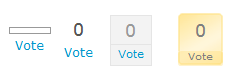
Available themes for the voting widget

Plugin in action

Most voted widgets

Plugin configuration page

Vote management page

Log in message if guest voting is disallowed

Two-way voting
Installation
-
Upload the “voteitup” folder into the “/wp-content/plugins/” directory.
-
Login to your WordPress Administration Panel
-
Activate the “Vote It Up” plug-in from the plugins page in the WordPress dashboard. If there are no error messages, the plugin is properly installed.
-
You can choose which of the following themes you want to represent the votes as via the VoteItUp options page. You will need to insert the relevant code (
<?php DisplayVotes(get_the_ID()); ?>) into the WordPress loop. -
You can customize the plugin options via the WordPress Dashboard (
Options > Vote It Upin WordPress versions prior to 2.3,Settings > Vote It Upin WordPress versions after 2.5). -
You can install the Most Voted widget by adding the following PHP code
<?php MostVotedAllTime(); ?>. Installing this widget is not required for Vote It Up to function. If your template supports sidebar widgets, you can install it as a widget in your sidebar. -
Editing votes can be done via the WordPress Dashboard (
Options > Edit Votesin WordPress versions prior to 2.3,Settings > Edit Votesin WordPress versions after 2.5). -
Automatic insertion of voting widget to posts can be enabled via a setting in the plugin options
FAQ
- What are the currently available themes for this plugin?
-
The following themes are currently bundled with the latest version of the plugin:
- Bar (default)
- Percent
- Ticker
- Text
- Orange Ticker
Theme support was added on version 1.0.7.
- This plugin doesn’t seem installed properly
-
If the plugin cannot write to the database, you can try manually executing the below SQL queries (you can use phpMyAdmin to do this):
CREATE TABLE `wp_votes` (
      ID int(11) NOT NULL auto_increment,
      post int(11) NOT NULL,
      votes text NOT NULL,
      guests text NOT NULL,
      usersinks text NOT NULL,
      guestsinks text NOT NULL,
  PRIMARY KEY  (`ID`)
);

CREATE TABLE `wp_votes_users` (
      ID int(11) NOT NULL auto_increment,
      user int(11) NOT NULL,
      votes text NOT NULL,
      sinks text NOT NULL,
  PRIMARY KEY  (`ID`)
);
For other problems, you may want to ensure that there are no missing files, and that you have followed instructions in this Read Me file
- Is there any limit to the number of votes?
-
There is no limit as to how many votes for each post can take. The vote count can also go into the negatives as well.
- I have a very popular site, will VoteItUp be able to handle it?
-
Vote It Up is able to handle hundreds of votes a day, without causing any server strain at all. The technical limit is about 8000 votes if all are made from guests, however that limit can be overcomed by doing a minor adjustment to the database your blog runs in.
Running the following query will remove the technical limit. Note that this will take up more space on your hosting. (Note, the following SQL query assumes your database prefix is wp_, which is default for WordPress).
ALTER TABLE `wp_votes` CHANGE `guestsinks` `guestsinks` LONGTEXT CHARACTER SET latin1 COLLATE latin1_swedish_ci NOT NULL
ALTER TABLE `wp_votes` CHANGE `guests` `guests` LONGTEXT CHARACTER SET latin1 COLLATE latin1_swedish_ci NOT NULL
Reviews
There are no reviews for this plugin.
Contributors & Developers
“Vote It Up” is open source software. The following people have contributed to this plugin.
Contributors

Translate “Vote It Up” into your language.
Interested in development?
Browse the code, check out the SVN repository, or subscribe to the development log by RSS.
Changelog
Feature: New addition to the plugin
Changed: Modified an existing feature of the plugin
Bug fix: Fixed existing problems on the plugin
1.2.4
[Feature] - Add the ability to insert voting widget without editing the template
[Bug Fix] - Patch XSS vulnerability
[Bug Fix] - Default skin option now be selected properly
[Bug Fix] - Most voted widget entries now formatted properly
[Changed] - Plugin now dual licensed under LGPL and MIT

1.2.3
[Changed] - Re-designate 1.2.x plugin as unstable.

1.2.2
[Bug Fix] - Roll back option added to complement database update. Please use this option if the database update failed. You can access this option via the plugin options page.

1.2.1
[Bug Fix] - Fixes guest voting issues with new database format. Simply replace votingfunctions.php file. This is an important update.
[Bug Fix] - Hides unneccessary pop up when guest voting is enabled.

1.2.0
[Changed] - Database format changed. You will need to update the vote database in order to use the new features present in this plugin and future revisions of the plugin
[Changed] - Drafts, private posts and pages no longer show up on widget
[Bug Fix] - Technical limit removed for voting. Votes can be created as long as the blog still has sufficient disk space for it
[Bug Fix] - Fixed duplicate voting issues arising from caching
[Bug Fix] - After Vote Text issue with images fixed
[Bug Fix] - Added pagination for Edit Votes Panel
[Bug Fix] - Votes considered in Most Voted widget correctly includes the most recent posts

1.1.1
[Feature] - Added Percent (%) voting mathamatics and capability (inital votes count as "up" vote)
[Feature] - Added Percent skin

1.1.0
[Feature] - Initial vote count added
[Feature] - Text shown in place of vote text after user casts vote
[Feature] - Permission setting that can disallow post authors from voting own post. Their posts would show up as "voted" by themselves
[Feature] - Ability to set number of posts shown in Most voted posts widget
[Feature] - New template added: Text. This is a simplified version of the ticker without borders
[Feature] - Votes can now be edited via "Edit Votes"
[Changed] - Two-way voting now made more flexible
[Changed] - When guest voting is disabled, a popup appears to inform users they need to register
[Changed] - Some visual changes in administration panel for VoteItUp to fit the WordPress 2.7 dashboard
[Changed] - Template system modified so as to adapt to several plugin changes
[Changed] - Former "Modern ticker" template renamed to "Orange ticker"
[Bug fix] - Deleted posts no longer show up in widget
[Bug fix] - Several PHP errors in plugin fixed
[Bug fix] - Proper character encoding in widget. Now supports foreign languages
[Bug fix] - Plugin options can now be updated in WordPress MU

1.0.7
[Feature] - Most voted posts widget now can be installed as a theme widget if your template supports sidebar widgets
[Feature] - Compatibility file added for specific cases
[Feature] - Template system added
[Feature] - New template added: Orange Ticker.
[Changed] - Some visual changes in administration panel for VoteItUp to fit the WordPress 2.5 dashboard

1.0.6
[Bug fix] - File paths fixed

1.0.5
[Bug fix] - File paths fixed, plugin can now be installed in another directory

1.0.4
[Feature] - Most voted posts widget added

1.0.3
[Bug fix] - Guest voting fixed, guest votes can now go above 2

1.0.2
[Bug fix] - Code fixes

1.0.1
[Bug fix] - Removed cookie check for guest voting. Now guest voting relies entirely on IP addresses

1.0.0
[Feature] - Initial release