
Description
This plugin allows you to prevent specified posts from being featured on the front page or in feeds, and from notifying external services of publication. Beneficial in instances where you want to publish new content without any fanfare and just want the post added to archive and category pages and its own permalink page.
A “Stealth publish?” checkbox is added to the “Write Post” admin page. Posts which are saved with that checkbox checked will no longer be featured on the front page of the blog, nor will the post be included in any feeds.
A stealth published post will also not notify any external services about the publication. This includes not sending out pingbacks, trackbacks, and pings to update services such as pingomatic.com. This behavior can be overridden via the ‘c2c_stealth_publish_silent’ filter (see Filters section).
NOTES:
-
Use of other plugins making their own queries against the database to find posts will possibly allow a post to appear on the front page. But use of the standard WordPress functions for retrieving posts (as done for the main posts query and the recent posts widget) should not allow stealth published posts to appear on the home page.
-
If you use this plugin, you do not need to use my Silent Publish plugin as that functionality is incorporated into this plugin. Alternatively, if you like the silent publishing feature but want your new posts to appear on your blog’s front page and in feeds, then just use the “Silent Publish” plugin.
-
The plugin records when a post is stealth published, so subsequent edits of the post will have the “Stealth publish?” checkbox checked by default.
Links: Plugin Homepage | Plugin Directory Page | Author Homepage
Filters
The plugin is further customizable via three filters. Typically, these customizations would be put into your active theme’s functions.php file, or used by another plugin.
c2c_stealth_publish_meta_key (filter)
The ‘c2c_stealth_publish_meta_key’ filter allows you to override the name of the custom field key used by the plugin to store a post’s stealth publish status. This isn’t a common need.
Arguments:
- $custom_field_key (string): The custom field key to be used by the plugin. By default this is ‘_stealth-publish’.
Example:
/**
 * Defines a custom meta key to be used by Stealth Publish.
 *
 * @param string $custom_field_key The default custom field key name.
 * @return string
 */
function override_stealth_publish_key( $custom_field_key ) {
    return '_my_custom_stealth-publish';
}
add_filter( 'c2c_stealth_publish_meta_key', 'override_stealth_publish_key' );
c2c_stealth_publish_silent (filter)
The ‘c2c_stealth_publish_silent’ filter allows you to override whether the plugin also ensure the post gets published silently (i.e. without sending out pingbacks, tracbacks, and pings to update services).
Arguments:
- $publish_silently (bool): Should stealth published posts also be published silently? By default this is ‘true’.
- $post_id (int): The ID of the post being published.
Example:
/**
 * Disable silent publishing for stealth published posts.
 *
 * @param bool $publish_silently True if the post is to be published silently.
 * @param int  $post_id          The post ID.
 * @return Always false.
 */
function override_stealth_publish_silent( $publish_silently, $post_id ) {
    return false;
}
add_filter( 'c2c_stealth_publish_silent', 'override_stealth_publish_silent' );
c2c_stealth_publish_default (filter)
The ‘c2c_stealth_publish_default’ filter allows you to override the default state of the ‘Stealth Publish?’ checkbox.
Arguments:
- $state (boolean): The default state of the checkbox. By default this is false.
- $post (WP_Post): The post currently being created/edited.
Example:
// Have the Stealth Publish? checkbox checked by default.
add_filter( 'c2c_stealth_publish_default', '__return_true' );
Screenshots
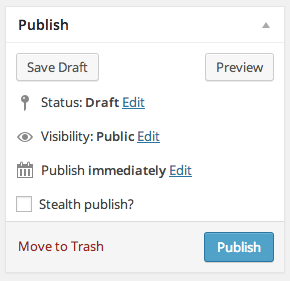
A screenshot of the 'Publish' sidebar box on the Add New Post admin page. The 'Stealth publish?' checkbox is integrated alongside the existing fields. 
A screenshot of the 'Stealth publish?' checkbox displaying help text when hovering over the checkbox. 
A screenshot of the 'Stealth publish?' checkbox in the quick edit form. 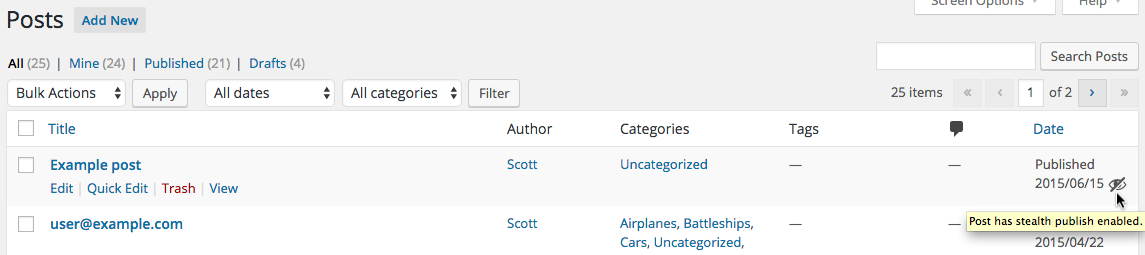
A screenshot of the icon adjacent to the post date for a post that has stealth publish enabled.
Installation
- Whether installing or updating, whether this plugin or any other, it is always advisable to back-up your data before starting
- Unzip
stealth-publish.zipinside the/wp-content/plugins/directory (or install via the built-in WordPress plugin installer) - Activate the plugin through the ‘Plugins’ admin menu in WordPress
- For posts that you do not want to be featured on the front page and feeds, check the “Stealth publish?” checkbox when creating/editing a post
FAQ
- Why would I want to stealth publish a post?
-
This is probably the kind of thing that you would recognize the need for or you don’t. It’s beneficial in instances where you want to publish new content without any fanfare and just want the post added to archive and category pages and its own permalink page.
- Can I have the checkbox checked by default?
-
Yes. See the Filters section (under Other Notes) and look for the example using the ‘c2c_stealth_publish_default’ filter. You’ll have to put that code into a site-specific plugin or your active theme’s functions.php file.
- Why is the checkbox still present when editing a post that has already been published?
-
The checkbox is always present since it continues to have an effect on published posts, such as preventing the post from appearing on the front page or in feeds. You may, after publication, decide to not have the post be stealthy. In such a case, you can do so directly by editing the post and unchecking the checkbox; you do not need to change it back to a draft and then republish it.
- How does the plugin know which posts are stealth published?
-
(This is a developer-level question that doesn’t affect general users.) The plugin assigns a custom field of “_stealth-publish” with a value of “1” to indicate posts that are stealth published. Unless, of course, the name of the custom field was changed via use of the ‘c2c_stealth_publish_meta_key’ filter.
- Does this plugin include unit tests?
-
Yes.
Reviews


Contributors & Developers
“Stealth Publish” is open source software. The following people have contributed to this plugin.
Contributors
“Stealth Publish” has been translated into 1 locale. Thank you to the translators for their contributions.
Translate “Stealth Publish” into your language.
Interested in development?
Browse the code, check out the SVN repository, or subscribe to the development log by RSS.
Changelog
2.6 (2016-03-27)
Highlights:
* This release adds the ability to set the stealth publish checkbox via the quick edit box, adds an icon next to the post date in the admin listing to denote a post has stealth update enabled, adds support for language packs, and has some minor behind-the-scenes changes.
Details:
* New: Add ability to set the Stealth Publish? value in the Quick Edit form.
* Add add_to_submitbox(), add_to_quick_edit(), admin_enqueue_scripts().
* Add option arg $checked to add_ui() and use its value as the default if not null.
* New: Add hidden icon next to post’s date column in posts table to indicate which posts have stealth publish enabled.
* Change: Delete meta key on save if stealth publish is not enabled for post.
* Change: Run esc_attr() on the field name before display for safety.
* Change: Don’t run esc_attr() on meta key name as it need not be so restrictive (and isn’t for display).
* Change: Add support for language packs:
* Set textdomain using a string instead of a variable.
* Don’t load textdomain from file.
* Remove ‘Domain Path’ from plugin header.
* Remove .pot file and /lang subdirectory.
* New: Add LICENSE file.
* New: Add empty index.php to prevent files from being listed if web server has enabled directory listings.
* Change: Add docblocks for class variables.
* Change: Add docblock to example code.
* Change: Note compatibility through WP 4.5+.
* Change: Update copyright date (2016).
2.5.1 (2015-02-21)
- Revert to using
dirname(__FILE__); DIR is only supported in PHP 5.3+ - Ensure only ‘1’ or ” is saved as meta field value
2.5 (2015-02-17)
- Revert to pre-2.4 approach, which didn’t have conflicts with other plugins and edge cases. Should fix most reported issues.
- Cache stealth published post IDs in a transient; delete transient on post updates
- Disregard protocol in URL comparison
- Add more unit tests
- Use existing class static variable for meta name instead of hardcoding it
- Remove memoization static var and its use
- Reformat plugin header
- Use DIR instead of
dirname(__FILE__) - Change documentation links to wp.org to be https
- Minor documentation spacing changes throughout
- Note compatibility through WP 4.1+
- Update copyright date (2015)
- Add plugin icon
- Regenerate .pot
2.4.1 (unreleased)
- Delay hooking ‘pre_get_posts’ action to minimize conflicts with other plugins
2.4 (2014-01-23)
- Exclude stealth posts from front page (when is_front_page() would be true)
- Add should_exclude_stealth_posts() to encapsulate logic for determining if stealth posts should be excluded
- Hook pre_get_posts and try to exclude stealth posts in the original query without using secondary query (when possible)
- Stop hooking posts_where, unless necessary
- Add reset() to reset memoized protected variables
- Add unit tests
- Minor documentation improvements
- Minor code reformatting (spacing, bracing)
- Note compatibility through WP 3.8+
- Drop compatibility with version of WP older than 3.6
- Update copyright date (2014)
- Regenerate .pot
- Change donate link
- Update screenshots
- Add banner
2.3
- Deprecate ‘stealth_publish_meta_key’ filter in favor of ‘c2c_stealth_publish_meta_key’ (but keep it temporarily for backwards compatibility)
- Deprecate ‘stealth_publish_silent’ filter in favor of ‘c2c_stealth_publish_silent’ (but keep it temporarily for backwards compatibility)
- Don’t allow a blank string from ‘c2c_stealth_publish_meta_key’ to override the default meta key name
- Remove private static $textdomain and its use; include textdomain name as string in translation calls
- Remove function
load_textdomain() - Add check to prevent execution of code if file is directly accessed
- Re-license as GPLv2 or later (from X11)
- Add ‘License’ and ‘License URI’ header tags to readme.txt and plugin file
- Minor improvements to inline and readme documentation
- Regenerate .pot
- Minor code reformatting
- Remove ending PHP close tag
- Note compatibility through WP 3.5+
- Tweak installation instructions in readme.txt
- Update copyright date (2013)
- Move screenshots into repo’s assets directory
2.2.1
- Add version() to return plugin’s version
- Update readme with example and documentation for new filter
- Note compatibility through WP 3.3+
- Update screenshots for WP 3.3
- Use DIRECTORY_SEPARATOR instead of hardcoded ‘/’
- Create ‘lang’ subdirectory and move .pot file into it
- Regenerate .pot
- Add ‘Domain Path’ directive to top of main plugin file
- Add link to plugin directory page to readme.txt
- Update copyright date (2012)
2.2
- Fix bug where using Quick Edit on post caused Stealth Publish status to be cleared
- Add filter ‘c2c_stealth_publish_default’ to allow configuring checkbox to be checked by default
- Note compatibility through WP 3.2+
- Minor code formatting changes (spacing)
- Fix plugin homepage and author links in description in readme.txt
2.1
- Switch from object instantiation to direct class invocation
- Explicitly declare all functions public static and class variables private static
- Note compatibility through WP 3.1+
- Update copyright date (2011)
2.0.2
- Bugfix for auto-save losing value of stealth publish status
2.0.1
- Bugfix for WP 2.9.2 compatibility
2.0
- Encapsulate all code in new c2c_StealthPublish class
- Now also silently publish posts that are stealth published (i.e. don’t send out pingbacks, tracbacks, and pings to update services)
- Add checkbox labeled “Stealth publish?” to Publish meta_box rather than requiring direct use of custom fields
- Allow overriding of custom field used via ‘stealth_publish_meta_key’ filter (default value is ‘_stealth_publish’)
- Add filter ‘stealth_publish_meta_key’ to allow overriding custom field key name
- Add filter ‘stealth_publish_silent’ to allow overriding silent publish feature
- Add class of ‘c2c-stealth-publish’ to admin UI div containing checkbox
- Change custom field used to be a hidden custom field by prepending ‘_’ to the name
- Accept second arg to stealth_publish_where()
- Completely re-implemented find_stealth_published_post_ids()
- Full support for localization
- Store plugin instance in global variable, $c2c_stealth_publish, to allow for external manipulation
- Remove docs from top of plugin file (all that and more are in readme.txt)
- Minor code reformatting (spacing)
- Add PHPDoc documentation
- Note compatibility with WP 3.0+
- Drop compatibility with versions of WP older than 2.9
- Add screenshots
- Update copyright date
- Add package info to top of plugin file
- Add Changelog, Filters, and Upgrade Notice sections to readme.txt
- Add .pot file
- Add to plugin repository
1.0
- Initial release