
Description
Powerful, flexible, XHTML-compliant, server-side code highlighting, credits for everything
but ‘making it a plugin’ go to Jay Pipes
and GeSHi.
Features
- Highlight sources of any language
- automatically, server-side (no javascripts)
- XHTML-Compliant,
<div>,<ul>,<span>with class-attributes and a css-file are used for styling - optionally add a heading for every code-block
- optionally specify line-number offset (BREAKS XHTML COMPLIANCE)
- optionally don’t display line-numbers
- set per-codeblock if the code is html_entity_encoded or not
- only parses
<pre>-tags with thelang=-attribute, thus does not interfere with any regular preformatted contents you might have - degrades beautifully through
<pre>-tags (if you keep the sources clean, that is) - all settings through logical, valid arguments for the main container
- comes with generic cross-browser CSS (tested: IE5.5+, FF, Safari, Opera)
Version History
- 1.3: Thanks to a tipp now the link-path to the stylesheets is correct, sorry for the inconvenience
- 1.2: Leading whitespace isn’t stripped anymore (indents as well as newlines), when there’s no title the title-div is not being generated anymore
- 1.1: Solved the issue with single-quotes being changed to typographical quotes
Known Issues
While the plugin is basically XHTML 1.0 Strict compliant there’s just no way of getting the offset-based line-numbering to display without inadequate (ab)use of javascript and css hacks, so be warned that IF you use the line-number offset, your documents will NOT validate because of the forbidden start=-attribute for the <ol>!
Documentation
More on the Highlight Source Pro Page
Screenshots
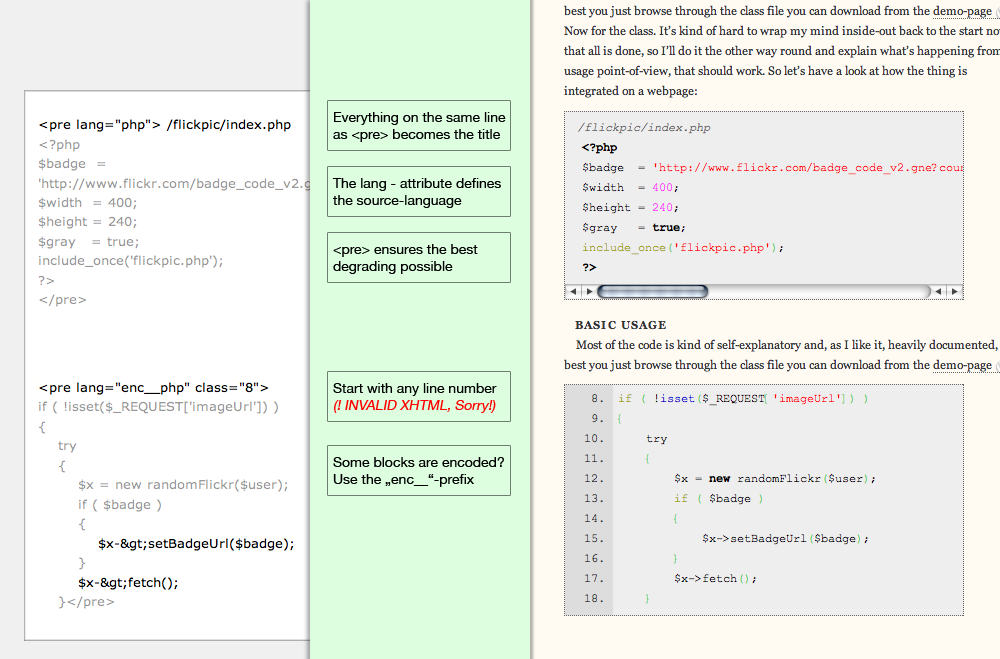
All-In-One Preview
Installation
The plugin is simple to install:
- Upload the
highlight_source_profolder to your/wp-content/pluginsdirectory - Enable via Admin-Interface
How to Use
Set your code-blocks as <pre>-tags. If the language is supported by GeSHi (see file list in the /geshi-directory) use the filename (without extension) as language-attribute. If your code is encoded (html-entities; e.g. < is displayed as < – most likely the case if you write in the visual editor) add the enc__-prefix. For example for a php-codeblock you would start as follows:
<pre lang="php">
You can control various things:
* Start of Line-Offset, e.g. for #17: <pre class="17">
* define entity-encoded blocks, e.g. for php: <pre lang="enc__php">
* Define a title for your code-block that appears inside the block, but above the code lines. Everything in the same line as the opening <pre> tag will be considered the title, including HTML works fine:
<pre lang="php"><strong>This is</strong> an <em>example</em> with a <h3>headline</h3>
* disable line numbers by not specifying an offset
* combine all those things as long as you stick to the right order:
FAQ
- I use Self-Formatted Markup in older posts, what’s gonna happen?
-
As long as they aren’t wrapped in
<pre>-tags with alang=-attribute nothing is going to happen – your markup will stay untouched. Highlight Source Pro only hooks in for those<pre>-tags having alang=-attribute. - What about that class-abuse for line numbering???
-
The line-numbering is the one problem here, because – currently – it requires to break with the XHTML-Standard. Because the
<ol>is always and guaranteed inside a<div>with the.geshi-class there is no need for theclass-attribute on the list element. Also due to the fact that a CSS-classname is not allowed to start with a number, this solution is valid XHTML for downgrading and can never interfere with existing CSS-rules. - I can use all HTML for the title-line?
-
Yep. The basic idea is, once again, backwards compatibility. If you consider your code-blocks being important you’ll most likely want to add a heading instead of just a line, on the other hand you can simply use the title-feature to show which file is being talked about. Since the title-string will be placed inside a
<div>you’ll be fine as long as there’s no line-break (and your markup is valid) - What about that html_entity_decode thing and the enc__ – prefix??
-
There’s two ways of handling code-listing in your original post source. You can either use the HTML-input and hardcode PHP, C or whatever you think about, statements in there, Highlight Source Pro will handle those listings without any problems (in fact, it’s the safer version to use for Highlighting as all characters are present in their original form).
On the other hand this will get problematic if – for any reason – you stop using Highlight Source Pro, because WordPress (and every other serious software) will strip lots of those listings for security and compatibility reasons. If you want to be sure that your listings don’t break when moving to another platform you should consider using htmlentities() on your listings, or writing them with the Visual Editor in the first place, so when falling back everything will be displayed as you want.
In this case you’ll have to use the
enc__-prefix to tell Highlight Source Pro to applyhtml_entity_decode()before the actual syntax-highlighting. While this might be the more default case it’s still the one requiring the alteration with the prefix, for compatibility reasons. If encoded scripts would be marked with the original language-signature and the source would later on be used in another GeSHi-environment things would get very, very complicated and confusing.
Reviews
There are no reviews for this plugin.
Contributors & Developers
“Highlight Source Pro” is open source software. The following people have contributed to this plugin.
Contributors
Translate “Highlight Source Pro” into your language.
Interested in development?
Browse the code, check out the SVN repository, or subscribe to the development log by RSS.