

Description
Enhance the default WordPress embedding to get previews for any article,
including your own blog posts. You also get embeds for YouTube, Vimeo, Twitch,
Google Maps, and Embedly’s growing list of 1000+ supported
providers.
You can customize the style of the embeds, to optimize for darker WP themes,
alignment, and width. In addition, social buttons can be added around the embeds
to make it easier to share content from your blog posts.
If you have an Embedly Cards account, you can link it to the plugin with your Embedly API key. Not only does this remove branding from the cards, it also gives you access to analytics and viewer behaviors for most popular music and video player embeds (YouTube, Vimeo, Instagram, SoundCloud). Find out how many people viewed your embeds for how long. To learn more about Embedly Cards please visit our website.
Using it is as simple as the default WordPress embedding. Embed media by pasting its URL in a single line when writing a post.
The plugin automatically displays an embed of the media in the WordPress post editor.
Fair Warning: This plugin generates static HTML content for your posts. After you deactivate
the plugin, that HTML will still remain behind in all posts where the plugin was used to create
embeds.
Screenshots
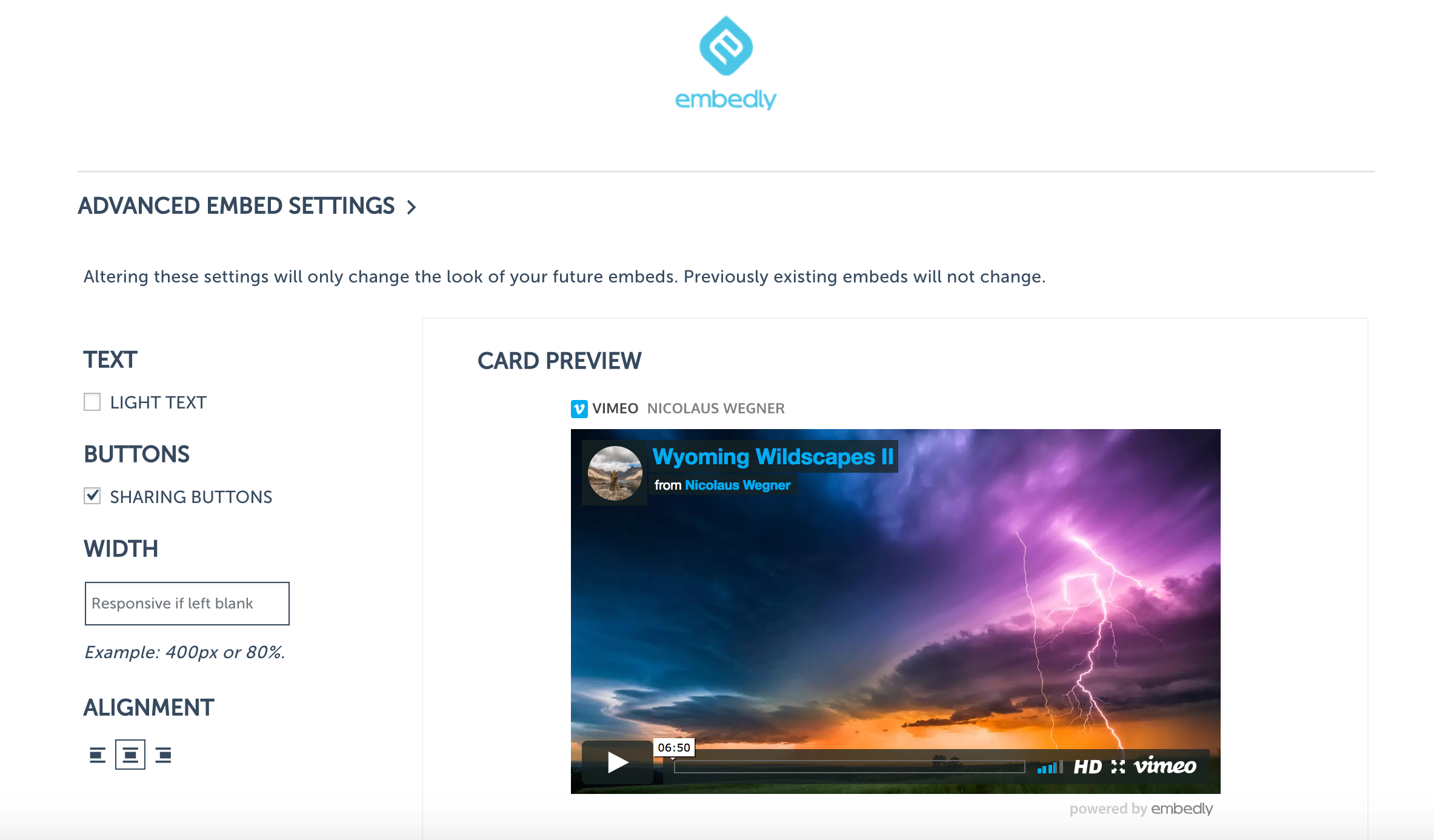
Advanced Embed Settings

Writing a post and embedding.

Sample Post.
Installation
Using the Plugin Manager
Click Plugins in the WordPress Dashboard sidebar.
Click Add New.
Search for Embedly.
Click Install
Click Install Now
Click Activate Plugin
Create a new post and paste a URL. It will automatically turn into an embed.
(optional) Save your Embedly API key to link your Embedly Cards account for analytics and unbranding
Manually
Upload
embedlyto the/wp-content/plugins/directoryActivate the plugin through the ‘Plugins’ menu in WordPress
Go through the sign up flow as described above.
Multi-Site
Navigate to My Sites -> Network Admin
Follow Steps 1-5 in Using the Plugin Manager setup above,
Do not Network ActivateGo to each site’s dashboard and activate Embedly in Plugins section
Go through the sign up flow as described above.
FAQ
The embeds from the Embedly WordPress plugin include title and description meta
information that can provide relevant information to search engines about the
embeds to boost SEO.
Reviews


Contributors & Developers
“Embedly” is open source software. The following people have contributed to this plugin.
Contributors
Translate “Embedly” into your language.
Interested in development?
Browse the code, check out the SVN repository, or subscribe to the development log by RSS.
Changelog
4.9.3
- Tested and confirmed compatible with WordPress 6.9.1.
- Fixed settings page capability check (manage_options instead of activate_plugins).
- Fixed potential fatal error when get_current_screen() returns null during AJAX requests.
- Moved admin stylesheet enqueue from deprecated admin_print_styles to admin_enqueue_scripts.
- Fixed API key validation call to use HTTPS.
- Updated minimum requirements: WordPress 5.0+, PHP 7.4+.
- Removed leftover WP 3.x compatibility code.
4.7.0
- Having an active app.embed.ly account is now optional to use the plugin! Users who want access to unbranded
card embeds and/or analytics can elect to input their Embedly API key in the plugin settings, but users who just want
to get started embedding no longer need to create an embedly account and activate the plugin.
4.0.9
- Improved plugin security.
4.0.6
- Embedly is not currently supporting historical analytics for embeds, but you can still see realtime views.
- Improves the implementation of javascript dependencies via the wp_enqueue_script api.
4.0
- Removed Embedly TinyMCE Button.
- Added Editor Preview URL functionality for all URLS (WP v4.0+)
- Redesigned Embedly Admin page
- All embeds will be generated as Embedly Cards
3.2
- Embedly TinyMCE dialog and dependencies managed server side.
- Refactor code to use class structure.
- Clean up deprecated SQL generation to make compliant with WP3.6 and above.
3.1.3
- Fix Add Post bug in IE.
3.1.2
- Enable Twitter WP OEmbed.
3.1
- Fixes issue with Embedly not loading on WP3.9.
- Load tiny_mce_popup_4_0.js when TinyMCE is v4.0.
3.0
- Upgrade Embedly TinyMce editor option to use Embedly Cards.
2.3.0
- Use TinyMCE provided by WP Core.
- Fixes issue with HTML editting and formatting.
2.2.2
- Change server side calls to HTTP to avoid issues.
- Disable rocketloader syntax.
2.2
- Update TinyMce Popup js to latest.
- Update to latest JQuery 1.10.2.
- Update Powered by link destination to code generator.
- Fix powered by logo for RSS generation.
- Add support for links to open in new window.
2.1.4
- Support for blogs using HTTPS.
- Steps for multi-site setup.
2.1.2
- Use wp-includes tiny_mce_popup.js
- Compatible with WP 3.5
2.1.1
- Providers save fix.
2.1
- Admin Redesign.
- embedly_settngs option for wp_options table.
- SQL optimizations.
2.0.9
- Fix for feature status check.
2.0.8
- Allow script tag embeds.
2.0.6
- Add Embedly providers on ‘plugins_loaded’ instead of ‘init’ and other tweaks
2.0.5
- Fixing the path to TinyMCE plugin.
2.0.4
-
Updated flow for previewing and updating embeds.
-
Improved previews for preview endpoint.
-
Better error handling for loading plugin in Post Editor.
2.0.3
-
Resolve issue with tag attributes getting stripped
-
Resolve quirks with height getting set incorrectly
2.0.2
- Resolve conflict with WordPress image editing
2.0.1
- Resolves Rich Editor not showing up.
2.0
-
Adds Embedly TinyMCE plugin to Rich Editor.
-
Support for Embedly Key to Embed “any” URL.
1.0
A few fixes.
0.9
Initial Version